

Questions? We’re Here to Help!
Phone Support: 626-965-1008 x31
Monday–Friday, 9:00 am to 5:30 pm PST
Email Support: support@MEEaudio.com
All emails are responded to within 2 business days.
Lifetime Replacement
Things don’t always go according to plan in the real world. Whether your headphones get crushed, shredded, fried, misplaced, or carried off by army ants, we’ve got you covered. Just tell us what happened and we’ll give you a new pair at half price, no questions asked (note: we reserve the right to ask for more of a great story).
Visit www.MEEaudio.com/LRP for more information or to request a replacement.
↑ Back to topPackage Contents
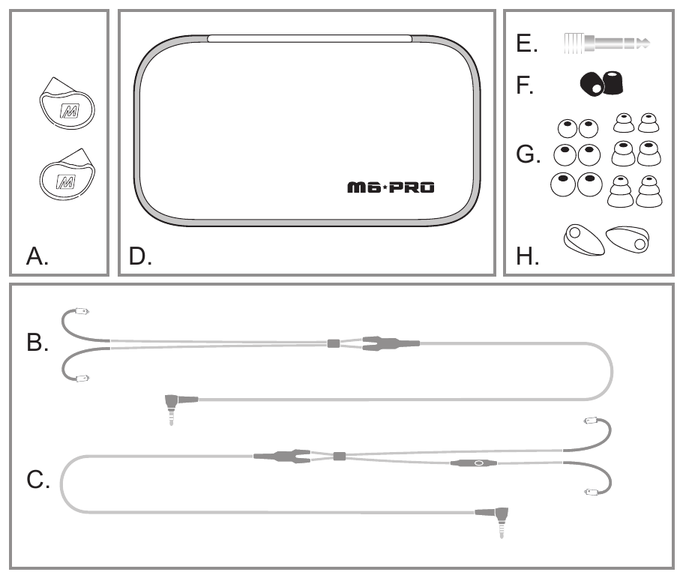
- A. M6 PRO In-Ear Monitors
- B. Stereo audio cable
- C. Stereo headset cable
- D. Carrying case
- E. ¼″ (6.3 mm) adapter
- F. Comply™ memory foam eartips
- G. Silicone eartips (6 pairs)
- H. Shirt clips (2)
- I. User Manual
Step 1 – Selecting Eartips
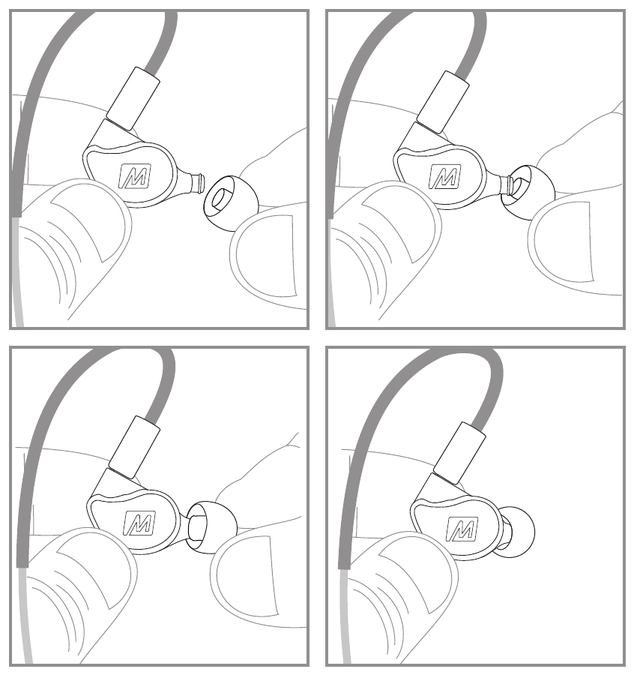
Multiple sets of eartips are included to ensure you get the best fit with your headphones.
The correct eartips for your ear will allow the earpieces to fit flush, reduce outside noise, and provide good bass response.
Install eartips as shown. Make sure eartips are installed securely before use.
↑ Back to topComply™ Memory Foam Eartips
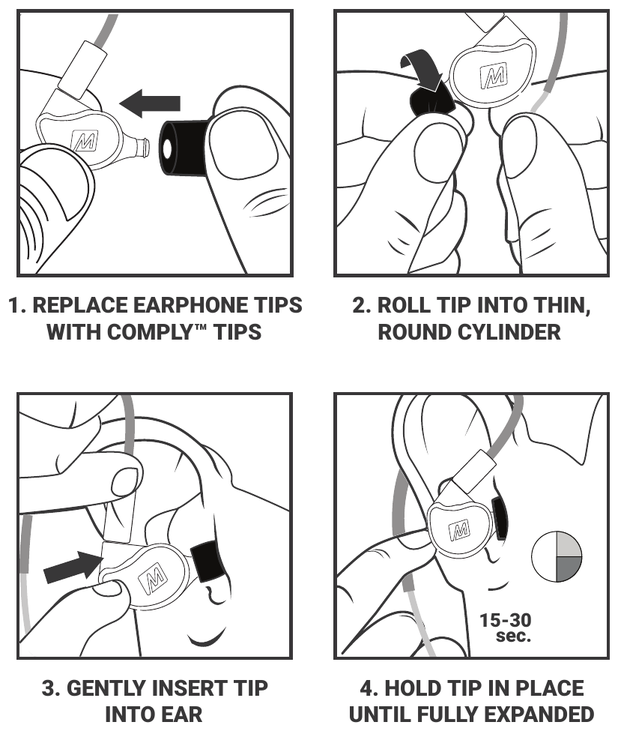
- Replace the earphone tips with the Comply™ tips.
- Roll the tip into a thin, round cylinder.
- Gently insert the tip into your ear.
- Hold the tip in place until it is fully expanded (about 15–30 seconds).
Step 2 – Wearing the M6 PRO
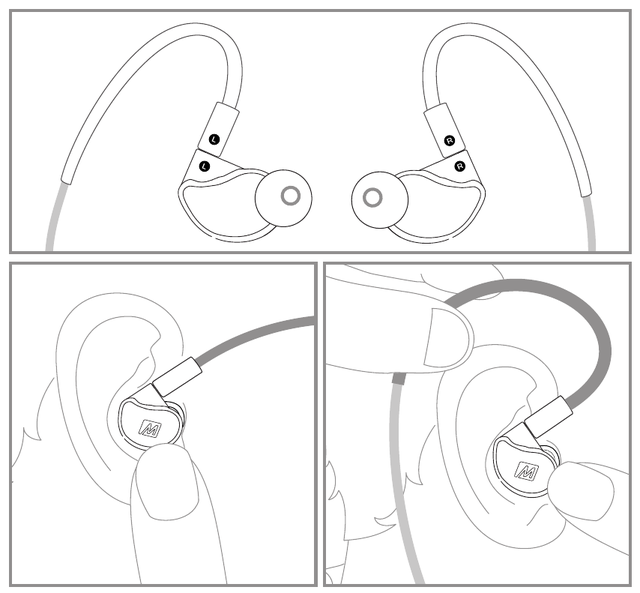
Identify the right and left earpieces.
Straighten the memory wire and put each earpiece in the corresponding ear.
Adjust each earpiece until it fits flush in your ear and the eartip seals the ear canal.
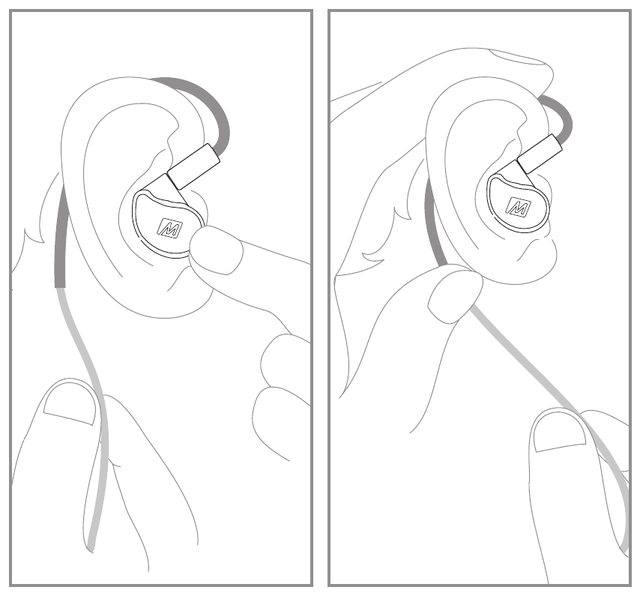
Holding the earpiece in place, bend the memory wire around your ear to achieve a conforming fit.
While pulling the cable gently with one hand, squeeze the memory wire behind your ear with the other hand until the fit is tight and secure.
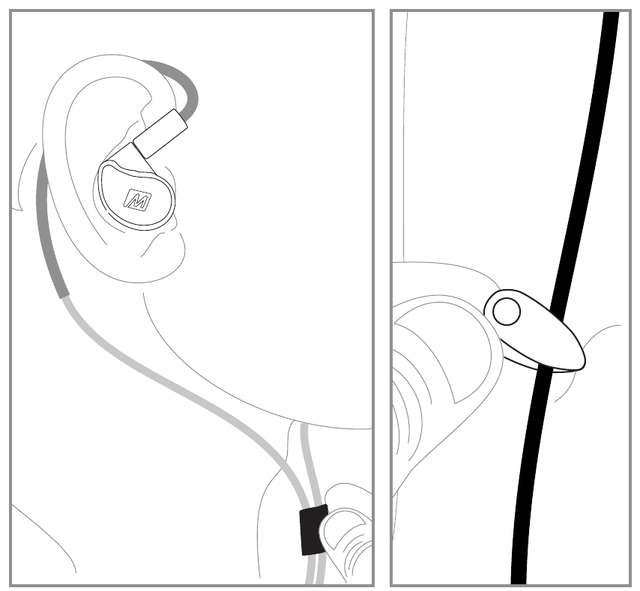
Tighten the sliding cable cinch for the most secure fit.
Use the shirt clip to control cable movement.
↑ Back to topStep 3 – Replacing the Cable
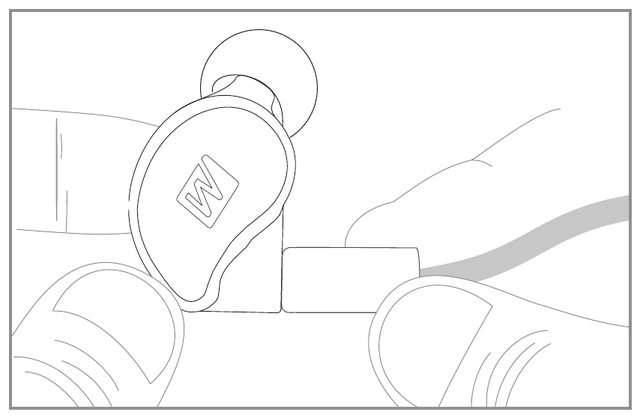
The M6 PRO includes two detachable, interchangeable cables – an audio-only cable and a headset cable with a built-in microphone and remote.
Additional cable types, replacement parts, and other accessories are available at www.MEEaudio.com/PROhelp.
To detach the cable, grasp the earpiece and cable connector firmly, and pull straight apart without twisting.
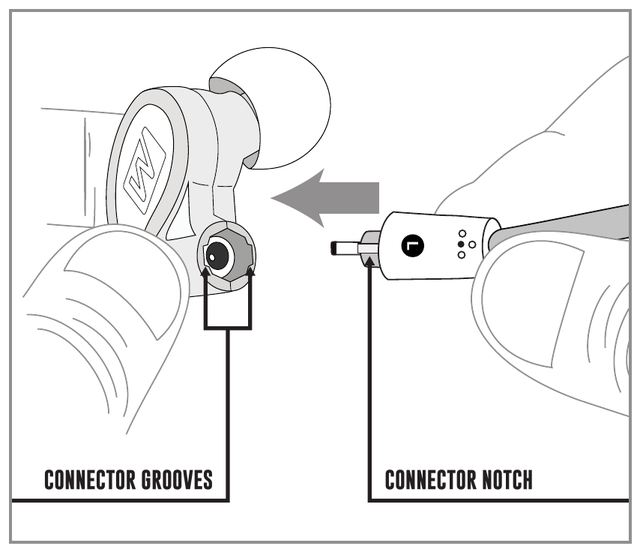
Attach the new cable by lining up the notches on the connectors with the grooves in the earpieces as shown. Push the connectors in until they fit securely.
Make sure to attach the cable connector marked “R” to the right earpiece and the connector marked “L” to the left earpiece.
↑ Back to topMicrophone & Remote Use
The included headset cable features an inline microphone and remote that can be used during phone calls and to control media playback.
Basic remote operation for Apple® iPhone®, iPad®, iPod®, and most Android™ devices:
| Function | Operation |
|---|---|
| Answer incoming phone call | Press the remote button |
| End phone call | Press the remote button |
| Play media (see note 1) | Press the remote button |
| Pause media | Press the remote button |
| Skip to next track (see note 2) | Double-press the remote button |
| Restart the track / previous track (see note 2) | Triple-press the remote button |
| Activate Siri® / Voice control / Voice dialing (see note 2) | Press and hold the remote button |
A single press of the remote button performs a different action depending on the current context: it answers an incoming call, ends an active call, or plays or pauses media when no call is in progress.
Note 1 (*): You may need to open the media player application for initial playback to start.
Note 2 (**): Not all media players support this functionality.
↑ Back to topAdditional Information
For Additional Support
- View FAQs and troubleshooting guides at MEEaudio.com/Support
- Contact us at support@MEEaudio.com
Warning
Using headphones at high to moderate volumes for extended periods of time will result in permanent hearing damage. It is advised that you keep volume levels moderate to low at all times for your safety. Do not use while driving a car, cycling, operating machinery, or performing other activities that require hearing surrounding sounds.
Keep the device and packaging out of reach of children.
Warranty
The M6 PRO is covered by a 1-year manufacturer warranty. For more information, visit MEEaudio.com/Support.
Have a Question?
Email support@MEEaudio.com
↑ Back to top