Getting Started: Installing Earpieces
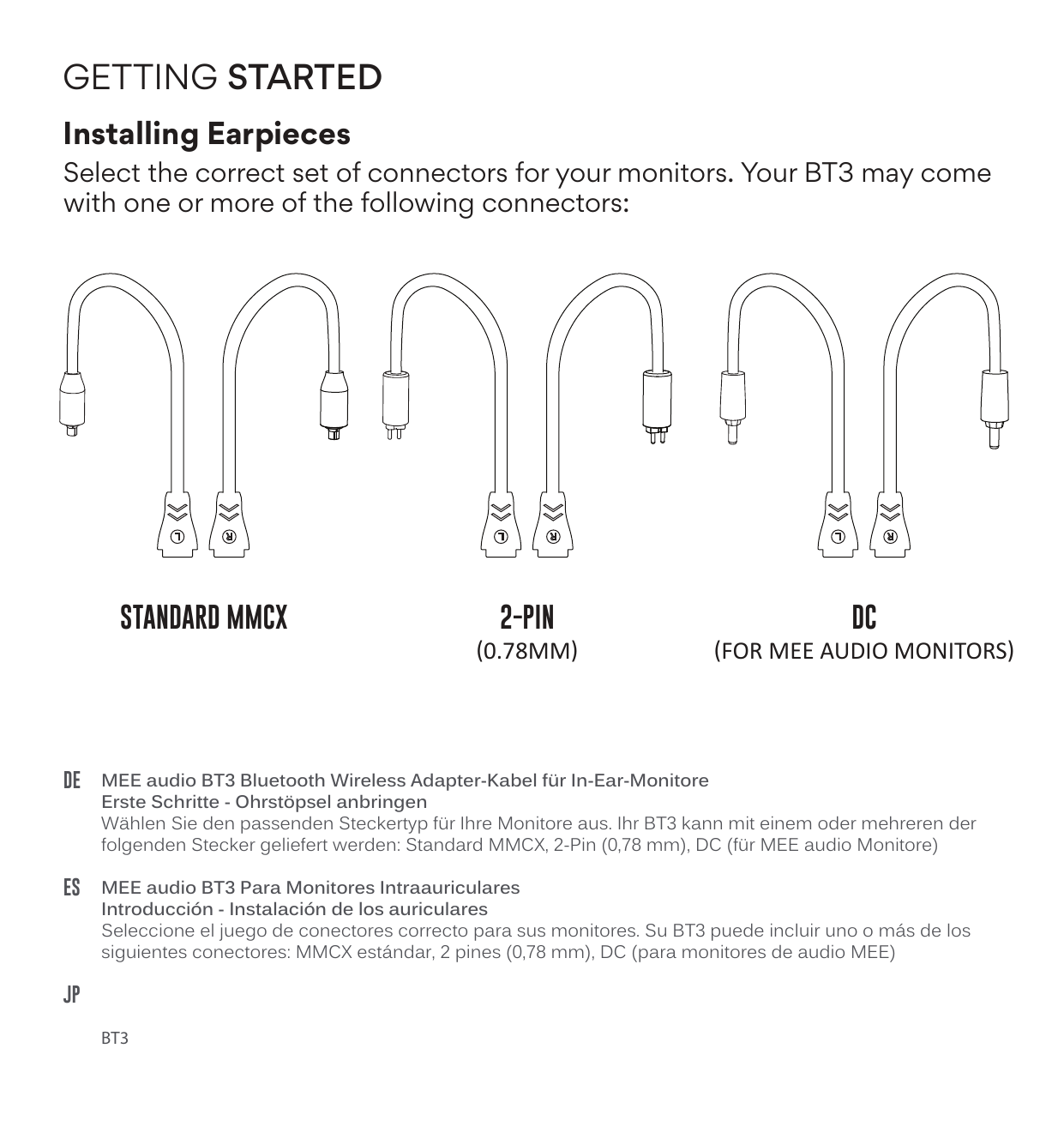
Select the correct set of connectors for your monitors. Your BT3 may come with one or more of the following connectors:
- Standard MMCX
- 2-Pin (0.78mm)
- DC (for MEE audio monitors)
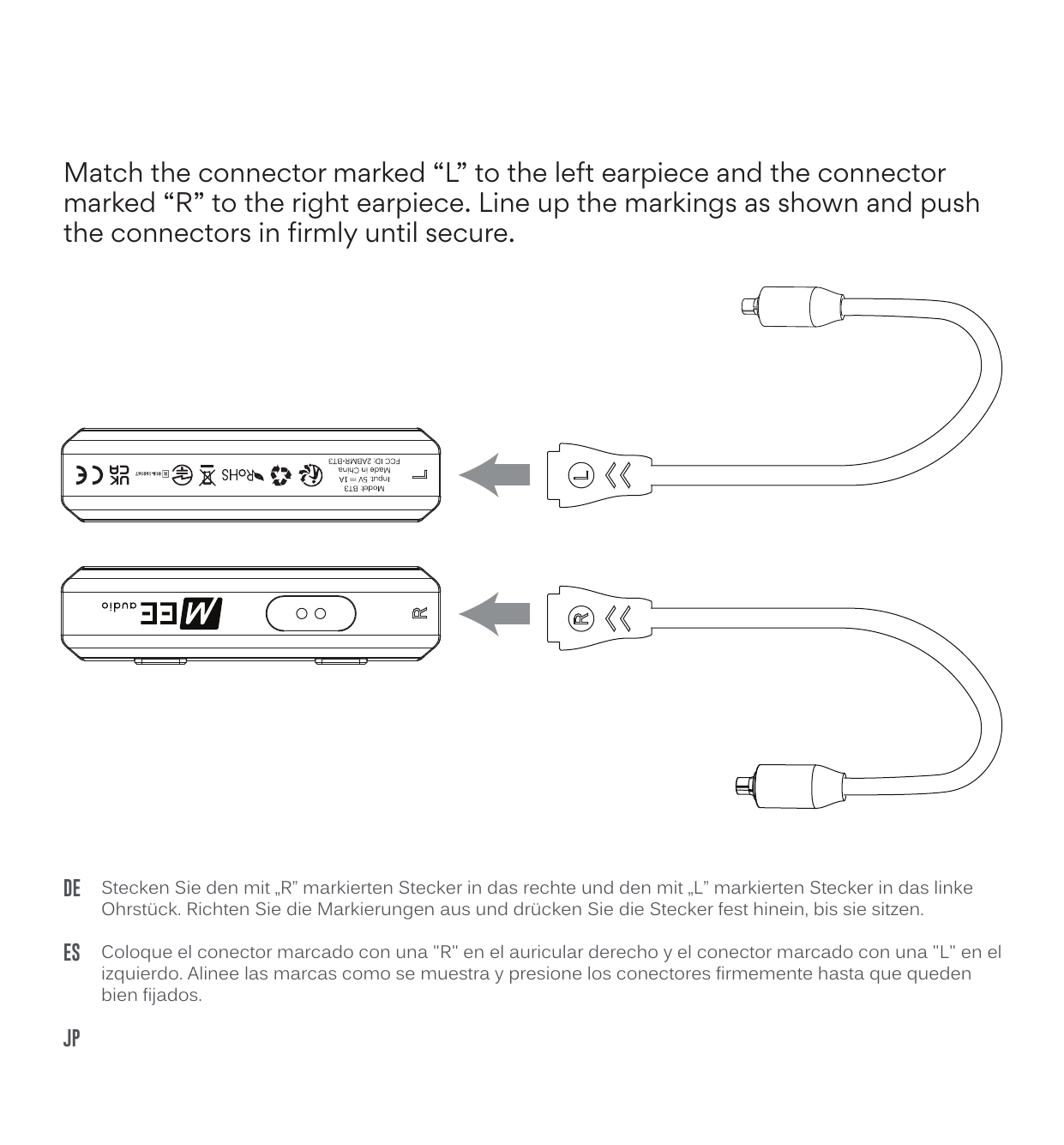
Match the connector marked "L" to the left earpiece and the connector marked "R" to the right earpiece. Line up the markings as shown and push the connectors in firmly until secure.
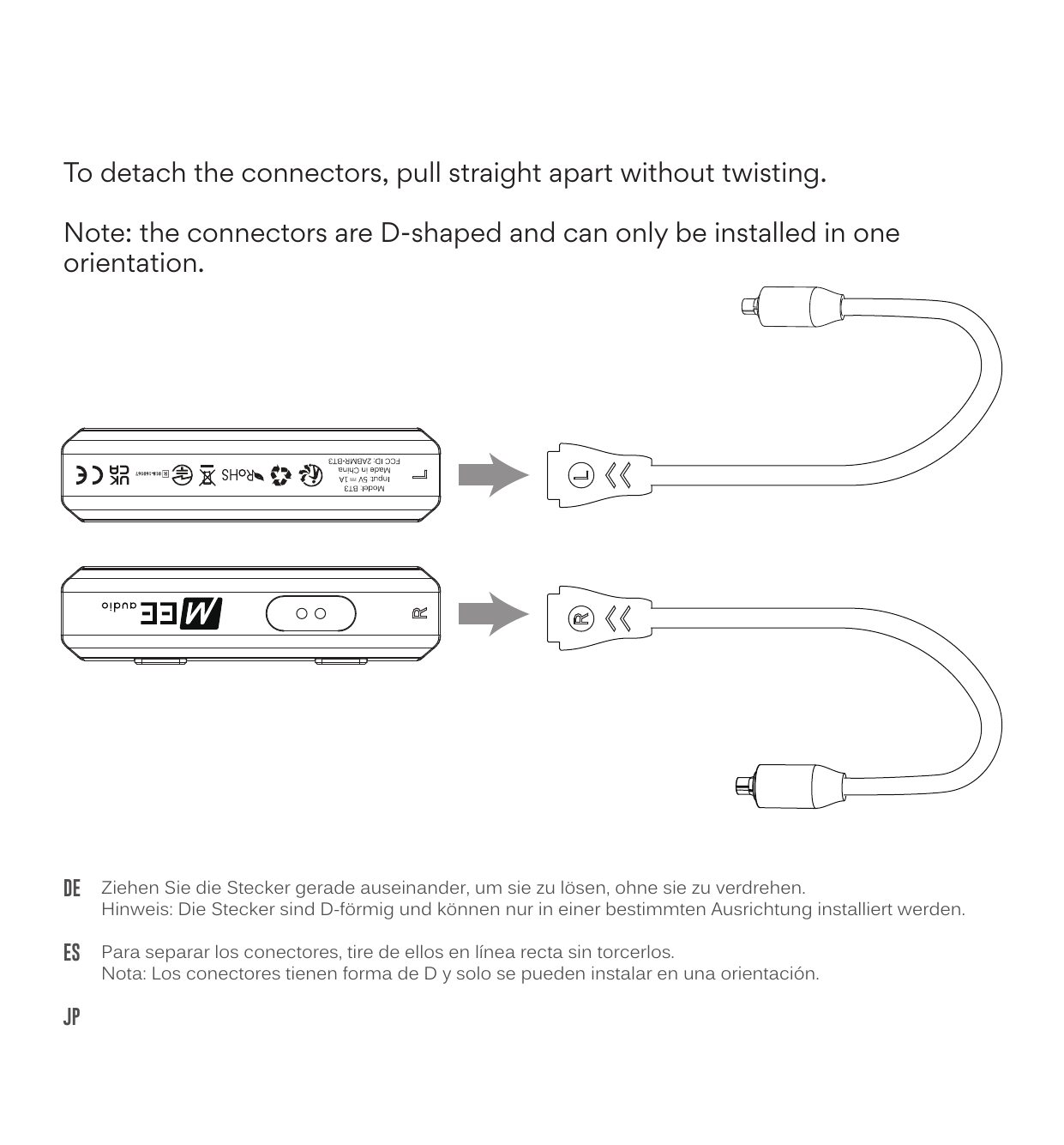
To detach the connectors, pull straight apart without twisting.
The connectors are D-shaped and can only be installed in one orientation.
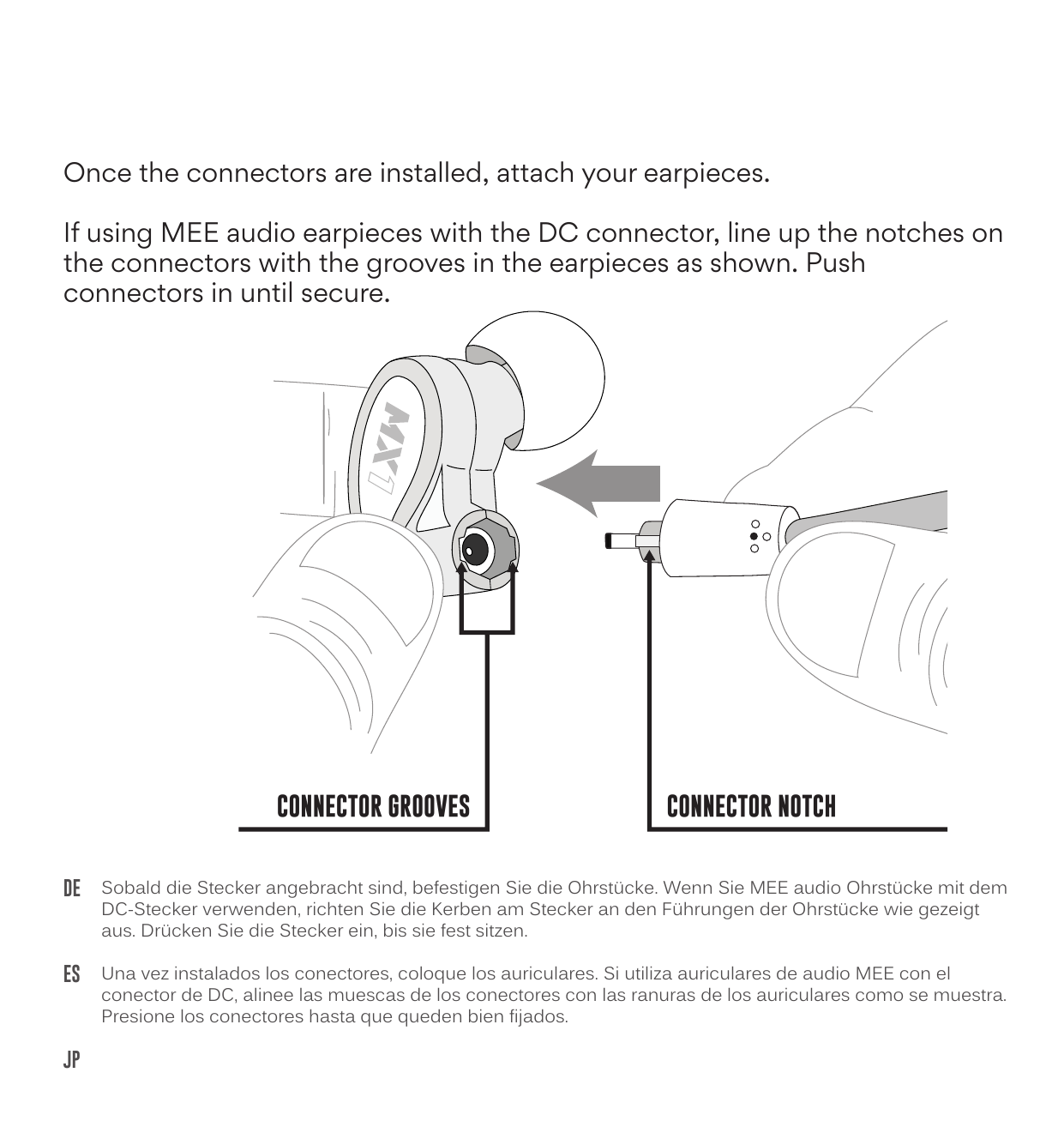
Once the connectors are installed, attach your earpieces. If using MEE audio earpieces with the DC connector, line up the notches on the connectors with the grooves in the earpieces as shown. Push connectors in until secure.
DE Erste Schritte — Ohrstöpsel anbringen
Wählen Sie den passenden Steckertyp für Ihre Monitore aus. Ihr BT3 kann mit einem oder mehreren der folgenden Stecker geliefert werden: Standard MMCX, 2-Pin (0,78 mm), DC (für MEE audio Monitore).
Stecken Sie den mit „R" markierten Stecker in das rechte und den mit „L" markierten Stecker in das linke Ohrstück. Richten Sie die Markierungen aus und drücken Sie die Stecker fest hinein, bis sie sitzen.
Ziehen Sie die Stecker gerade auseinander, um sie zu lösen, ohne sie zu verdrehen. Hinweis: Die Stecker sind D-förmig und können nur in einer bestimmten Ausrichtung installiert werden.
Sobald die Stecker angebracht sind, befestigen Sie die Ohrstücke. Wenn Sie MEE audio Ohrstücke mit dem DC-Stecker verwenden, richten Sie die Kerben am Stecker an den Führungen der Ohrstücke wie gezeigt aus. Drücken Sie die Stecker ein, bis sie fest sitzen.
ES Introducción — Instalación de los auriculares
Seleccione el juego de conectores correcto para sus monitores. Su BT3 puede incluir uno o más de los siguientes conectores: MMCX estándar, 2 pines (0,78 mm), DC (para monitores de audio MEE).
Coloque el conector marcado con una "R" en el auricular derecho y el conector marcado con una "L" en el izquierdo. Alinee las marcas como se muestra y presione los conectores firmemente hasta que queden bien fijados.
Para separar los conectores, tire de ellos en línea recta sin torcerlos. Nota: Los conectores tienen forma de D y solo se pueden instalar en una orientación.
Una vez instalados los conectores, coloque los auriculares. Si utiliza auriculares de audio MEE con el conector de DC, alinee las muescas de los conectores con las ranuras de los auriculares como se muestra. Presione los conectores hasta que queden bien fijados.
JP はじめに — イヤホンに取り付ける
お使いのイヤホンに適合するコネクタセットを選択してください。BT3には以下のコネクタが用意されています:標準のMMCXコネクター、2ピン(0.78mm)コネクター、DCコネクター(MEE audioイヤホン用)。
「R」マークのコネクタを右耳用イヤホンに、「L」マークのコネクタを左耳用イヤホンに接続します。図のようにマークを合わせてコネクタを確実に固定されるまで押し込みます。
コネクタを外す際は、ねじらずにまっすぐ引き抜いてください。注意:コネクタはD字型の形状になっていますので、取り付け方向は1つだけです。回転しません。
コネクタを取り付けたら、イヤホンを装着してください。DCコネクターでMEE audioのイヤホンと接続する場合は、図のようにコネクタの溝とイヤホン側コネクターの溝を合わせてください。コネクタが確実に固定されるまで押し込みます。
Using the Cable Cinches
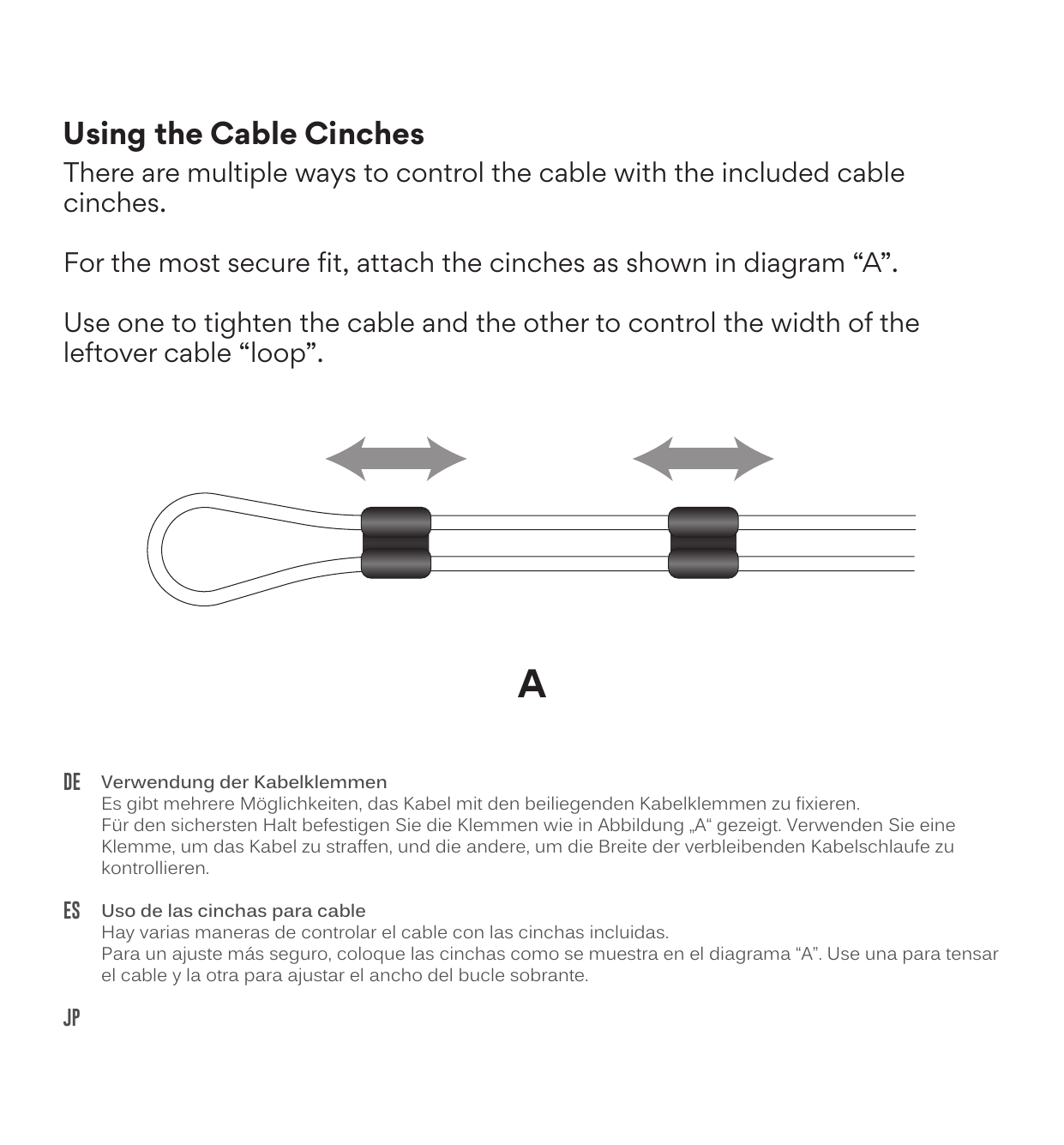
There are multiple ways to control the cable with the included cable cinches.
Diagram A — Most Secure Fit
Attach the cinches as shown in diagram "A". Use one to tighten the cable and the other to control the width of the leftover cable "loop".
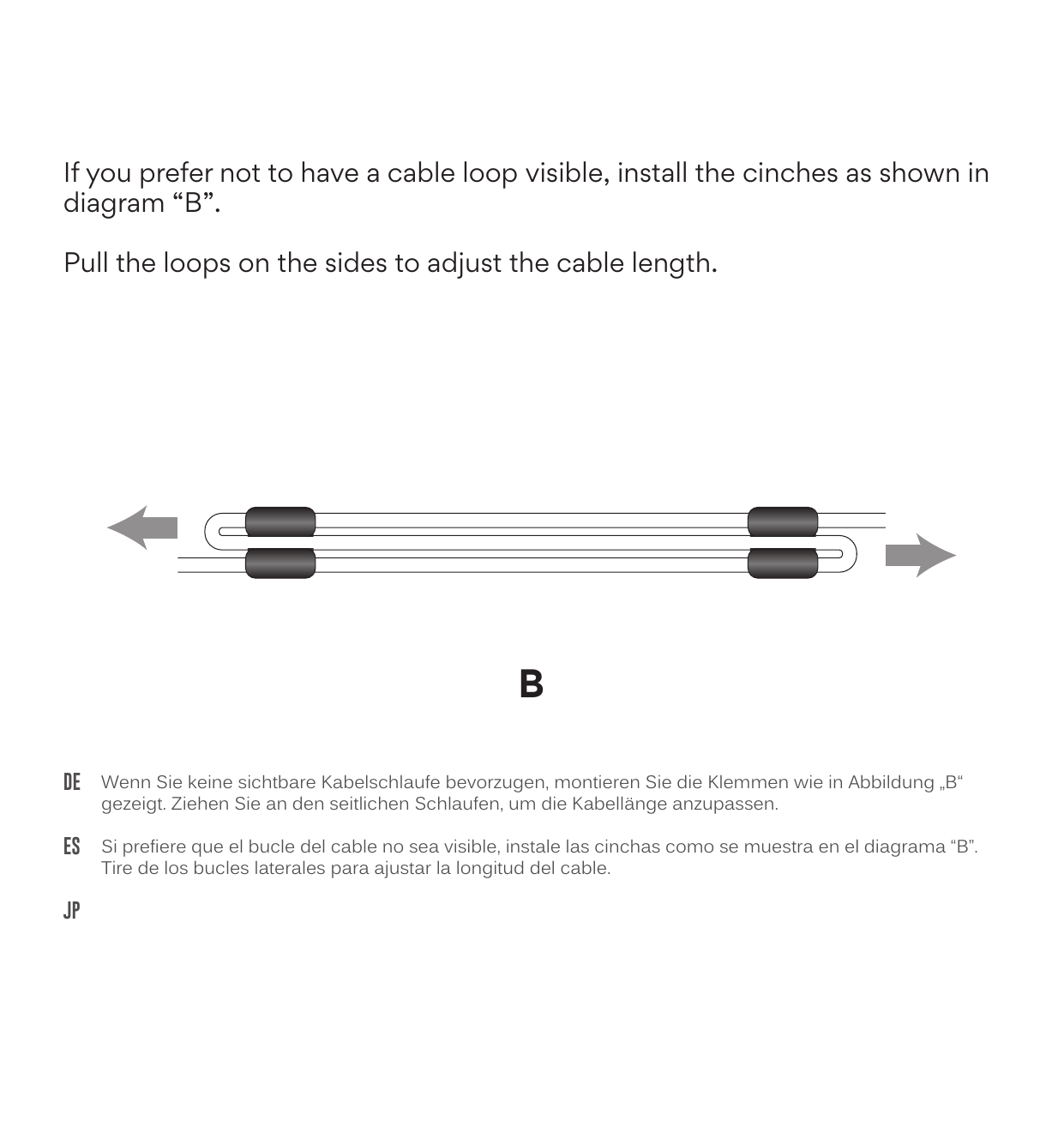
Diagram B — No Visible Loop
If you prefer not to have a cable loop visible, install the cinches as shown in diagram "B". Pull the loops on the sides to adjust the cable length.
DE Verwendung der Kabelklemmen
Es gibt mehrere Möglichkeiten, das Kabel mit den beiliegenden Kabelklemmen zu fixieren. Für den sichersten Halt befestigen Sie die Klemmen wie in Abbildung „A" gezeigt. Verwenden Sie eine Klemme, um das Kabel zu straffen, und die andere, um die Breite der verbleibenden Kabelschlaufe zu kontrollieren. Wenn Sie keine sichtbare Kabelschlaufe bevorzugen, montieren Sie die Klemmen wie in Abbildung „B" gezeigt. Ziehen Sie an den seitlichen Schlaufen, um die Kabellänge anzupassen.
ES Uso de las cinchas para cable
Hay varias maneras de controlar el cable con las cinchas incluidas. Para un ajuste más seguro, coloque las cinchas como se muestra en el diagrama "A". Use una para tensar el cable y la otra para ajustar el ancho del bucle sobrante. Si prefiere que el bucle del cable no sea visible, instale las cinchas como se muestra en el diagrama "B". Tire de los bucles laterales para ajustar la longitud del cable.
JP ケーブルシンチの使用方法
付属のケーブルシンスでケーブルを固定する方法は複数あります。最も確実に固定するには、図「A」のように固定クリップを取り付けます。1つでケーブルを締め付け、もう1つで余ったケーブルの「ループ」幅を調整します。ケーブルループを目立たせたくない場合は、図「B」のように固定クリップを取り付けます。両側のループを引っ張ってケーブル長を調整します。
Charging
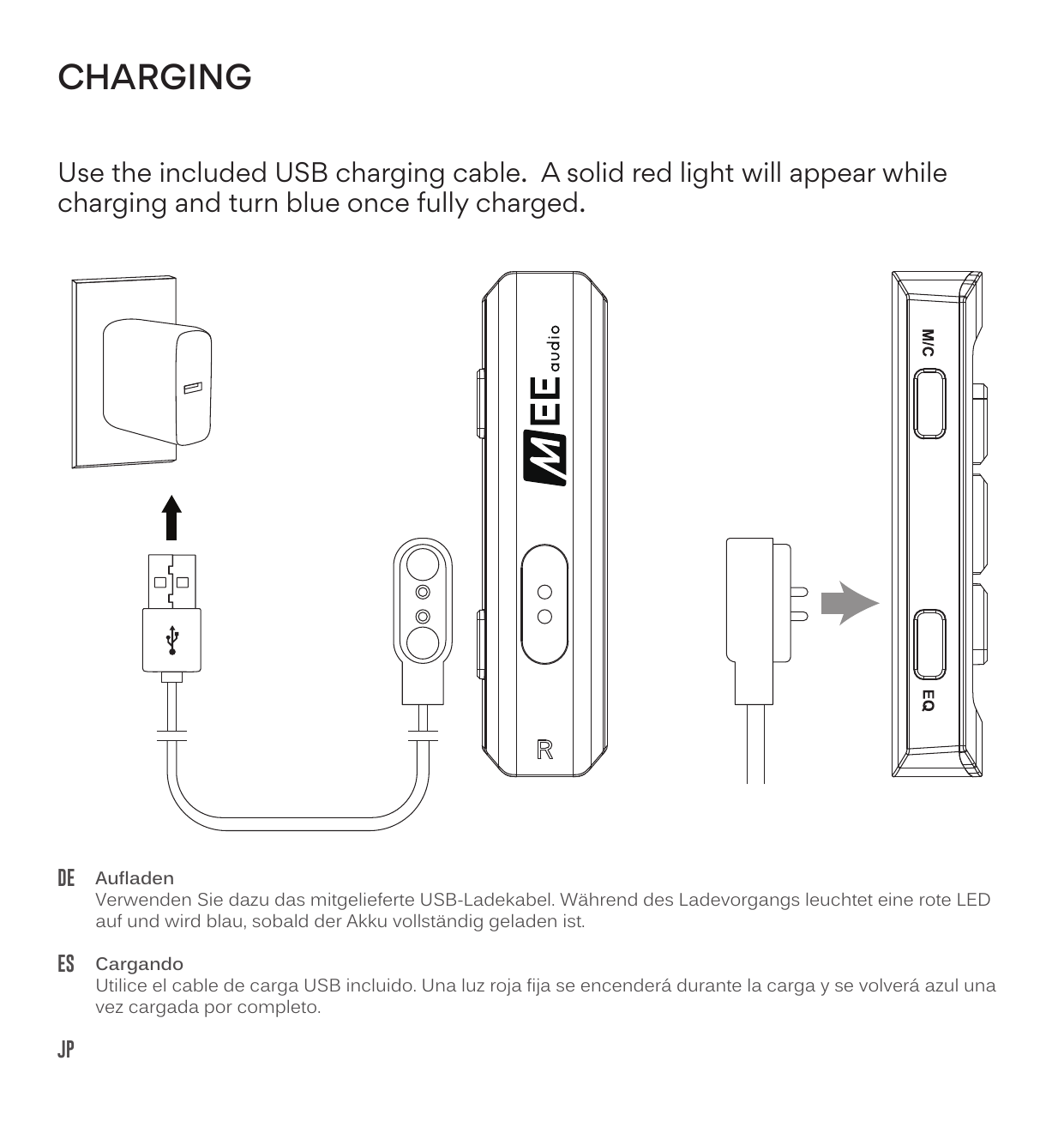
Use the included USB charging cable. A solid red light will appear while charging and turn blue once fully charged.
DE Aufladen
Verwenden Sie dazu das mitgelieferte USB-Ladekabel. Während des Ladevorgangs leuchtet eine rote LED auf und wird blau, sobald der Akku vollständig geladen ist.
ES Cargando
Utilice el cable de carga USB incluido. Una luz roja fija se encenderá durante la carga y se volverá azul una vez cargada por completo.
JP 充電方法
付属のUSB充電ケーブルを使用してください。充電中は赤色ランプが点灯し、充電完了後は青色に変わります。
Connecting via Bluetooth
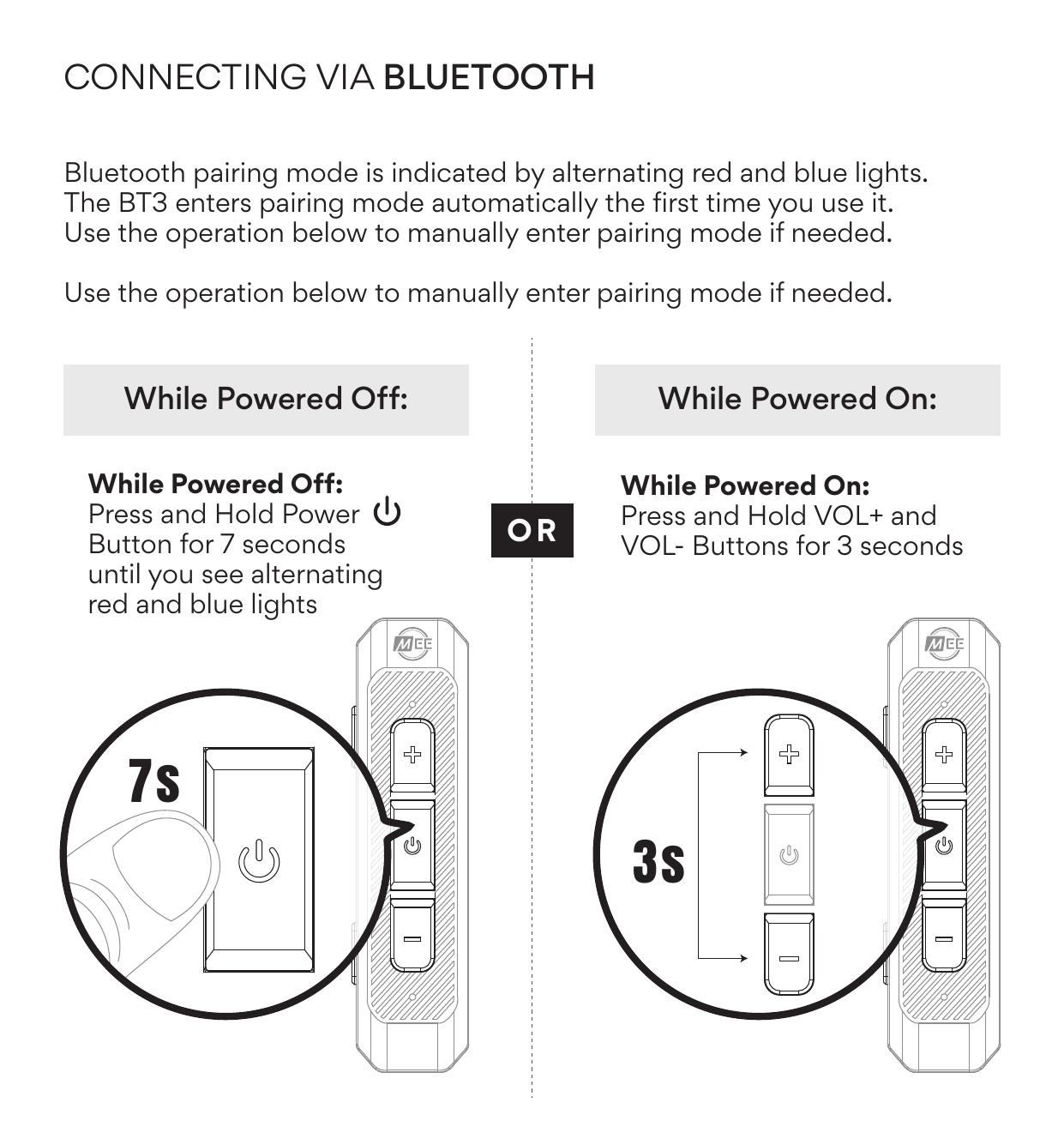
Bluetooth pairing mode is indicated by alternating red and blue lights. The BT3 enters pairing mode automatically the first time you use it.
To manually enter pairing mode:
| Device State | Action |
|---|---|
| While Powered Off | Press and hold the Power button for 7 seconds until you see alternating red and blue lights |
| While Powered On | Press and hold the VOL+ and VOL− buttons simultaneously for 3 seconds |
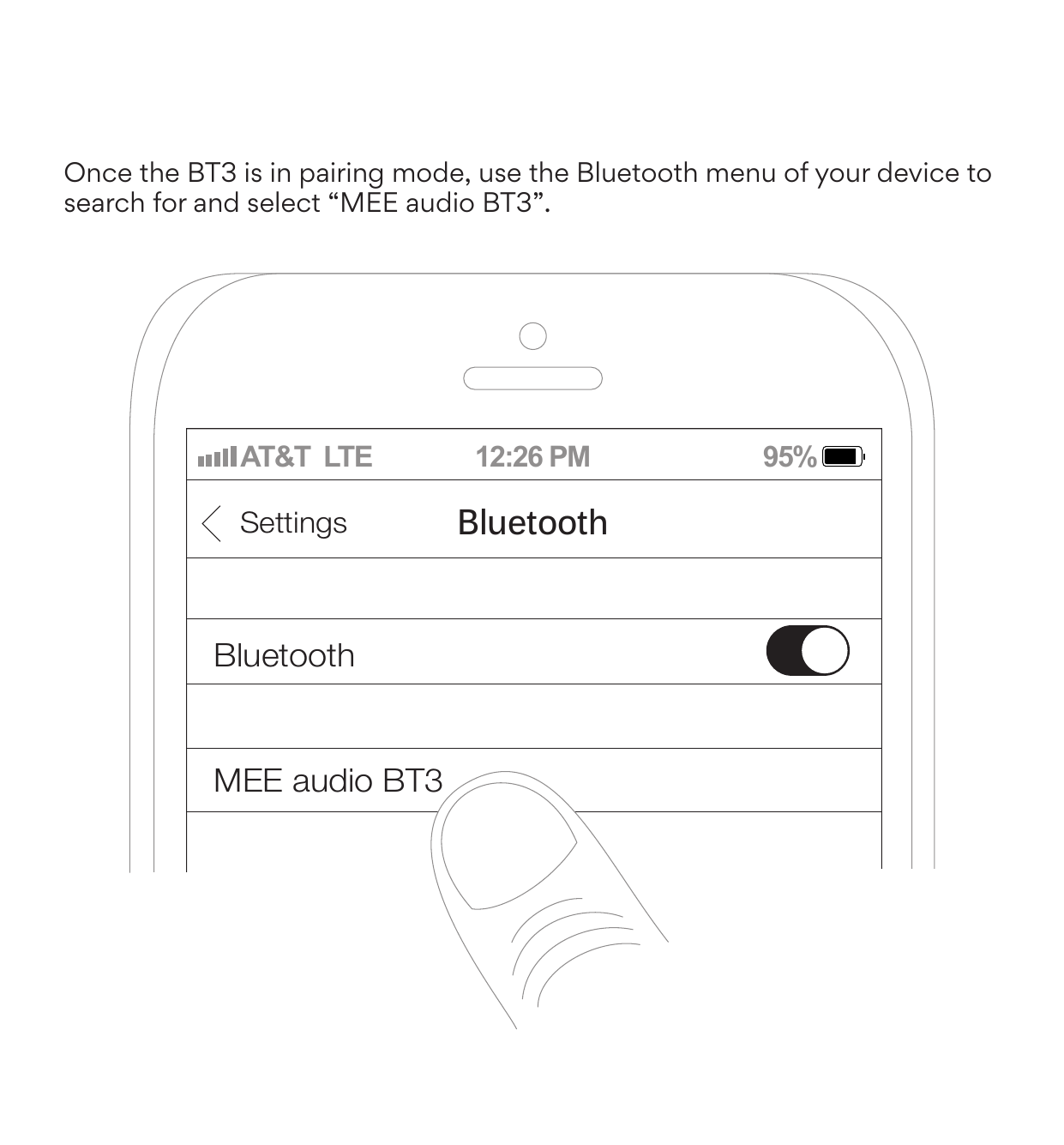
Once the BT3 is in pairing mode, use the Bluetooth menu of your device to search for and select "MEE audio BT3".
DE Verbinden über Bluetooth
Der Bluetooth-Kopplungsmodus wird durch abwechselnd rote und blaue Lichter angezeigt. Das BT3 wechselt beim ersten Benutzen automatisch in den Pairing-Modus.
Im ausgeschalteten Zustand: Halten Sie die Taste (⏻) sieben Sekunden lang gedrückt, bis Sie abwechselnd rote und blaue Lichter sehen.
Im eingeschalteten Zustand: Halten Sie die Tasten (+) und (–) drei Sekunden lang gedrückt.
Sobald sich das BT3 im Pairing-Modus befindet, suchen Sie im Bluetooth-Menü Ihres Geräts nach „MEE audio BT3" und wählen es aus.
ES Conexión por Bluetooth
El modo de emparejamiento por Bluetooth se indica mediante luces rojas y azules alternadas. El BT3 entra en modo de emparejamiento automáticamente la primera vez que lo usa.
Con el dispositivo apagado: Mantenga pulsado el botón (⏻) durante 7 segundos hasta que vea luces rojas y azules alternadas.
Con el dispositivo encendido: Mantenga pulsados los botones (+) y (-) durante 3 segundos.
Una vez que el BT3 esté en modo de emparejamiento, utilice el menú Bluetooth de su dispositivo para buscar y seleccionar "MEE audio BT3".
JP BLUETOOTH接続方法
Bluetoothペアリングモード時はLEDが赤色と青色の交互点滅になります。BT3は電源を入れると自動的にペアリングモードに入ります。
電源オフ時:(⏻)ボタンを7秒間長押しし、赤と青の点滅を確認する。
電源オン時:(+)ボタンと(-)ボタンを同時に3秒間長押しする。
BT3がペアリングモードになったら、お使いのデバイスのBluetoothメニューで「MEE audio BT3」を検索・選択してください。
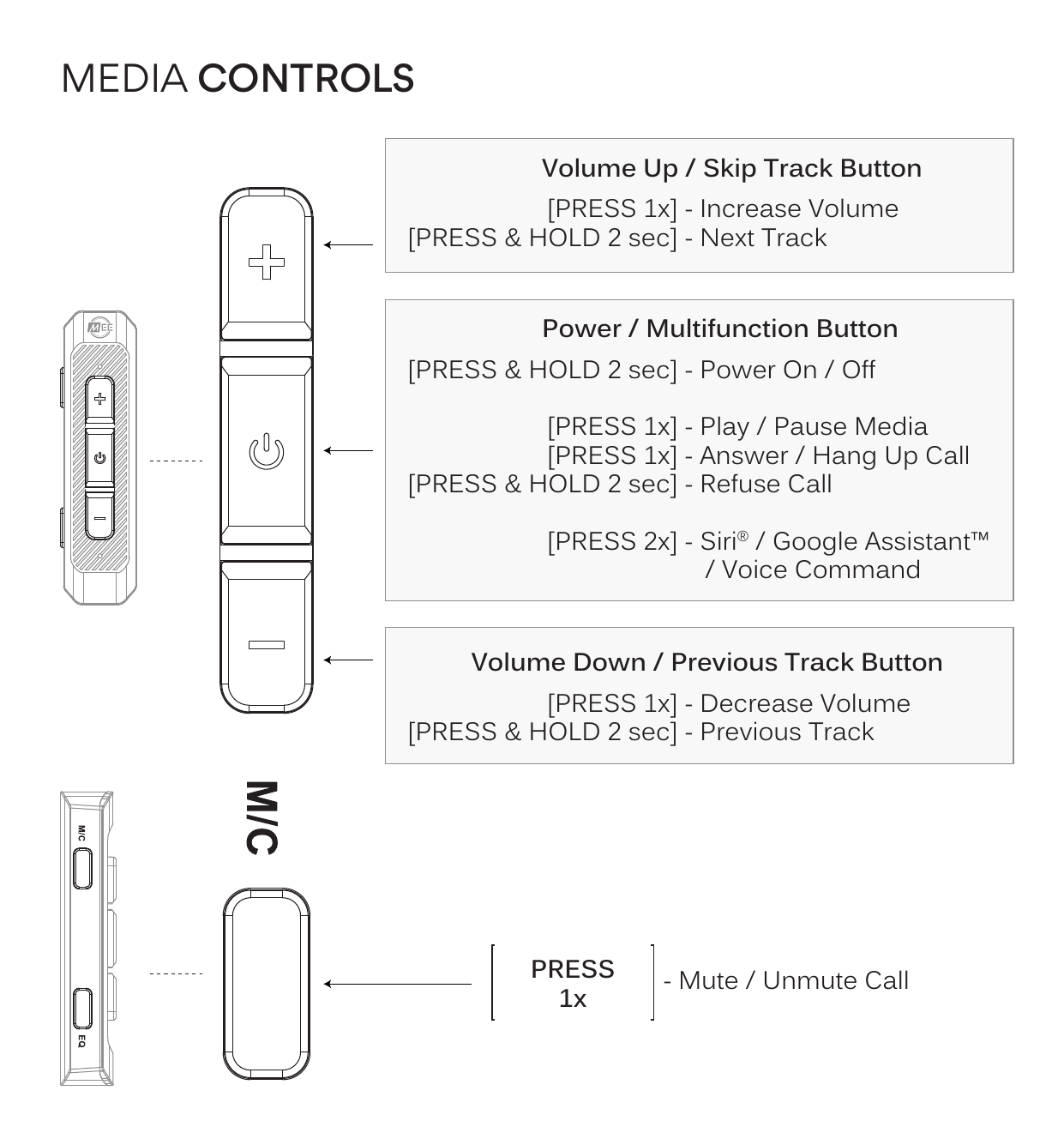
Media Controls
| Button | Action | Function |
|---|---|---|
| Volume Up / Skip Track (+) | Press 1× | Increase Volume |
| Press & Hold 2 sec | Next Track | |
| Power / Multifunction (⏻) | Press & Hold 2 sec | Power On / Off |
| Press 1× | Play / Pause Media | |
| Press 1× | Answer / Hang Up Call | |
| Press & Hold 2 sec | Refuse Call | |
| Press 2× | Siri® / Google Assistant™ / Voice Command | |
| Volume Down / Previous Track (−) | Press 1× | Decrease Volume |
| Press & Hold 2 sec | Previous Track | |
| M/C Button | Press 1× | Mute / Unmute Call |
DE Bedienung
- Einschalten / Ausschalten: Drücken und halten Sie die Taste (⏻) für drei Sekunden.
- Lautstärke Erhöhen: Taste (+) einmal drücken.
- Lautstärke Verringern: Drücken Sie die Taste (-) einmal.
- Medien Abspielen / Anhalten & Anrufe Annehmen / Auflegen: Drücken Sie die Taste (⏻) einmal.
- Siri / Google Assistant / Sprachsteuerung: Drücken Sie die Taste (⏻) zweimal.
- Nächster Titel: Halten Sie die (+)-Taste 2 Sekunden lang gedrückt.
- Vorheriger Titel: Halten Sie die Taste (-) zwei Sekunden lang gedrückt.
- Anruf Ablehnen: Drücken und halten Sie die Taste (⏻) für 2 Sekunden.
- Anruf Stummschalten / Aufheben: Drücken Sie die Taste M/C einmal.
ES Controles
- Encendido / Apagado: Mantenga pulsado el botón (⏻) durante 3 s.
- Subir Volumen: Pulse el botón (+) 1 vez.
- Bajar Volumen: Pulse el botón (-) 1 vez.
- Reproducir / Pausar & Contestar / Colgar Llamada: Pulse el botón (⏻) 1 vez.
- Siri / Asistente de Google / Comando de Voz: Pulse el botón (⏻) 2 veces.
- Pista Siguiente: Mantenga pulsado el botón (+) durante 2 s.
- Pista Anterior: Mantenga pulsado el botón (-) durante 2 s.
- Rechazar Llamada: Mantenga pulsado el botón (⏻) durante 2 s.
- Silenciar / Activar Llamada: Pulse el botón M/C 1 vez.
JP 操作方法
- 電源オン/オフ:(⏻)ボタンを3秒間長押し。
- 音量アップ:(+)ボタンを1回押す。
- 音量ダウン:(-)ボタンを1回押す。
- メディア再生/一時停止、通話応答/終了:(⏻)ボタンを1回押す。
- Siri/Google Assistant/音声コマンド:(⏻)ボタンを2回押す。
- 次のトラック:(+)ボタンを2秒間長押し。
- 前のトラック:(-)ボタンを2秒間長押し。
- 着信拒否:(⏻)ボタンを2秒間長押し。
- 通話ミュート/ミュート解除:M/Cボタンを1回押す。
Dynamic Audio Enhancement
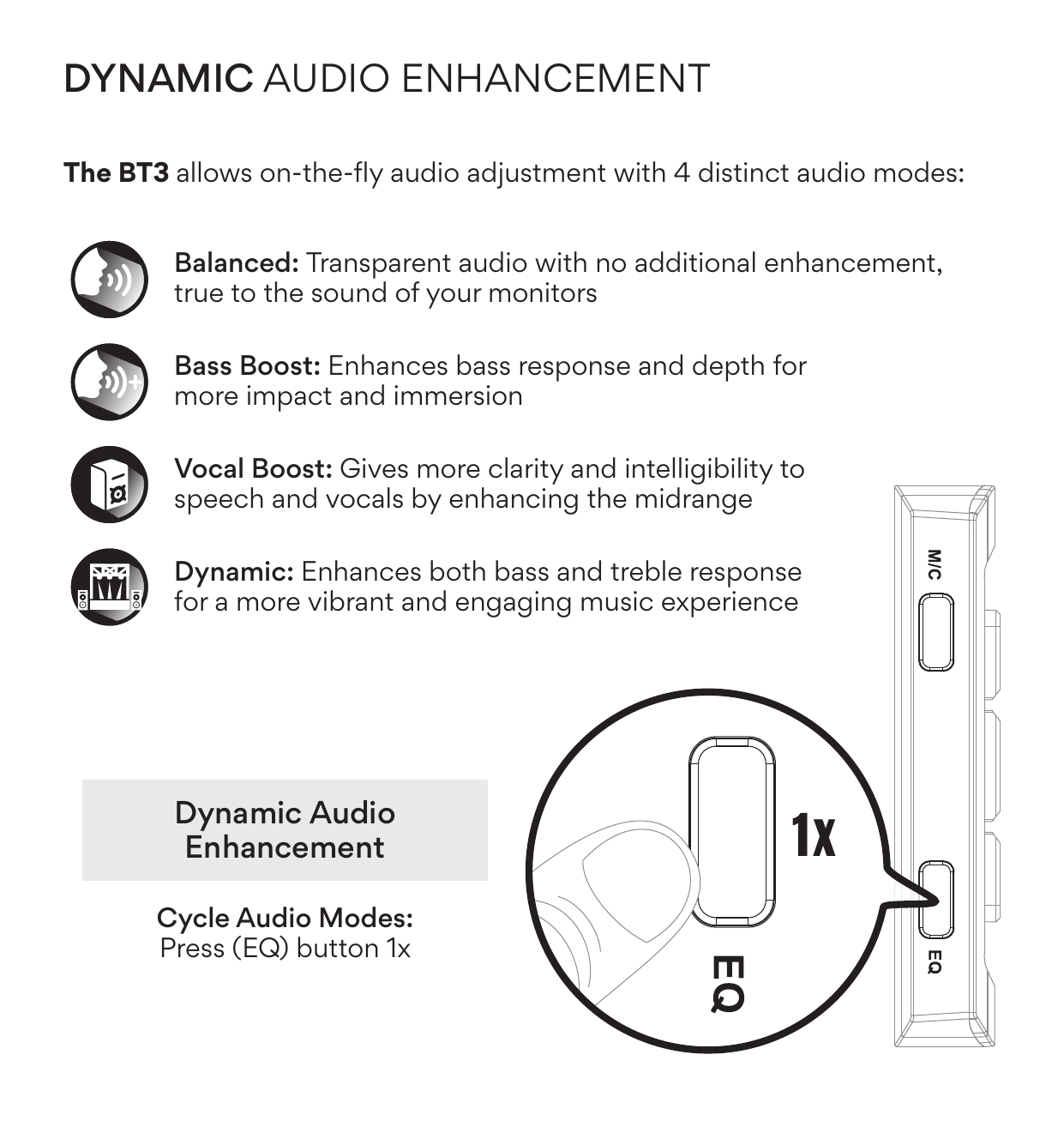
The BT3 allows on-the-fly audio adjustment with 4 distinct audio modes. To cycle through modes, press the EQ button once.
| Mode | Description |
|---|---|
| Balanced | Transparent audio with no additional enhancement, true to the sound of your monitors |
| Bass Boost | Enhances bass response and depth for more impact and immersion |
| Vocal Boost | Gives more clarity and intelligibility to speech and vocals by enhancing the midrange |
| Dynamic | Enhances both bass and treble response for a more vibrant and engaging music experience |
DE Dynamische Audioverbesserung
Der BT3 ermöglicht eine fliegende Audioanpassung mit vier verschiedenen Audiomodi. Audio-Modi durchschalten: Drücken Sie die Taste (EQ) einmal.
- „Ausgewogen": Transparentes Audio ohne zusätzliche Verstärkung, getreu dem Klang Ihrer Monitore.
- „Bassverstärkung": Verbessert die Basswiedergabe und -tiefe für mehr Wirkung und Eindringlichkeit.
- „Vocal Boost": Sorgt für mehr Klarheit und Verständlichkeit von Sprache und Gesang durch Anhebung des Mitteltonbereichs.
- „Dynamic": Verbessert sowohl die Bass- als auch die Höhenwiedergabe für ein lebendigeres und mitreißenderes Musikerlebnis.
ES Mejora Dinámica de Audio
El BT3 permite ajustar el audio sobre la marcha con 4 modos de audio distintos. Alternar modos de audio: Presione el botón (EQ) 1 vez.
- Equilibrado: Audio transparente sin mejoras adicionales, fiel al sonido de sus monitores.
- Refuerzo de graves: Mejora la respuesta y la profundidad de los graves para un mayor impacto e inmersión.
- Refuerzo vocal: Ofrece mayor claridad e inteligibilidad al habla y las voces al mejorar los medios.
- Dinámico: Mejora la respuesta de graves y agudos para una experiencia musical más vibrante y atractiva.
JP ダイナミックオーディオエンハンスメント
BT3は4つのオーディオモードを搭載しており、選択/切り替えがリアルタイムできます。オーディオモードの切り替え:(EQ)ボタンを1回押す。
- バランスモード:追加エンハンスメントなしの透明な音質。モニターの音に忠実。
- 低音ブーストモード:低音の応答性と深みを強化し、インパクトと没入感を向上。
- ボーカルブーストモード:中音域を強化し、会話やボーカルの明瞭さと理解度を高める。
- ダイナミックモード:低音と高音の両方を強化し、より活気ある没入感のある音楽体験を実現。
Bluetooth Multipoint
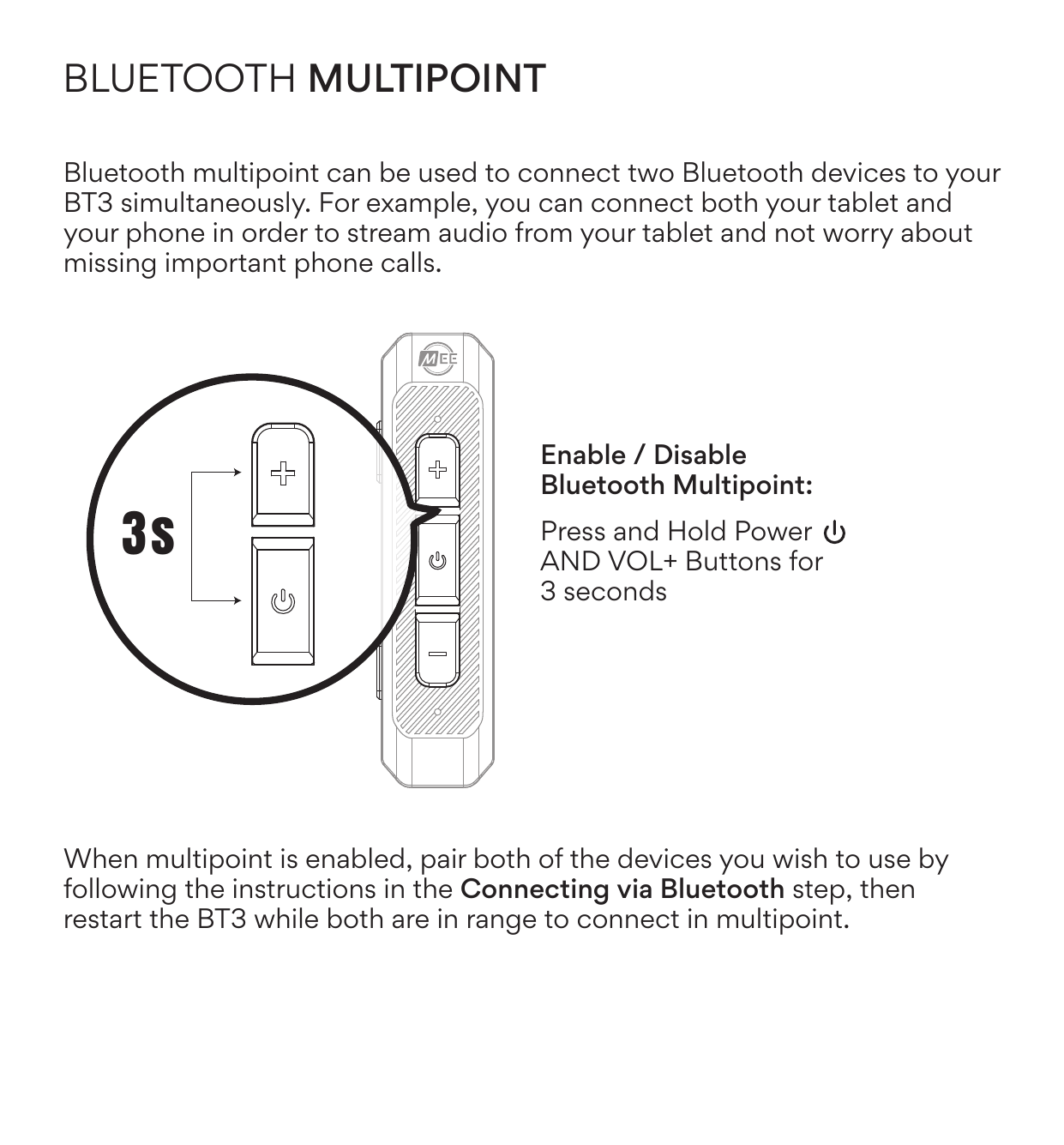
Bluetooth multipoint can be used to connect two Bluetooth devices to your BT3 simultaneously. For example, you can connect both your tablet and your phone in order to stream audio from your tablet and not worry about missing important phone calls.
Enable / Disable Bluetooth Multipoint
Press and hold the Power AND VOL+ buttons simultaneously for 3 seconds.
When multipoint is enabled, pair both of the devices you wish to use by following the instructions in the Connecting via Bluetooth step, then restart the BT3 while both are in range to connect in multipoint.
DE Bluetooth-Mehrfachverbindung
Mit der Bluetooth-Multipoint-Funktion können Sie zwei Bluetooth-Geräte gleichzeitig mit Ihrem BT3 verbinden.
Aktivieren/Deaktivieren: Halten Sie die Tasten (⏻) und (+) drei Sekunden lang gedrückt.
Wenn Multipoint aktiviert ist, koppeln Sie die beiden Geräte, die Sie verwenden möchten, indem Sie die Anweisungen im Abschnitt „Verbinden über Bluetooth" befolgen. Starten Sie dann das BT3 neu, während sich beide Geräte in Reichweite befinden.
ES Bluetooth Multipunto
El Bluetooth multipunto permite conectar dos dispositivos Bluetooth a tu BT3 simultáneamente.
Activar/desactivar: Mantenga pulsados los botones (⏻) y (+) durante 3 s.
Cuando el multipunto esté activado, empareje los dos dispositivos siguiendo las instrucciones del paso "Conectar por Bluetooth". A continuación, reinicie el BT3 mientras ambos estén dentro del alcance.
JP BLUETOOTHマルチポイント対応
Bluetoothマルチポイント機能により、2台のBluetoothデバイスを同時にBT3に接続できます。
有効/無効化:(⏻)ボタンと(+)ボタンを同時に3秒間長押し。
マルチポイント有効後、使用したい両デバイスを「Bluetooth接続手順」に従ってペアリングします。BT3を再起動し、マルチポイント接続を確立します。
Troubleshooting / Factory Reset
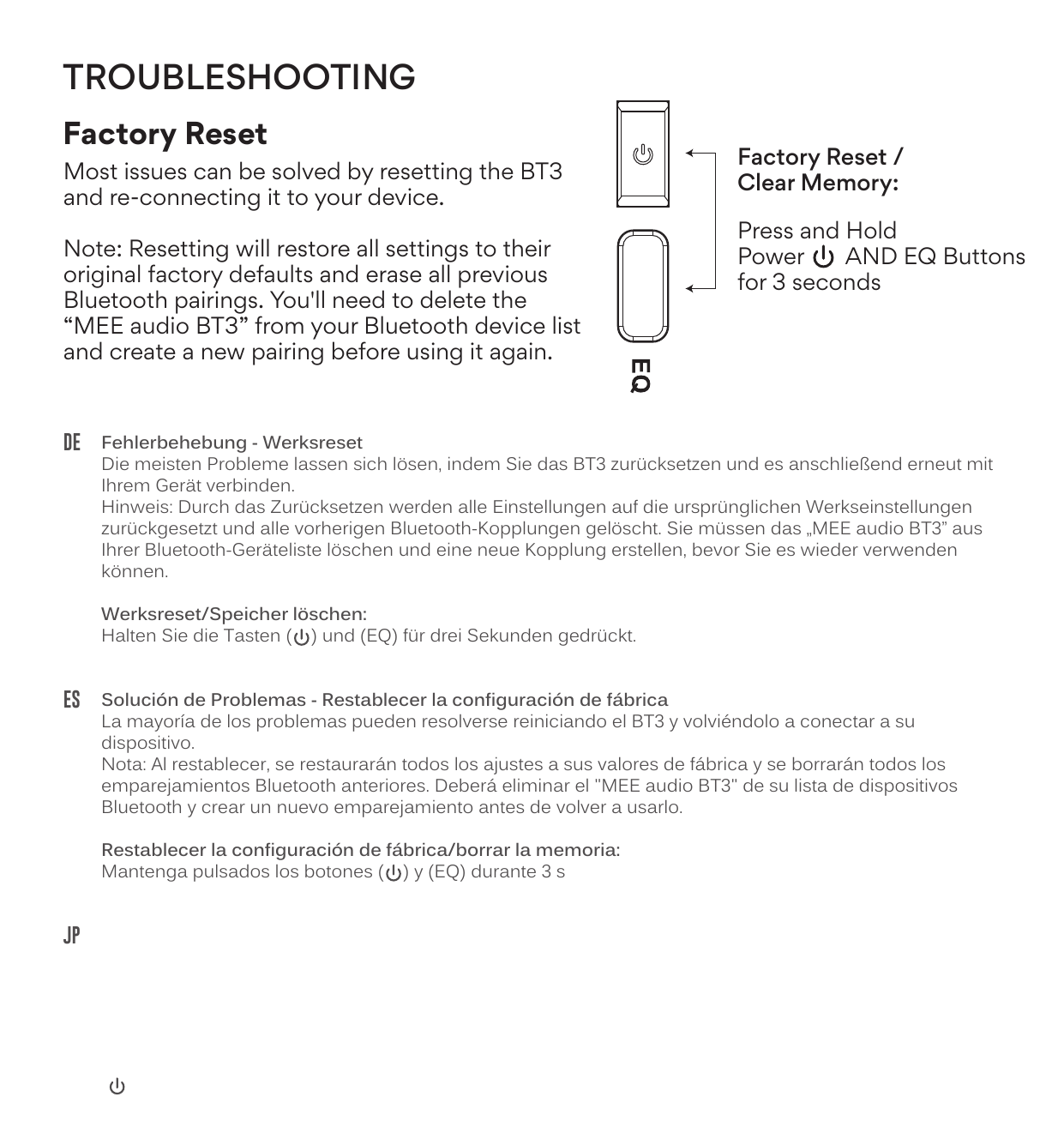
Most issues can be solved by resetting the BT3 and re-connecting it to your device.
Note: Resetting will restore all settings to their original factory defaults and erase all previous Bluetooth pairings. You'll need to delete "MEE audio BT3" from your Bluetooth device list and create a new pairing before using it again.
Factory Reset / Clear Memory
Press and hold the Power (⏻) AND EQ buttons simultaneously for 3 seconds.
DE Fehlerbehebung — Werksreset
Die meisten Probleme lassen sich lösen, indem Sie das BT3 zurücksetzen und es anschließend erneut mit Ihrem Gerät verbinden.
Werksreset/Speicher löschen: Halten Sie die Tasten (⏻) und (EQ) für drei Sekunden gedrückt.
ES Solución de Problemas — Restablecer la configuración de fábrica
La mayoría de los problemas pueden resolverse reiniciando el BT3 y volviéndolo a conectar a su dispositivo.
Restablecer/borrar la memoria: Mantenga pulsados los botones (⏻) y (EQ) durante 3 s.
JP トラブルシューティング — 工場出荷時設定へのリセット
ほとんどの問題はBT3をリセットし、デバイスに再接続することで解決できます。
工場出荷時設定へのリセット/メモリクリア:(⏻)ボタンと(EQ)ボタンを同時に3秒間長押し。
Other Connection Options
Bluetooth Auracast
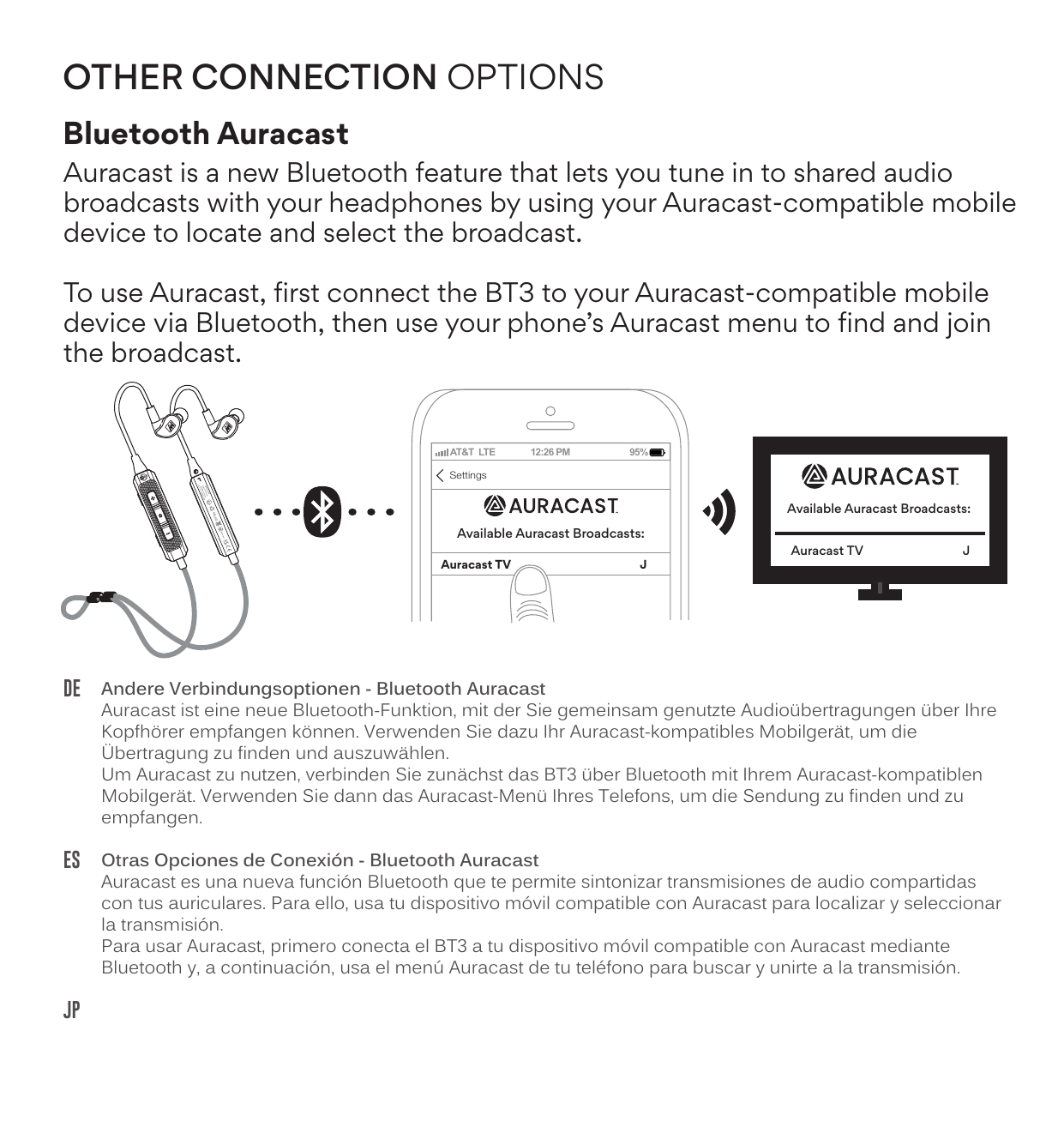
Auracast is a new Bluetooth feature that lets you tune in to shared audio broadcasts with your headphones by using your Auracast-compatible mobile device to locate and select the broadcast.
To use Auracast, first connect the BT3 to your Auracast-compatible mobile device via Bluetooth, then use your phone's Auracast menu to find and join the broadcast.
MEEcast
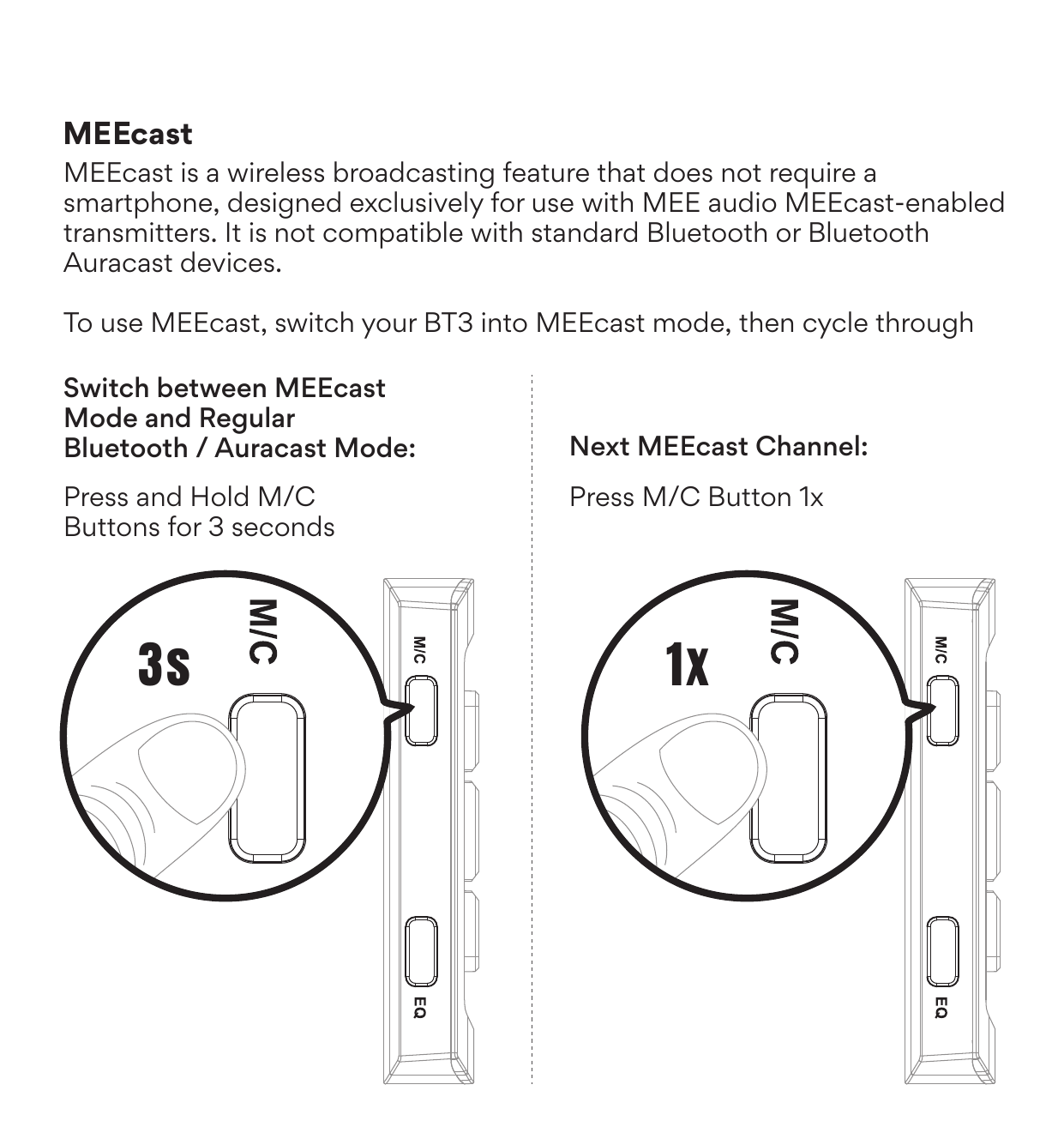
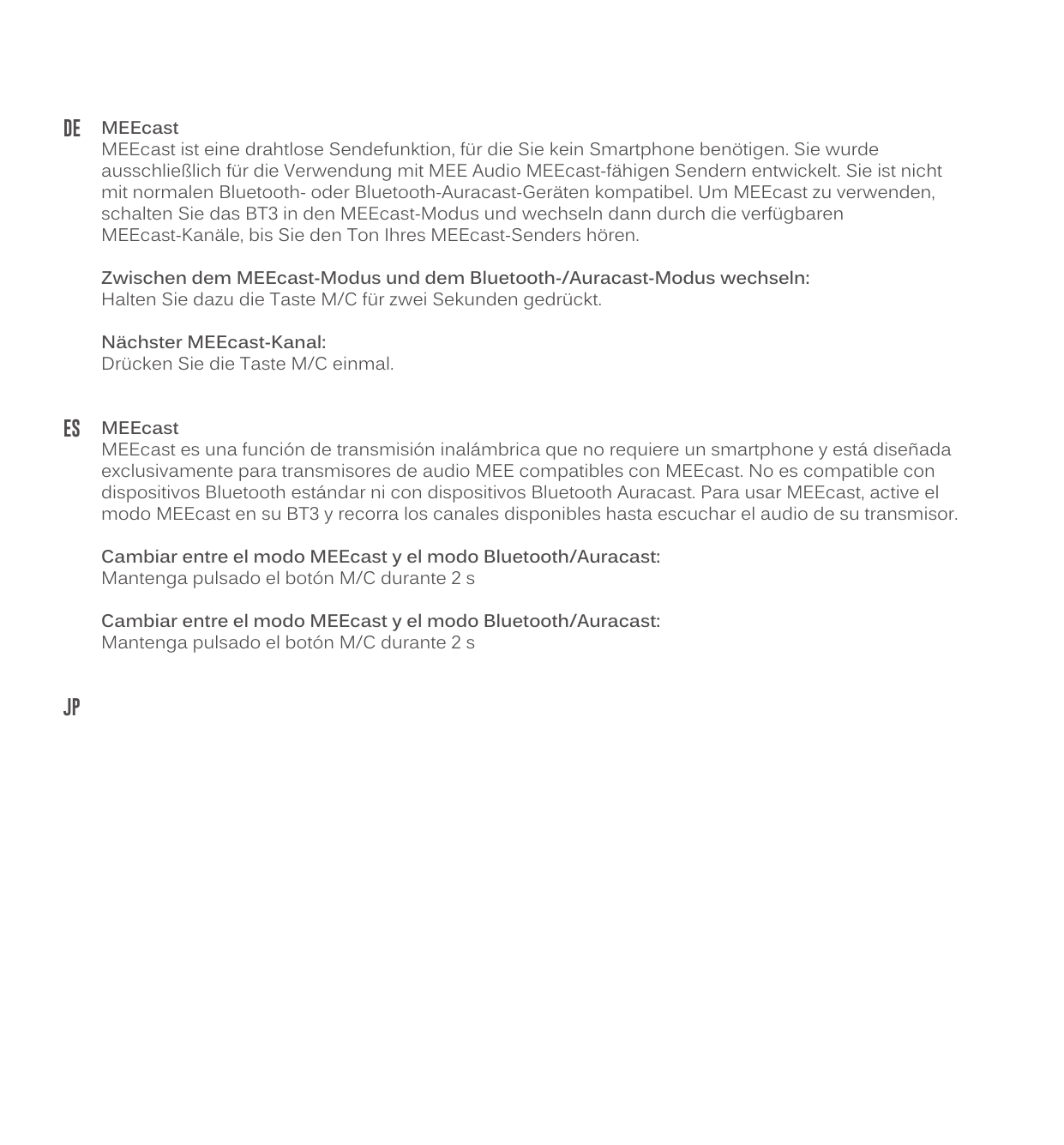
MEEcast is a wireless broadcasting feature that does not require a smartphone, designed exclusively for use with MEE audio MEEcast-enabled transmitters. It is not compatible with standard Bluetooth or Bluetooth Auracast devices.
To use MEEcast, switch your BT3 into MEEcast mode, then cycle through available MEEcast channels until you hear the audio from your MEEcast transmitter.
| Action | Button Operation |
|---|---|
| Switch between MEEcast Mode and Regular Bluetooth / Auracast Mode | Press and Hold M/C button for 3 seconds |
| Next MEEcast Channel | Press M/C button 1× |
DE Andere Verbindungsoptionen
Bluetooth Auracast: Auracast ist eine neue Bluetooth-Funktion, mit der Sie gemeinsam genutzte Audioübertragungen über Ihre Kopfhörer empfangen können. Um Auracast zu nutzen, verbinden Sie zunächst das BT3 über Bluetooth mit Ihrem Auracast-kompatiblen Mobilgerät. Verwenden Sie dann das Auracast-Menü Ihres Telefons, um die Sendung zu finden und zu empfangen.
MEEcast: MEEcast ist eine drahtlose Sendefunktion, für die Sie kein Smartphone benötigen. Sie ist nicht mit normalen Bluetooth- oder Bluetooth-Auracast-Geräten kompatibel. Zwischen MEEcast-Modus und Bluetooth-/Auracast-Modus wechseln: Halten Sie dazu die Taste M/C für drei Sekunden gedrückt. Nächster MEEcast-Kanal: Drücken Sie die Taste M/C einmal.
ES Otras Opciones de Conexión
Bluetooth Auracast: Auracast es una nueva función Bluetooth que te permite sintonizar transmisiones de audio compartidas. Para usar Auracast, primero conecta el BT3 a tu dispositivo móvil compatible con Auracast mediante Bluetooth y, a continuación, usa el menú Auracast de tu teléfono para buscar y unirte a la transmisión.
MEEcast: MEEcast es una función de transmisión inalámbrica que no requiere un smartphone. No es compatible con dispositivos Bluetooth estándar ni con dispositivos Bluetooth Auracast. Cambiar entre el modo MEEcast y el modo Bluetooth/Auracast: Mantenga pulsado el botón M/C durante 3 s. Canal siguiente: Mantenga pulsado el botón M/C durante 2 s.
JP その他の接続オプション
Bluetooth Auracast:AuracastはAuracast対応モバイル端末で放送を検索・選択し、ヘッドホンで共有オーディオ放送を聴取できる新機能です。まずBT3をAuracast対応モバイルデバイスにBluetooth接続し、スマートフォンのAuracastメニューから放送を検索・参加してください。
MEEcast:MEEcastはスマートフォン不要の無線放送機能で、MEEオーディオのMEEcast対応送信機専用に設計されています。MEEcastモードとBluetooth/Auracastモードの切り替え:M/Cボタンを2秒間長押し。次のMEEcastチャンネル:M/Cボタンを1回押す。
Safety and Care
- Clean with a soft cloth; use diluted soapy water if needed. Do not use chemical cleaners.
- Battery performance will be severely decreased when stored in extreme temperatures. Avoid extreme temperatures: below -10°C/14°F or above 45°C/113°F, including direct sunlight.
- The lifetime of the battery will be significantly reduced if the battery is charged for a long time. Charge at least once a month to maintain battery health.
- If the device comes in contact with liquids, quickly wipe away. If submerged in water, do not power on until completely dry. Note: liquid submersion voids the warranty.
Warnings
This device is designed and manufactured to operate within its defined design limits. Misuse may result in electric shock or fire. Read and follow these instructions carefully.
- Listening to audio at high volumes for extended periods can cause permanent hearing damage. To protect your hearing, always keep the volume at a moderate or low level. When connecting your headphones, start with the volume low, then increase gradually.
- Do not use headphones while driving, cycling, operating machinery, or during any activity that requires full awareness of your surroundings. The noise isolation may block important sounds like traffic, alarms, or warning signals, potentially putting you or others at risk. Use only in safe environments where reduced hearing will not compromise safety.
- Danger of explosion or fire if batteries are damaged. Never attempt to open the battery for any reason. Do not use the device if it has been crushed, pierced, or otherwise damaged in any way that could compromise the battery. Do not leave the device in any location with excessive heat including naked flames or near heat sources such as radiators and stoves. Do not expose the battery to spark, flame, or salt water.
- Do not charge or use around flammable gasses, liquids, or dust as fire or explosion may occur.
- There are no user replaceable/reparable parts in the device. Disassembling it will void your warranty and may cause personal injury. Changes or modifications to this unit not expressly approved by MEE audio could void the user's authority to operate the equipment.
- Only use attachments/accessories specified by the manufacturer.
Caution: Choking hazard. Keep the device and packaging out of reach of children and pets.
Warranty
MEE audio products purchased from authorized resellers are covered by a 1-year manufacturer warranty (2 years in the EU). For more information, contact your local MEE audio dealer or visit MEEaudio.com/Support.
↑ Back to topCompliance Information
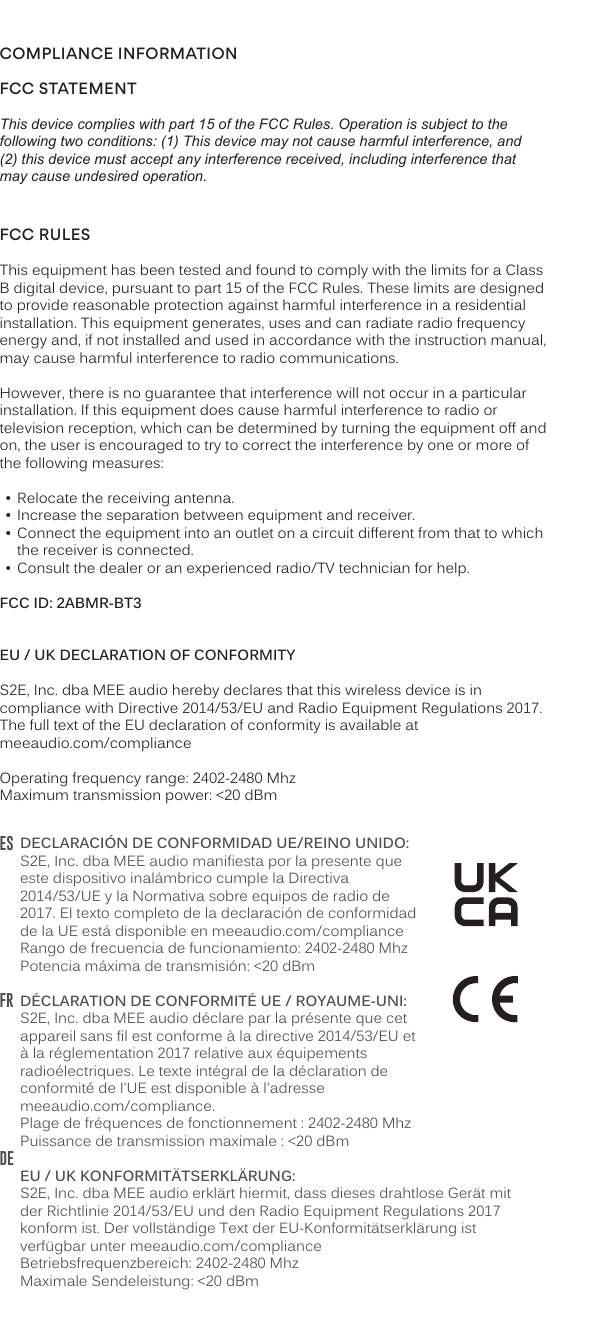
FCC Statement
This device complies with part 15 of the FCC Rules. Operation is subject to the following two conditions: (1) This device may not cause harmful interference, and (2) this device must accept any interference received, including interference that may cause undesired operation.
FCC Rules
This equipment has been tested and found to comply with the limits for a Class B digital device, pursuant to part 15 of the FCC Rules. These limits are designed to provide reasonable protection against harmful interference in a residential installation.
If this equipment does cause harmful interference to radio or television reception, the user is encouraged to try to correct the interference by one or more of the following measures:
- Relocate the receiving antenna.
- Increase the separation between equipment and receiver.
- Connect the equipment into an outlet on a circuit different from that to which the receiver is connected.
- Consult the dealer or an experienced radio/TV technician for help.
FCC ID: 2ABMR-BT3
EU / UK Declaration of Conformity
EN: S2E, Inc. dba MEE audio hereby declares that this wireless device is in compliance with Directive 2014/53/EU and Radio Equipment Regulations 2017. The full text of the EU declaration of conformity is available at meeaudio.com/compliance. Operating frequency range: 2402–2480 MHz. Maximum transmission power: <20 dBm.
ES: S2E, Inc. dba MEE audio manifiesta por la presente que este dispositivo inalámbrico cumple la Directiva 2014/53/UE y la Normativa sobre equipos de radio de 2017. El texto completo de la declaración de conformidad de la UE está disponible en meeaudio.com/compliance.
FR: S2E, Inc. dba MEE audio déclare par la présente que cet appareil sans fil est conforme à la directive 2014/53/EU et à la réglementation 2017 relative aux équipements radioélectriques. Le texte intégral de la déclaration de conformité de l'UE est disponible à l'adresse meeaudio.com/compliance.
DE: S2E, Inc. dba MEE audio erklärt hiermit, dass dieses drahtlose Gerät mit der Richtlinie 2014/53/EU und den Radio Equipment Regulations 2017 konform ist. Der vollständige Text der EU-Konformitätserklärung ist verfügbar unter meeaudio.com/compliance.
↑ Back to topVideo Setup Guide
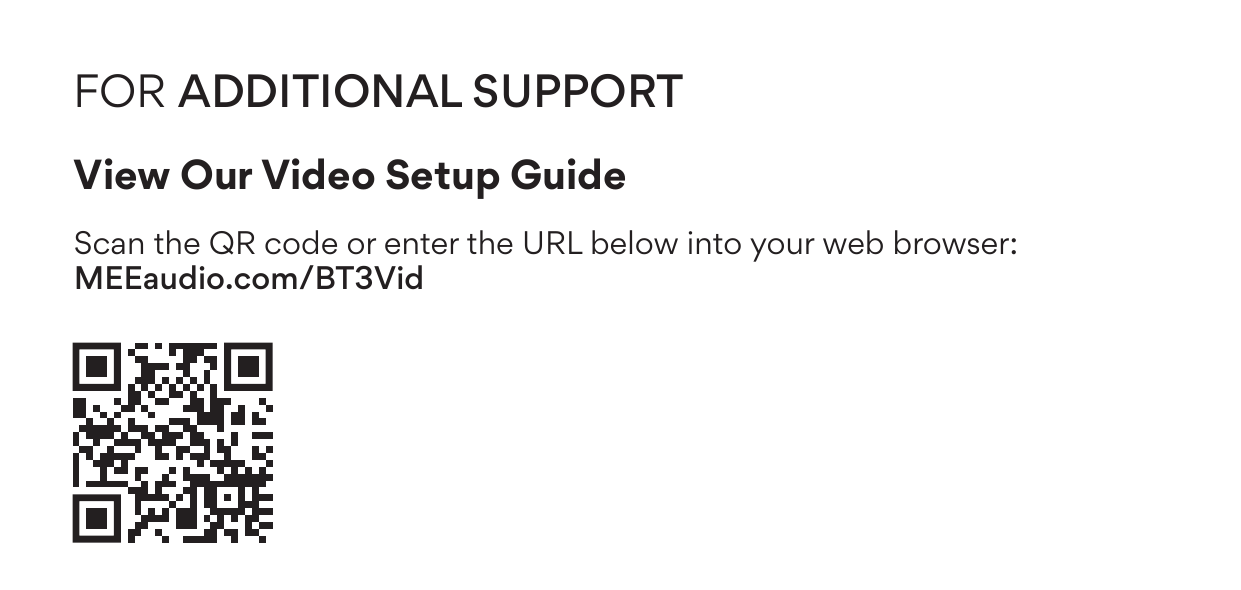
Scan the QR code or enter the URL below into your web browser: MEEaudio.com/BT3Vid
↑ Back to topQuestions? We're Here to Help!
Phone Support: 626-965-1008
Monday – Friday, 9:00am to 5:00pm PST
Email Support: support@meeaudio.com
All emails are responded to within 2 business days.