Quick Reference
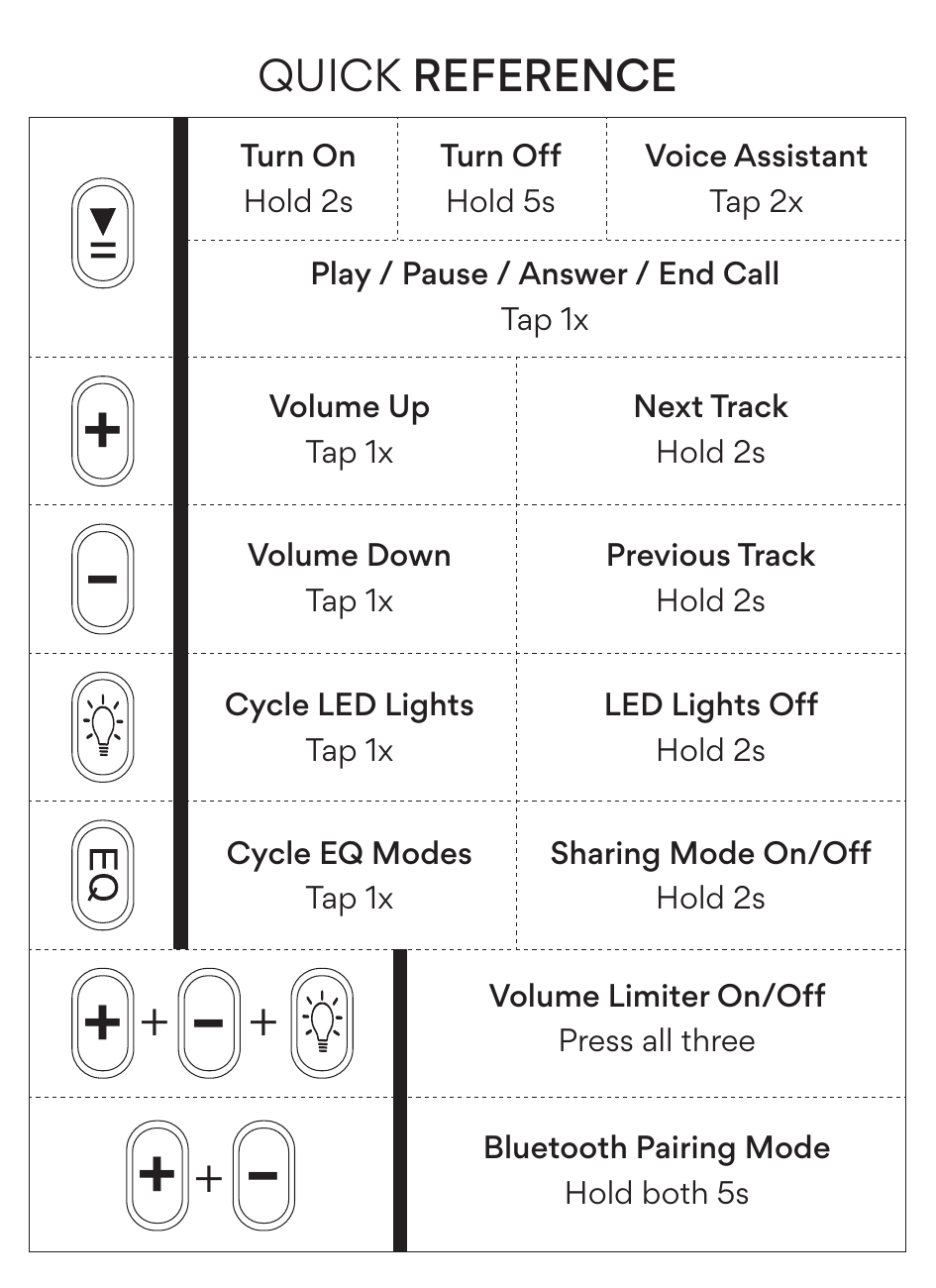
| Button | Function | Action |
|---|---|---|
| Multifunction button (▶‖) | Turn On | Hold 2s |
| Turn Off | Hold 5s | |
| Play / Pause / Answer / End Call | Tap 1x | |
| Voice Assistant | Tap 2x | |
| Volume Up / Skip Track button (+) | Volume Up | Tap 1x |
| Next Track | Hold 2s | |
| Volume Down / Previous Track button (−) | Volume Down | Tap 1x |
| Previous Track | Hold 2s | |
| LED Light Mode button | Cycle LED Lights | Tap 1x |
| LED Lights Off | Hold 2s | |
| EQ / Sharing Mode button | Cycle EQ Modes | Tap 1x |
| Sharing Mode On/Off | Hold 2s | |
| +, −, and LED Light Mode buttons simultaneously | Volume Limiter On/Off | Press all three at once |
| + and − buttons simultaneously | Bluetooth Pairing Mode | Hold both 5s |
Your KidJamz – Product Overview
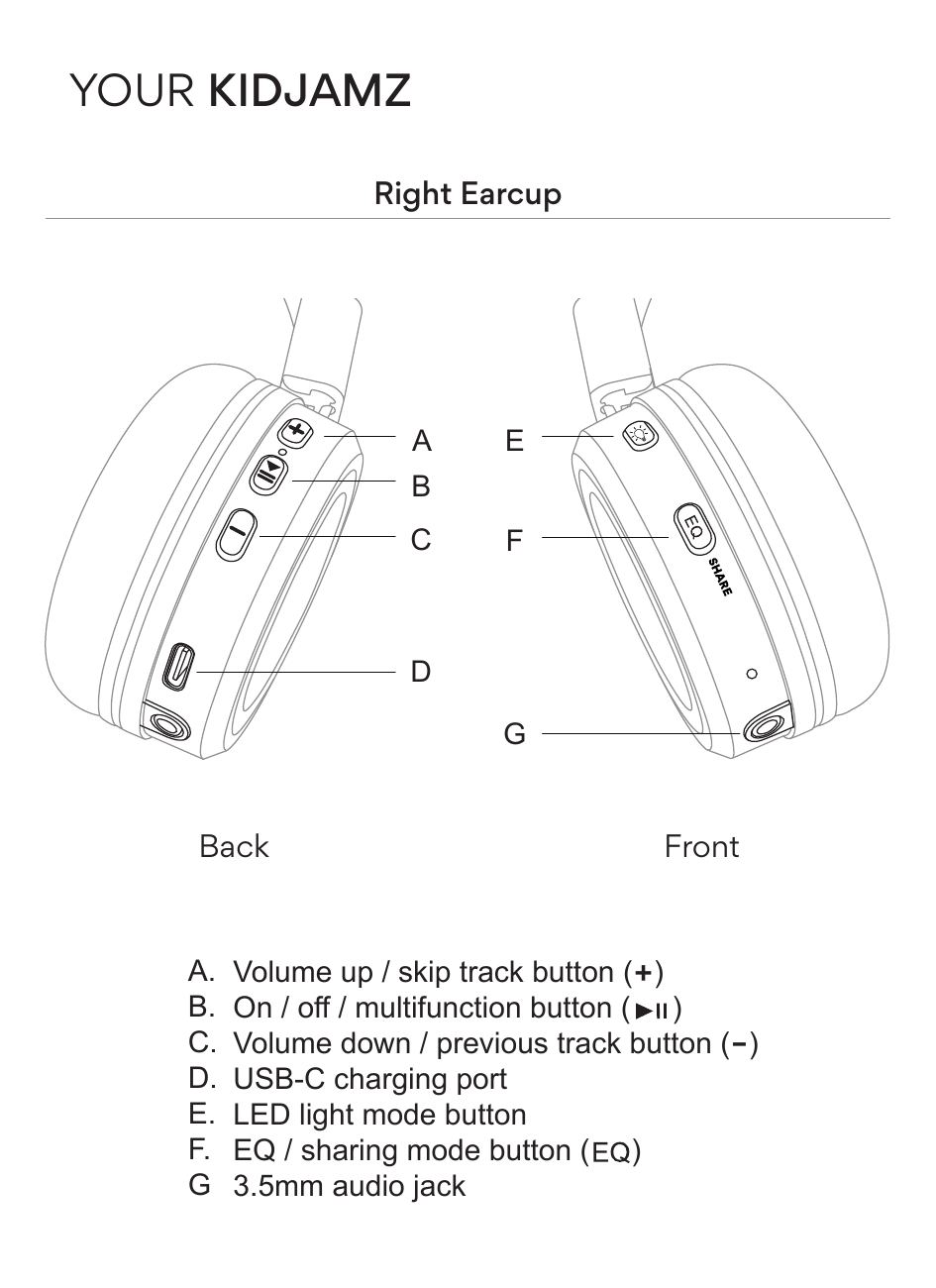
All controls are located on the right earcup. The back panel contains buttons A, B, C, and D; the front panel contains buttons E, F, and port G:
- A. Volume up / skip track button (+)
- B. On / off / multifunction button (▶‖)
- C. Volume down / previous track button (−)
- D. USB-C charging port
- E. LED light mode button
- F. EQ / sharing mode button (EQ)
- G. 3.5mm audio jack
Getting Started
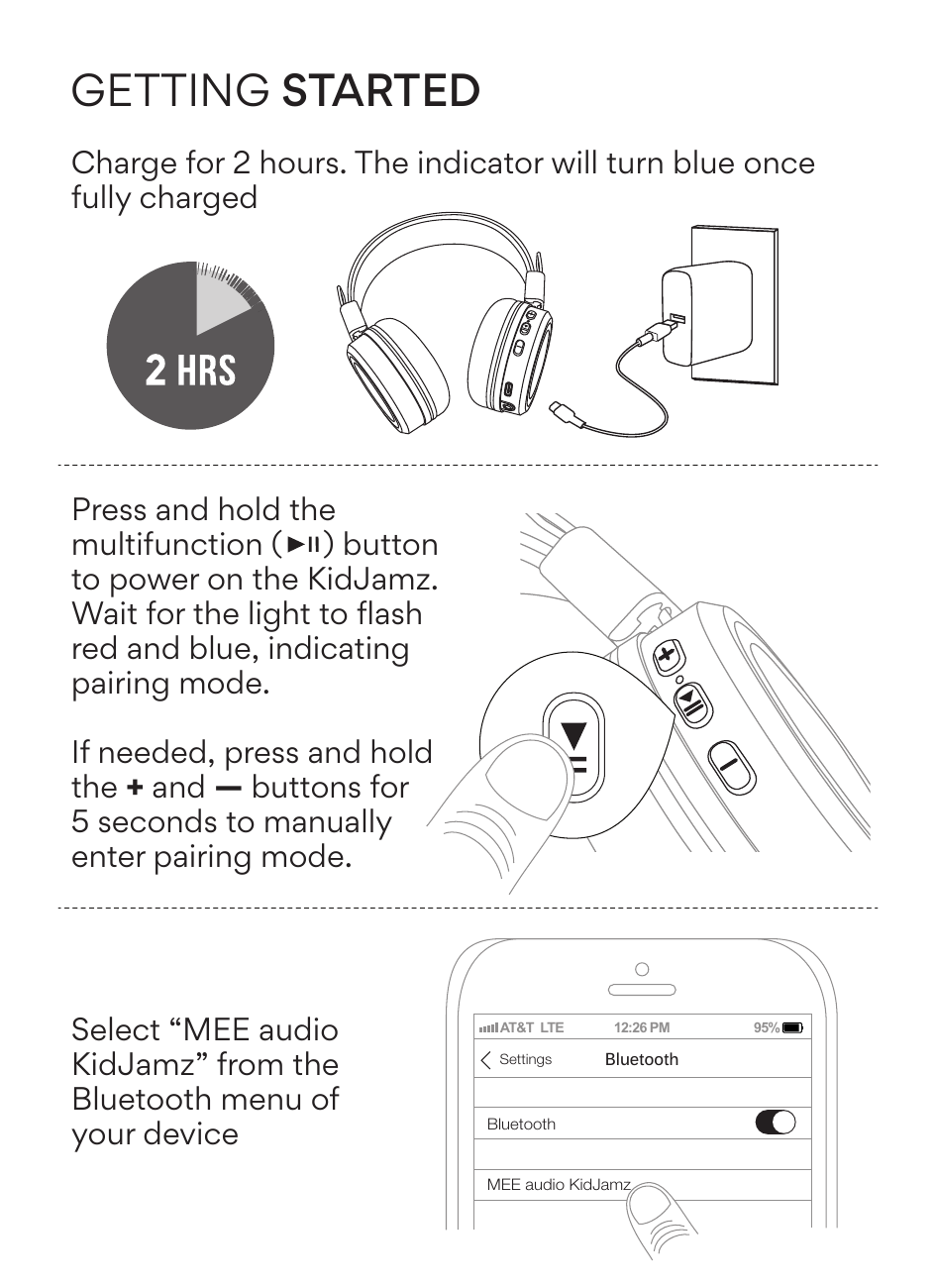
- Charge for 2 hours. The indicator light will turn blue once fully charged.
-
Power on. Press and hold the multifunction (▶‖) button to power on the KidJamz. Wait for the light to flash red and blue, indicating pairing mode.
Note: If needed, press and hold the + and − buttons for 5 seconds to manually enter pairing mode.
- Pair via Bluetooth. Open the Bluetooth menu on your device (usually in Settings → Bluetooth) and select "MEE audio KidJamz".
Controls
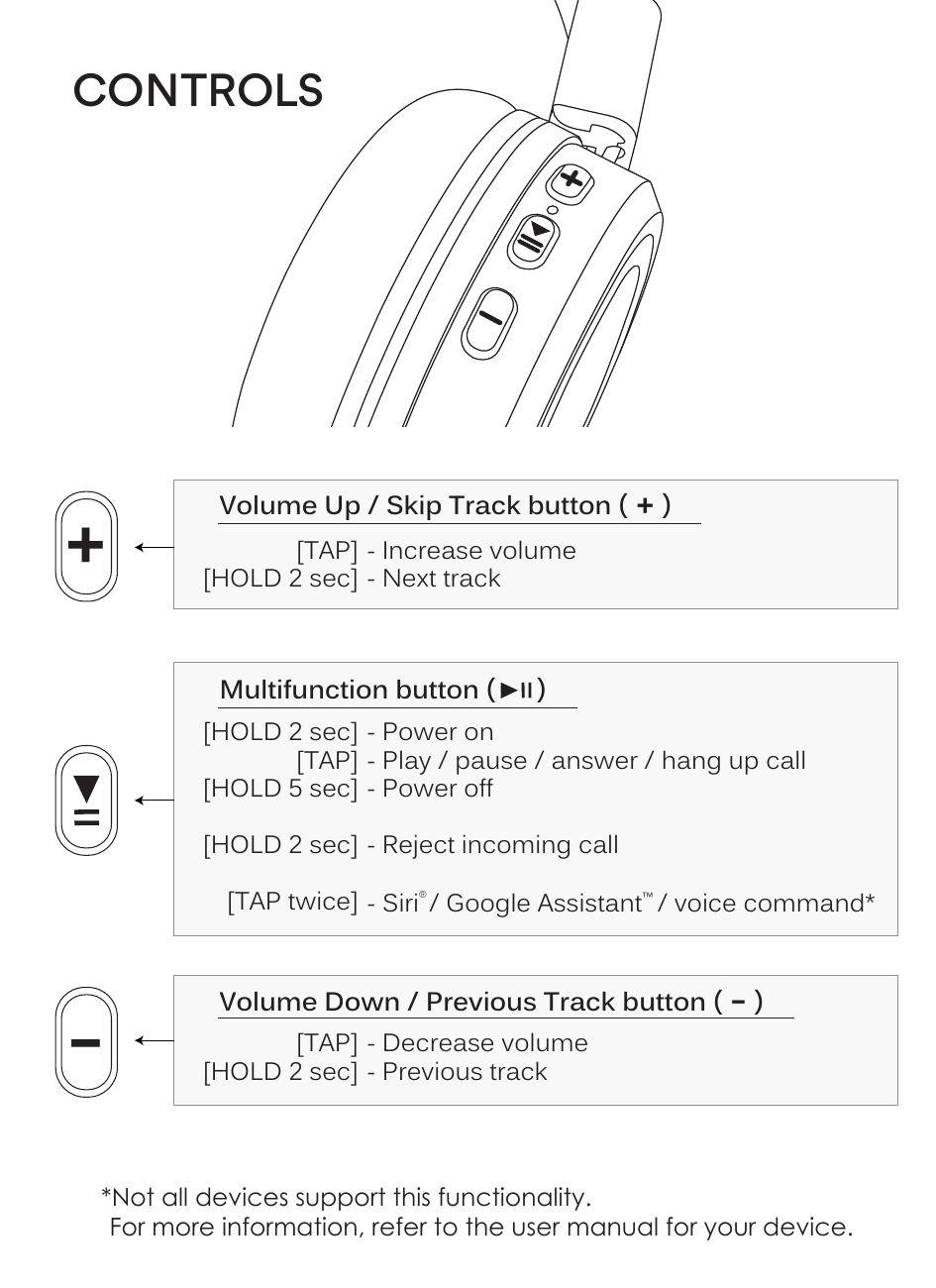
| Action | Function |
|---|---|
| Tap | Increase volume |
| Hold 2 seconds | Next track |
| Action | Function |
|---|---|
| Hold 2 seconds | Power on |
| Tap | Play / pause / answer / hang up call |
| Hold 5 seconds | Power off |
| Hold 2 seconds (during an incoming call) | Reject incoming call |
| Tap twice | Siri® / Google Assistant™ / voice command* |
| Action | Function |
|---|---|
| Tap | Decrease volume |
| Hold 2 seconds | Previous track |
*Not all devices support this functionality. For more information, refer to the user manual for your device.
↑ Back to topMultipoint Connectivity
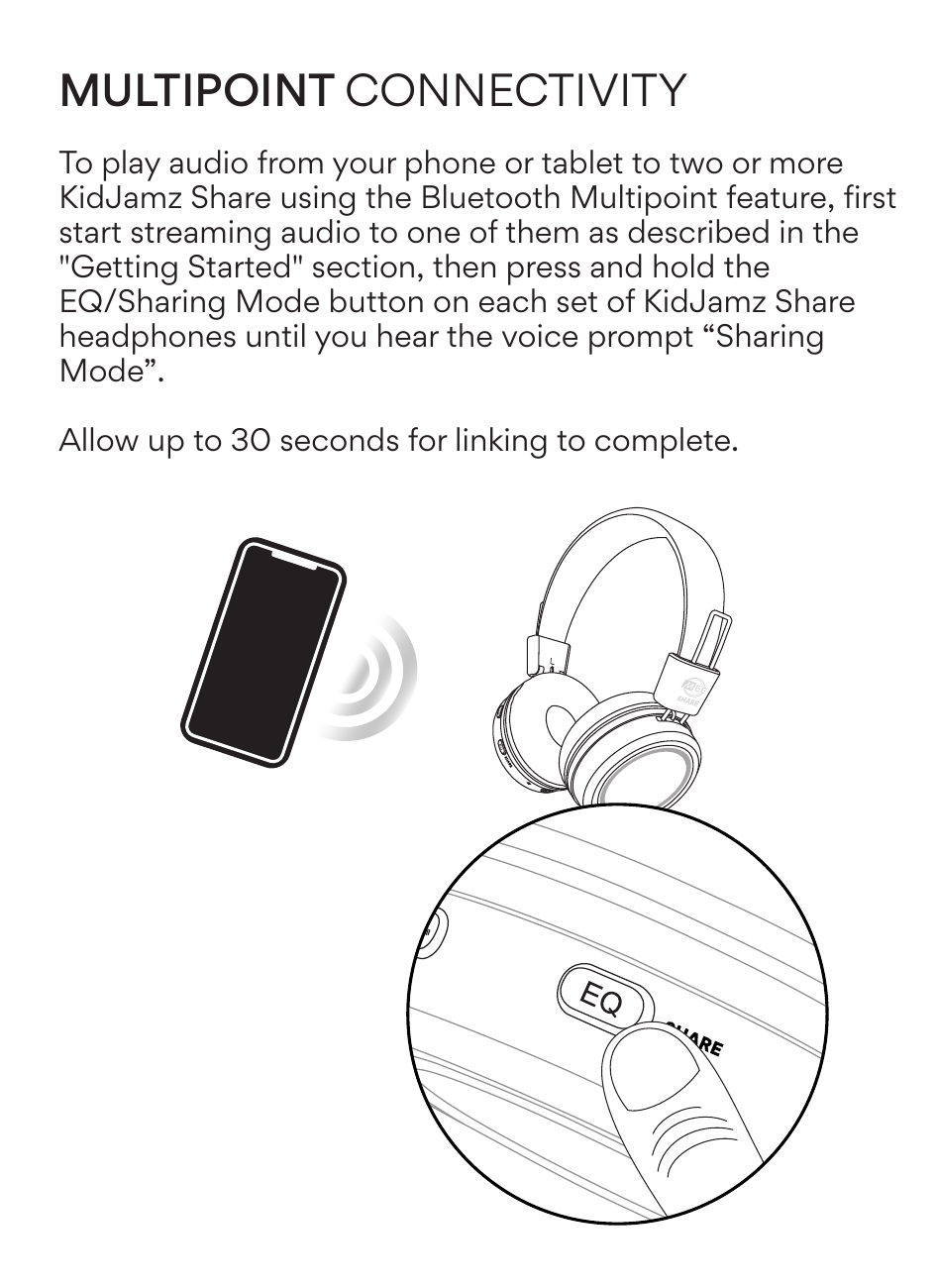
To play audio from your phone or tablet to two or more KidJamz Share headphones using the Bluetooth Multipoint feature:
- First start streaming audio to one set of headphones as described in the Getting Started section.
- Press and hold the EQ / Sharing Mode button on each set of KidJamz Share headphones until you hear the voice prompt "Sharing Mode".
- Allow up to 30 seconds for linking to complete.
Using the Volume Limiter
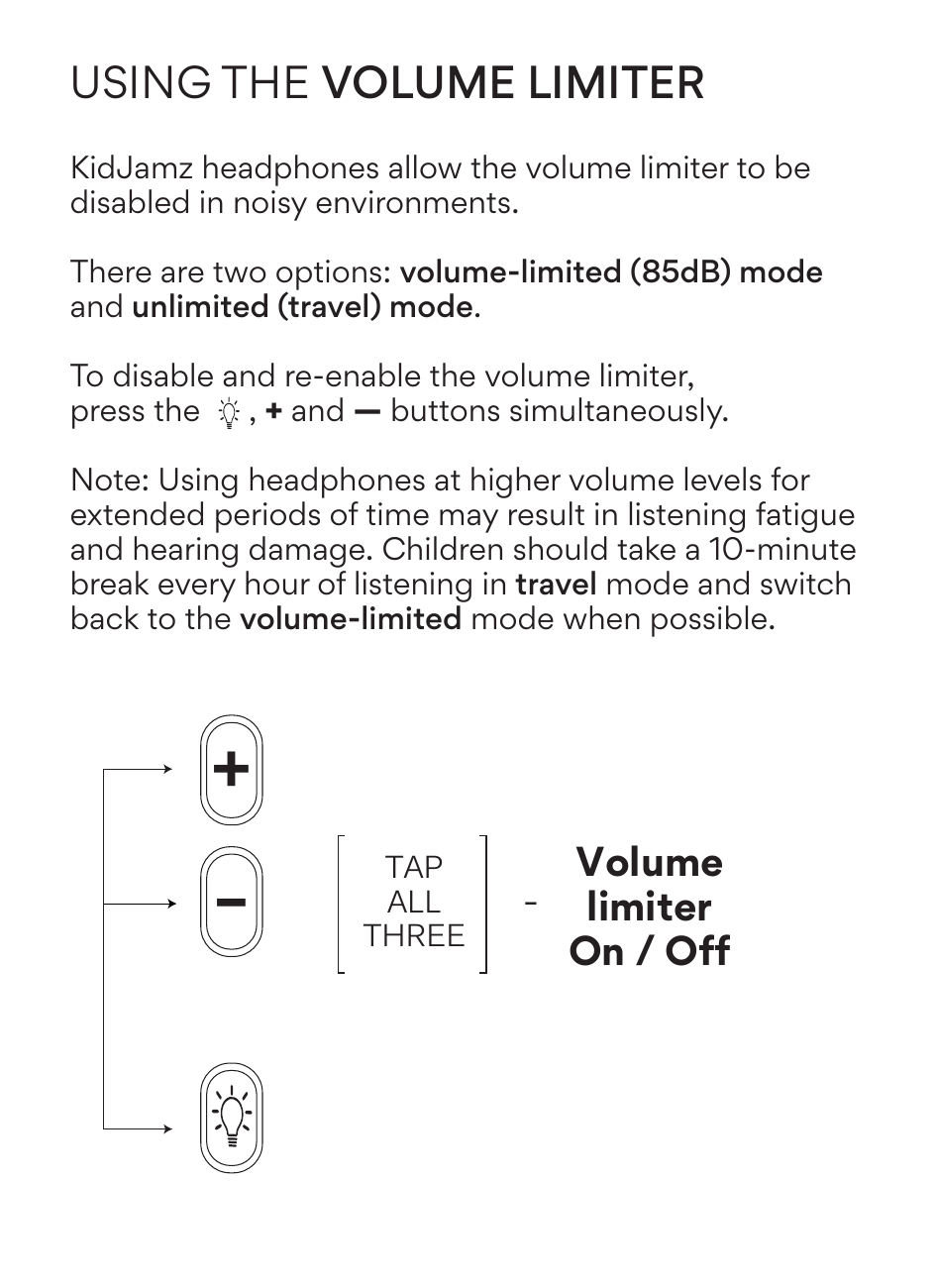
KidJamz headphones allow the volume limiter to be disabled in noisy environments. There are two options:
- Volume-limited (85 dB) mode — default safe listening mode
- Unlimited (travel) mode — for use in noisy environments
To toggle the volume limiter on or off, press the LED Light Mode, +, and − buttons simultaneously.
Note: Using headphones at higher volume levels for extended periods of time may result in listening fatigue and hearing damage. Children should take a 10-minute break every hour of listening in travel mode and switch back to volume-limited mode when possible.
About Our Volume-Limiting Technology
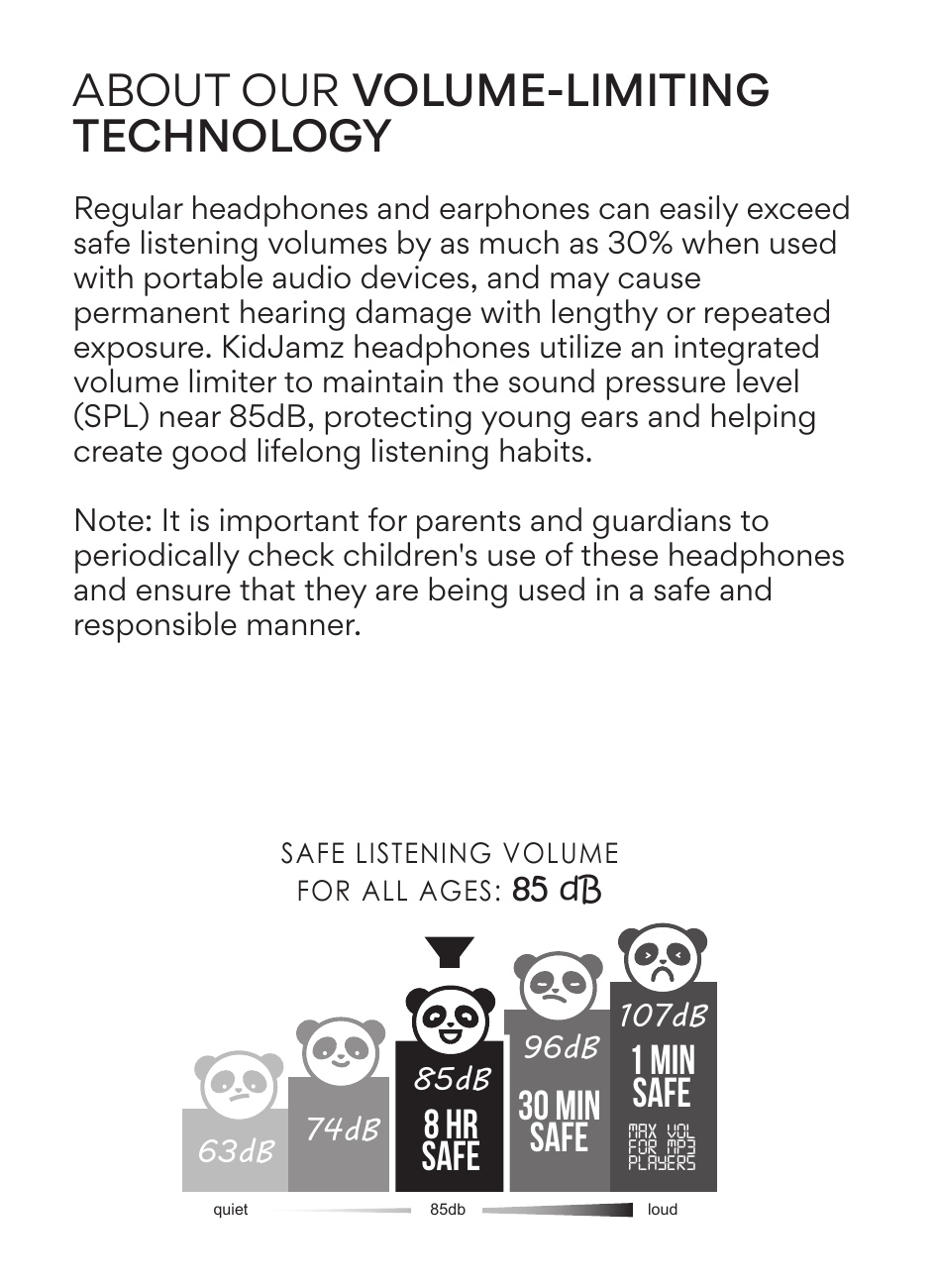
Regular headphones and earphones can easily exceed safe listening volumes by as much as 30% when used with portable audio devices, and may cause permanent hearing damage with lengthy or repeated exposure. KidJamz headphones utilize an integrated volume limiter to maintain the sound pressure level (SPL) near 85 dB, protecting young ears and helping create good lifelong listening habits.
Note: It is important for parents and guardians to periodically check children's use of these headphones and ensure that they are being used in a safe and responsible manner.
| Volume Level | Safe Listening Duration |
|---|---|
| 63 dB (quiet) | No limit |
| 74 dB | No limit |
| 85 dB — Safe for all ages | Up to 8 hours |
| 96 dB | 30 minutes |
| 107 dB (max vol for MP3 players) | 1 minute |
LED Light Modes
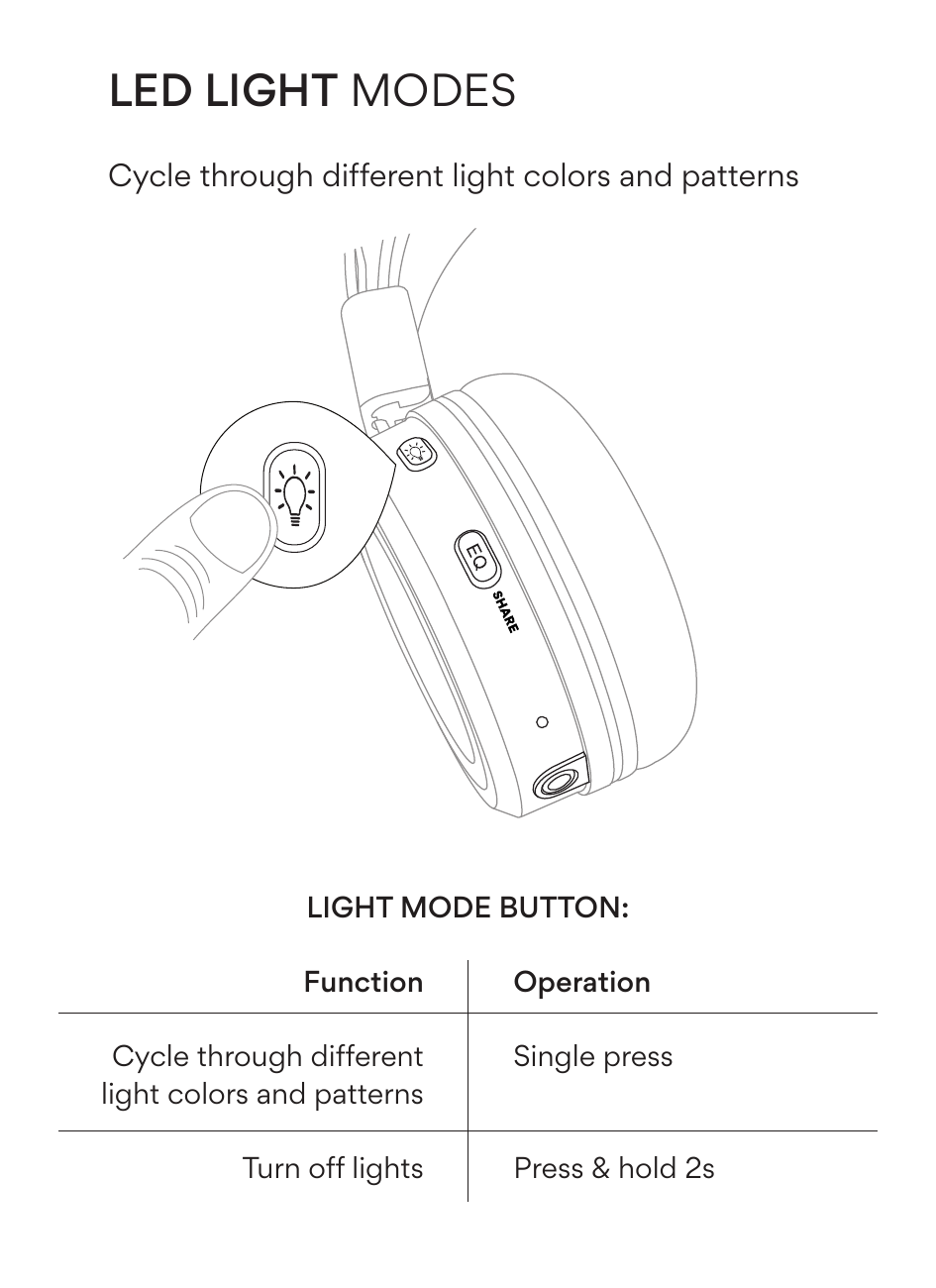
Use the LED Light Mode button to cycle through different light colors and patterns.
| Function | Operation |
|---|---|
| Cycle through different light colors and patterns | Single press |
| Turn off lights | Press & hold 2 seconds |
MEE audio Modes (EQ)
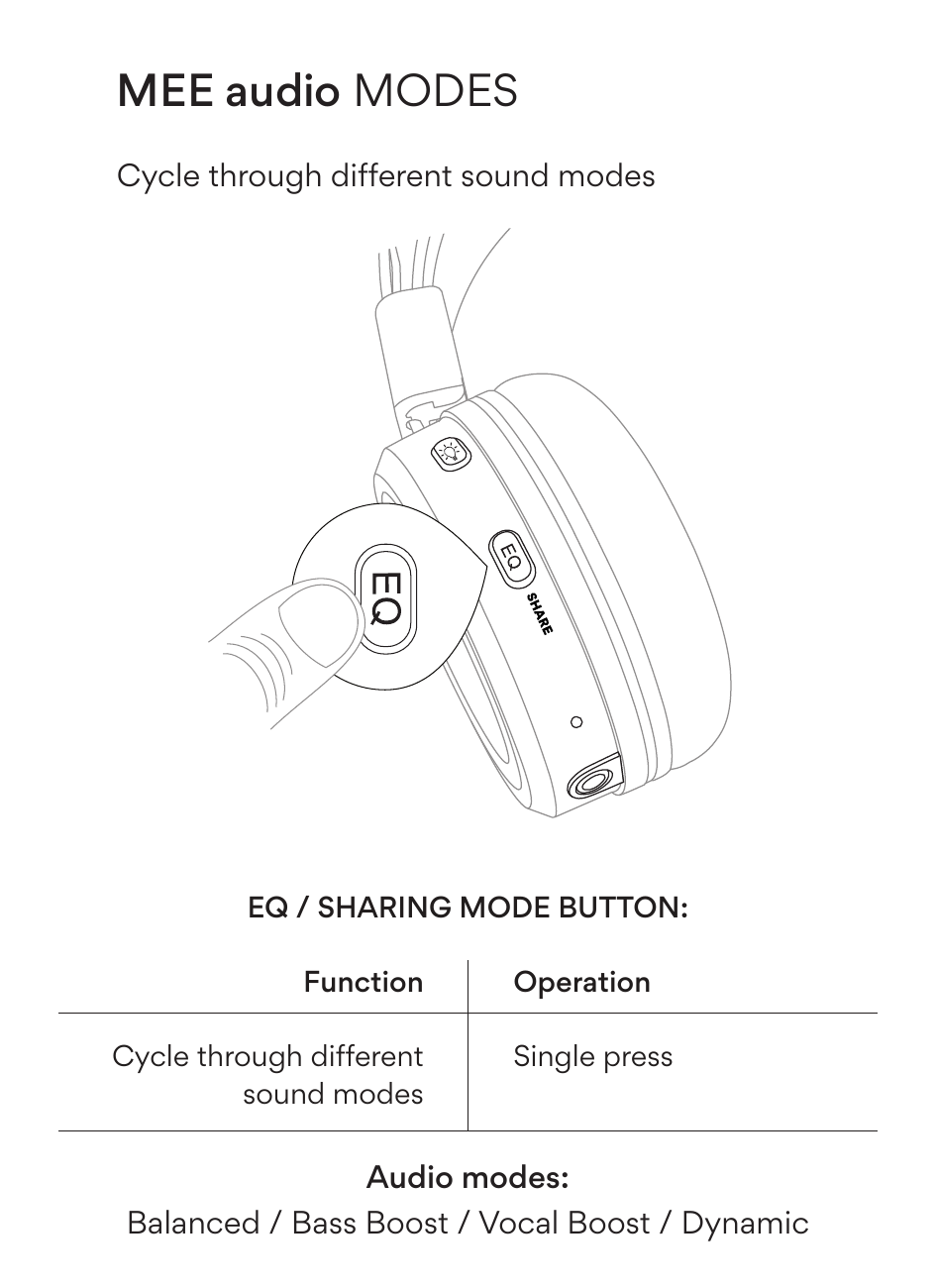
Use the EQ / Sharing Mode button to cycle through different sound modes.
| Function | Operation |
|---|---|
| Cycle through different sound modes | Single press |
| Sharing Mode On/Off | Hold 2 seconds |
Audio modes: Balanced / Bass Boost / Vocal Boost / Dynamic
↑ Back to topTroubleshooting
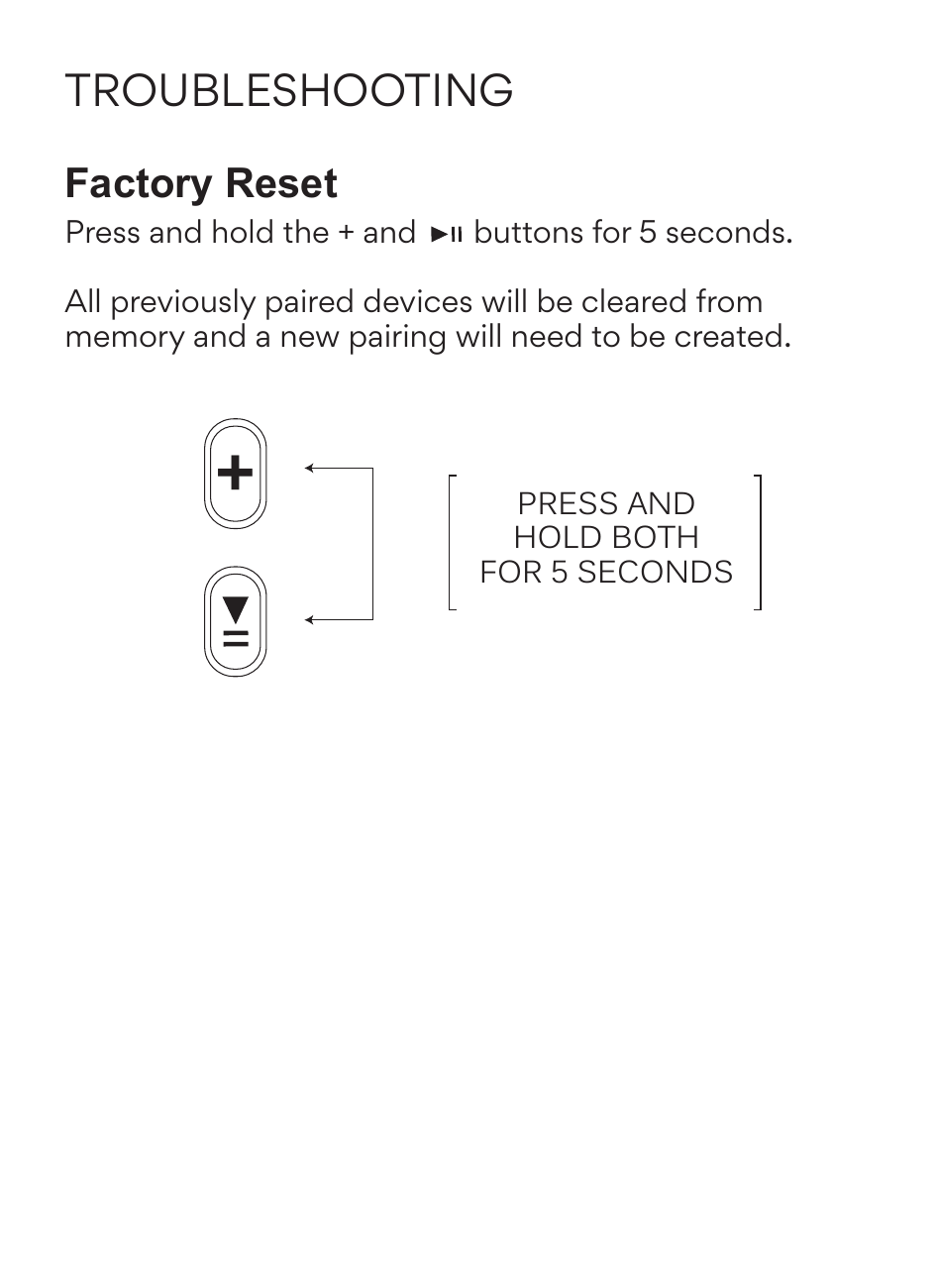
Factory Reset
Press and hold the + and multifunction (▶‖) buttons simultaneously for 5 seconds.
All previously paired devices will be cleared from memory and a new pairing will need to be created.
↑ Back to topSafety and Care
- Clean with a soft cloth, damp with diluted soap water solution if necessary. Do not use chemical cleaners.
- The lifetime of the battery will be significantly reduced if your device is not charged for a long time. It is recommended to charge your device at least once a month.
- Do not expose to liquids. If the device comes in contact with liquids, quickly wipe away. If submerged in water, do not power the device on until completely dried. Note: liquid submersion voids the warranty.
MEE audio and its logo are registered trademarks of S2E, Inc. All rights reserved.
Siri® is a registered trademark of Apple Inc.
Google Assistant™ is a registered trademark of Google Inc.
Warranty
MEE audio products purchased from authorized resellers are covered by a 1-year manufacturer warranty. For more information, contact your local MEE audio dealer or visit MEEaudio.com/support.
↑ Back to topWarnings
Choking hazard: small parts. Not for children under 3 years. Keep the packaging out of the reach of children.
- Do not use while driving a car, cycling, operating machinery, or performing other activities that require hearing surrounding sounds.
- This device is designed and manufactured to operate within its defined design limits. Misuse may result in electric shock or fire. Read and follow these instructions carefully.
- If submerged in water, do not turn the device on until completely dried. Note: liquid submersion voids the warranty.
- Danger of explosion or fire if batteries are damaged. Keep away from direct sunlight, naked flames, flammable gasses, or heat sources such as radiators or stoves.
- Battery performance will be severely decreased when stored in extreme temperatures: below −10°C / 14°F or above 45°C / 113°F including direct sunlight.
- Do not use around flammable gasses as fire or explosion may occur.
- There are no user replaceable/reparable parts in the device. Disassembling it will void your warranty.
- Only use attachments/accessories specified by the manufacturer.
Changes or modifications to this unit not expressly approved by MEE audio could void the user's authority to operate the equipment.
↑ Back to topCompliance Information
FCC Statement
This device complies with part 15 of the FCC Rules. Operation is subject to the following two conditions: (1) This device may not cause harmful interference, and (2) this device must accept any interference received, including interference that may cause undesired operation.
FCC Rules
This equipment has been tested and found to comply with the limits for a Class B digital device, pursuant to part 15 of the FCC Rules. These limits are designed to provide reasonable protection against harmful interference in a residential installation. This equipment generates, uses and can radiate radio frequency energy and, if not installed and used in accordance with the instruction manual, may cause harmful interference to radio communications.
However, there is no guarantee that interference will not occur in a particular installation. If this equipment does cause harmful interference to radio or television reception, which can be determined by turning the equipment off and on, the user is encouraged to try to correct the interference by one or more of the following measures:
- Relocate the receiving antenna.
- Increase the separation between equipment and receiver.
- Connect the equipment into an outlet on a circuit different from that to which the receiver is connected.
- Consult the dealer or an experienced radio/TV technician for help.
FCC ID: 2ABMR-KJ55BT
EU / UK Declaration of Conformity
S2E, Inc. dba MEE audio hereby declares that this wireless device is in compliance with Directive 2014/53/EU and Radio Equipment Regulations 2017. The full text of the EU declaration of conformity is available at meeaudio.com/compliance.
Operating frequency range: 2402–2480 MHz
Maximum transmission power: <20 dBm
ES – Declaración de Conformidad UE/Reino Unido
S2E, Inc. dba MEE audio manifiesta por la presente que este dispositivo inalámbrico cumple la Directiva 2014/53/UE y la Normativa sobre equipos de radio de 2017. El texto completo de la declaración de conformidad de la UE está disponible en meeaudio.com/compliance
Rango de frecuencia de funcionamiento: 2402–2480 MHz
Potencia máxima de transmisión: <20 dBm
FR – Déclaration de Conformité UE / Royaume-Uni
S2E, Inc. dba MEE audio déclare par la présente que cet appareil sans fil est conforme à la directive 2014/53/EU et à la réglementation 2017 relative aux équipements radioélectriques. Le texte intégral de la déclaration de conformité de l'UE est disponible à l'adresse meeaudio.com/compliance.
Plage de fréquences de fonctionnement : 2402–2480 MHz
Puissance de transmission maximale : <20 dBm
DE – EU / UK Konformitätserklärung
S2E, Inc. dba MEE audio erklärt hiermit, dass dieses drahtlose Gerät mit der Richtlinie 2014/53/EU und den Radio Equipment Regulations 2017 konform ist. Der vollständige Text der EU-Konformitätserklärung ist verfügbar unter meeaudio.com/compliance.
Betriebsfrequenzbereich: 2402–2480 MHz
Maximale Sendeleistung: <20 dBm
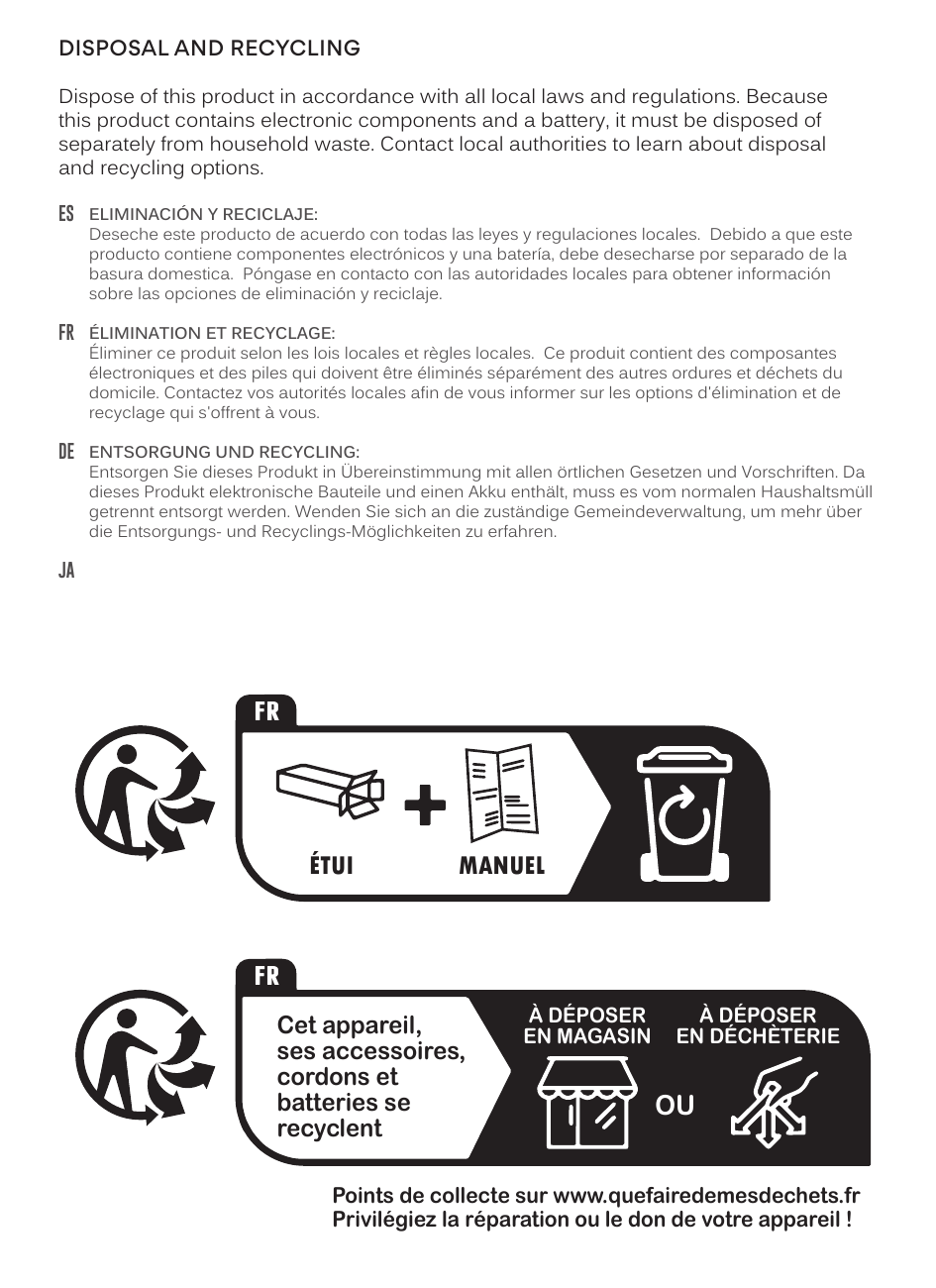
Disposal and Recycling
Dispose of this product in accordance with all local laws and regulations. Because this product contains electronic components and a battery, it must be disposed of separately from household waste. Contact local authorities to learn about disposal and recycling options.
ES – Eliminación y Reciclaje
Deseche este producto de acuerdo con todas las leyes y regulaciones locales. Debido a que este producto contiene componentes electrónicos y una batería, debe desecharse por separado de la basura doméstica. Póngase en contacto con las autoridades locales para obtener información sobre las opciones de eliminación y reciclaje.
FR – Élimination et Recyclage
Éliminer ce produit selon les lois locales et règles locales. Ce produit contient des composantes électroniques et des piles qui doivent être éliminés séparément des autres ordures et déchets du domicile. Contactez vos autorités locales afin de vous informer sur les options d'élimination et de recyclage qui s'offrent à vous.
DE – Entsorgung und Recycling
Entsorgen Sie dieses Produkt in Übereinstimmung mit allen örtlichen Gesetzen und Vorschriften. Da dieses Produkt elektronische Bauteile und einen Akku enthält, muss es vom normalen Haushaltsmüll getrennt entsorgt werden. Wenden Sie sich an die zuständige Gemeindeverwaltung, um mehr über die Entsorgungs- und Recyclings-Möglichkeiten zu erfahren.
JA – 廃棄とリサイクル
この製品を廃棄する場合はその地域の法律や規定に従って下さい。この製品には電気回路やバッテリーを含んでいますので、一般の家庭ゴミとは分別して下さい。詳しい廃棄方法等は、その地域当局でご確認下さい。
 ↑ Back to top
For Additional Support
View Our Video Setup Guide
Scan the QR code or enter the URL below into your web browser:
MEEaudio.com/KJ55BTSvid
Questions? We're Here to Help!
Phone Support: 626-965-1008
Monday – Friday, 9am to 5pm PST
Email Support: support@MEEaudio.com
All emails are responded to within 2 business days.