NearSound – User Manual
MEE audio AF-NS1 — Wireless TV Speaker with Transmitter
Video setup guide: MEEaudio.com/NS1SET
1. Package Contents
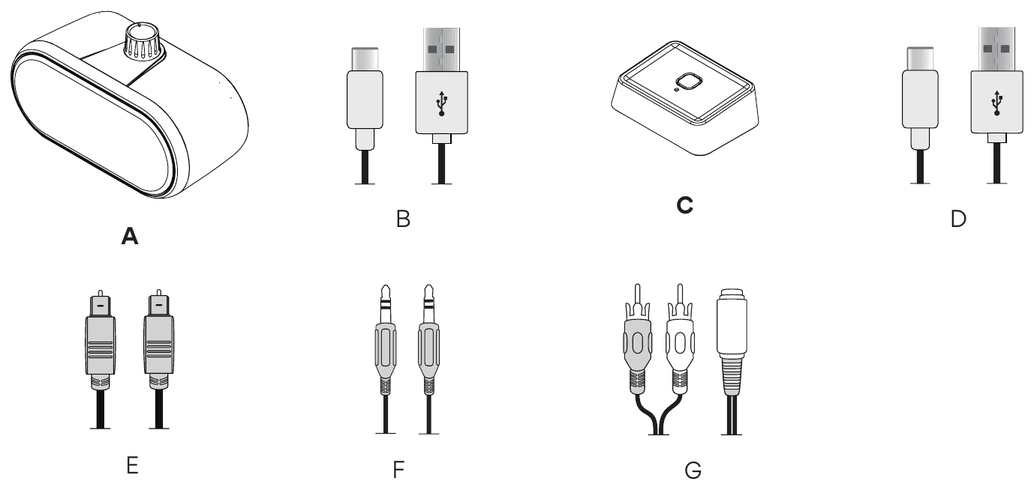
- A. NearSound wireless TV speaker
- B. USB charging cable
- C. NearSound wireless transmitter
- D. USB power cable
- E. Optical S/PDIF audio cable
- F. 3.5 mm audio cable
- G. 3.5 mm to RCA audio adapter
2. Product Overview
NearSound Speaker
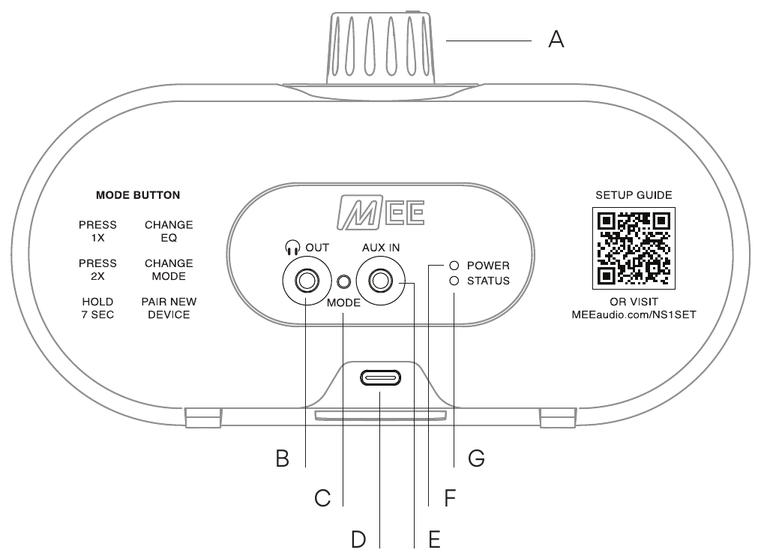
- A. Power / volume knob
- B. 3.5 mm headphone output port
- C. MODE button
- D. USB-C power / charging port
- E. 3.5 mm aux input port
- F. Power / charging indicator light
- G. Status indicator light
NearSound Transmitter
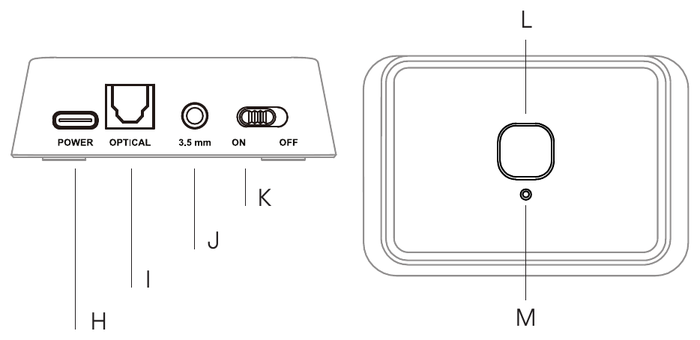
- H. USB-C power port
- I. Optical input port
- J. 3.5 mm aux input port
- K. Power switch
- L. Pairing button
- M. Status indicator light
3. Getting Started
Step 1 – Charge the Speaker
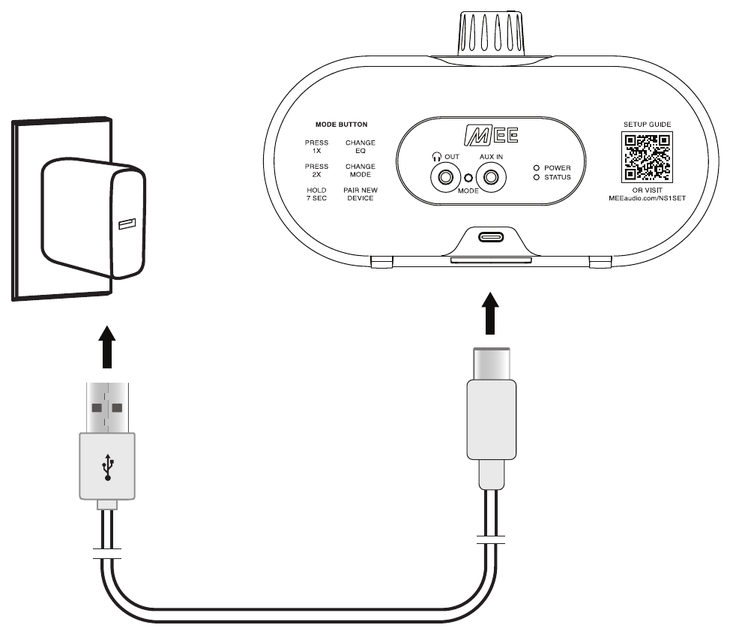
Plug the speaker into any powered USB port or standard USB wall charger, such as your phone charger, to charge.
A full charge takes up to 3 hours and provides up to 30 hours of listening time.
The POWER indicator light will be red while charging and turn green when fully charged.
↑ Back to top4. Setup with NearSound Transmitter – for Most TVs
Step 2 – Power on the Transmitter
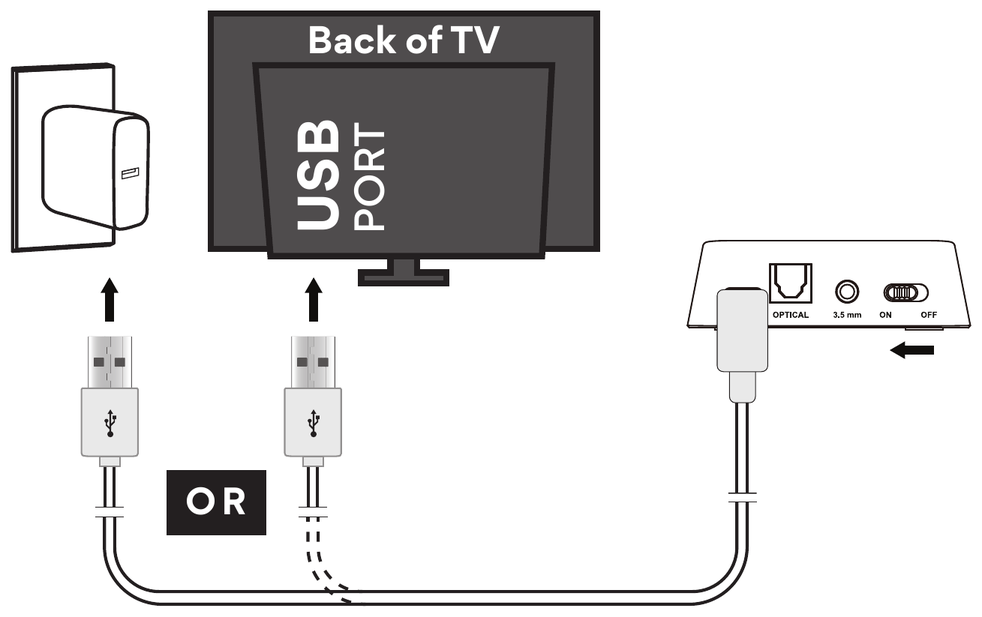
Plug the transmitter into USB power.
- Use any powered USB port, such as a USB wall adapter.
- You may also use the USB port on your TV.
Slide the switch to the ON position.
The transmitter should be left plugged in and powered on.
Step 3 – Power on the Speaker
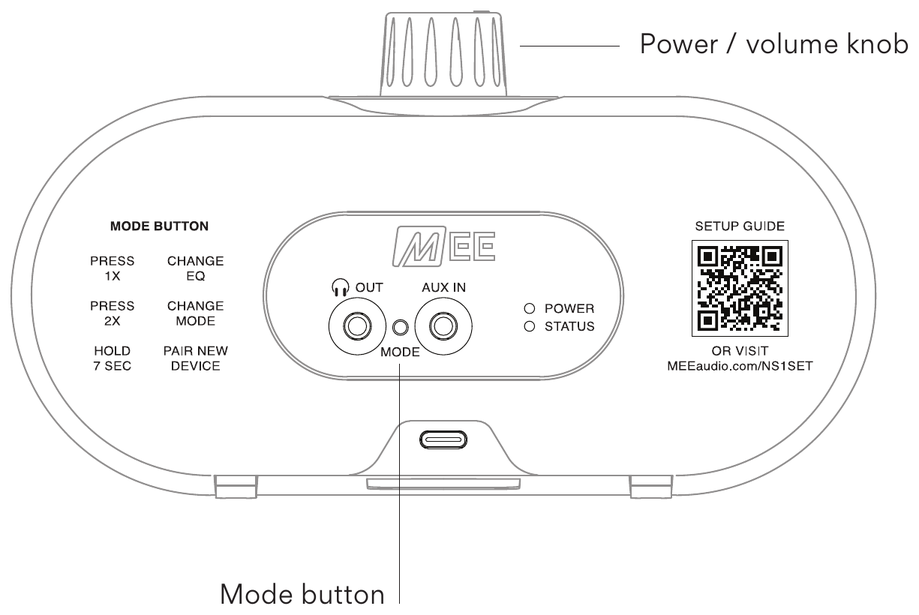
Turn the speaker Power / volume knob clockwise past the "click", until you hear a voice prompt.
If the speaker is not already in TV Mode, indicated by a pink STATUS indicator light, double press the MODE button until you hear the speaker enter TV Mode.
Step 4 – Connect Transmitter and Speaker
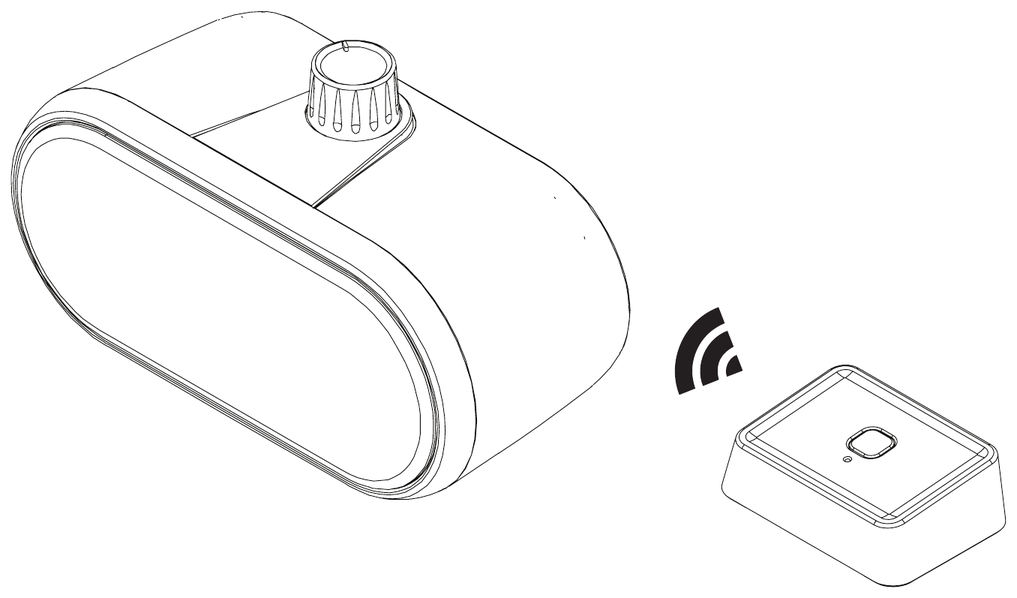
Once the transmitter and speaker are both powered on and the speaker is in TV Mode, the STATUS indicator light on the speaker will be solid pink to indicate that a connection has been established.
If a solid pink STATUS indicator light does not appear, press the pairing button on the transmitter and allow pairing to complete.
Once you see a solid light on the transmitter and a solid pink STATUS indicator light on the speaker, pairing has been completed.
Step 5 – Plug Transmitter into TV
Choose ONLY ONE audio cable supported by your TV. You should have ONE power cable and ONE audio cable plugged into your NearSound transmitter.
Choice A Optical
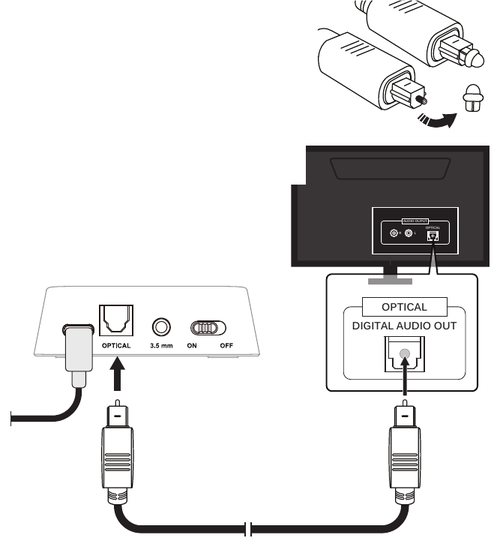
- Remove protective caps from both ends of the optical S/PDIF audio cable.
- Plug the optical S/PDIF audio cable into the square OPTICAL audio input of the transmitter.
- Plug the other end into the TV's DIGITAL AUDIO OUT (OPTICAL) port.
- All done! Turn on your TV and check the speaker for sound. Make sure your TV is not muted and the volume on your NearSound speaker is turned up.
If you're unable to hear audio, your TV may need to have its audio output setting set to "Optical," "Digital Audio Out," or "External Speakers" to activate the optical port – check your TV's user manual for details.
Choice B 3.5 mm
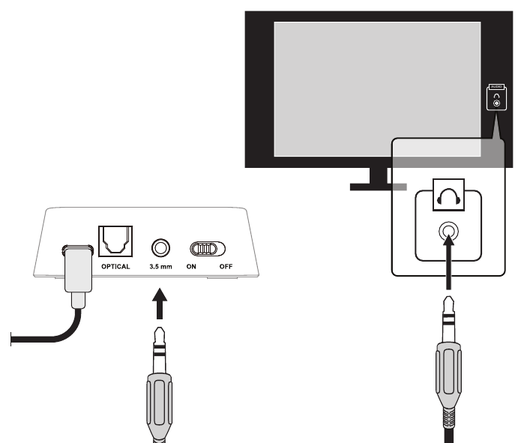
- Plug the 3.5 mm audio cable into the 3.5 mm audio input of the transmitter.
- Plug the other end into the TV's headphone jack.
- All done! Turn on your TV and check the speaker for sound. Make sure the volume on both your TV and NearSound speaker is turned up.
Note: The headphone jack may be located on the rear, side, front, or bottom of the TV. On many TVs, using the headphone jack will mute the TV's built-in speakers.
Choice C RCA
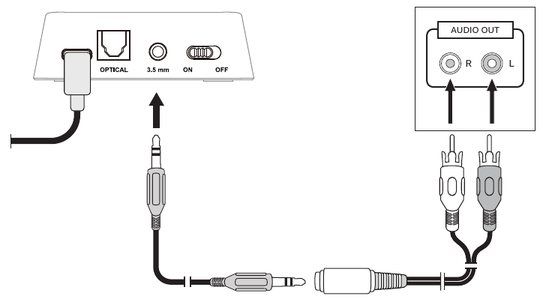
- Plug one end of the 3.5 mm audio cable into the 3.5 mm audio input of the transmitter and the other end into the 3.5 mm end of the red/white RCA adapter.
- Plug the red/white ends of the RCA adapter into the TV's red/white RCA AUDIO OUT ports.
- All done! Turn on your TV and check the speaker for sound. Make sure the volume on both your TV and NearSound speaker is turned up.
Note: The RCA ports on your TV must be labeled AUDIO OUT or AUDIO OUTPUT. RCA input ports, commonly labeled AV IN, INPUT, or COMP IN / COMPONENT, will not work.
Step 6 – Everyday Use
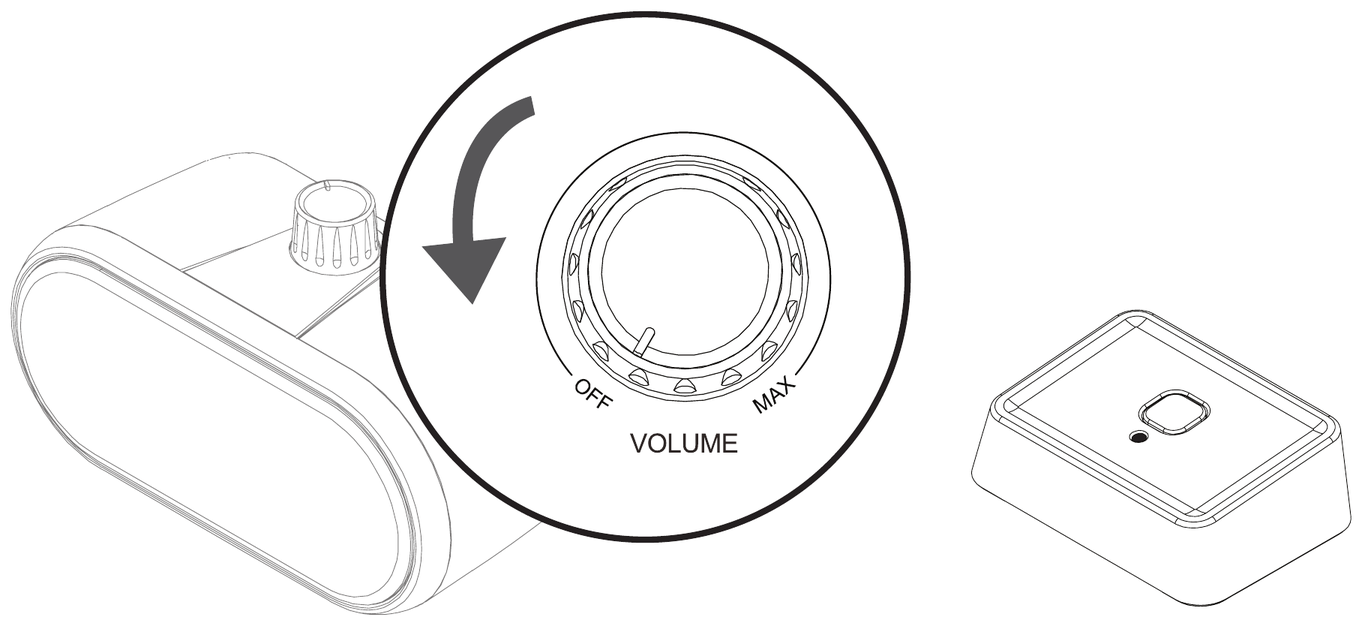
When finished listening, turn the speaker off by turning the Power / volume knob counterclockwise to the OFF position.
The transmitter should be left plugged in and powered on for future use.
When ready to use again, simply power on the speaker and it will reconnect automatically.
A solid light on the transmitter will indicate that a connection has been re-established.
↑ Back to top5. Setup with Bluetooth-enabled Devices
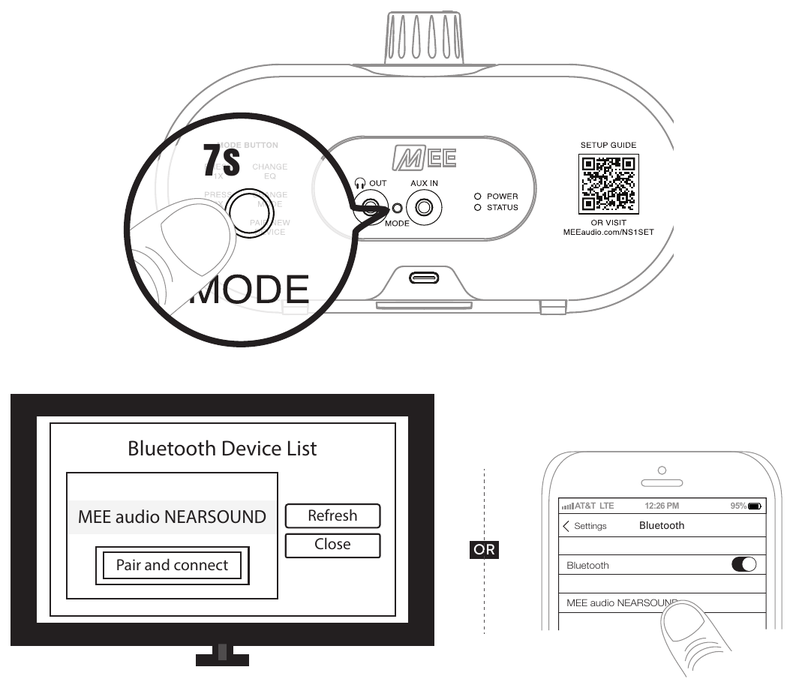
The NearSound speaker can be used with any Bluetooth device, such as your Bluetooth-enabled TV, phone, or tablet.
To connect your NearSound speaker to your Bluetooth device, first power the speaker by turning the Power / volume knob clockwise past the "click", until you hear a voice prompt.
If the speaker is not already in Bluetooth Mode, indicated by a blue or red-and-blue STATUS indicator light, double press the MODE button until you hear the speaker enter Bluetooth Mode.
The NearSound speaker will enter pairing mode automatically the first time you use Bluetooth, indicated by an alternating red and blue STATUS indicator on the rear of the speaker.
If you need to manually enter Bluetooth pairing mode, press and hold the MODE button for 7 seconds.
Bluetooth Pairing
Once the NearSound speaker is in pairing mode, use the Bluetooth menu of your TV or other device to search for and select "MEE audio NEARSOUND".
The STATUS indicator light on the NearSound speaker will be solid blue once a connection is established.
↑ Back to top6. Other Connection Options
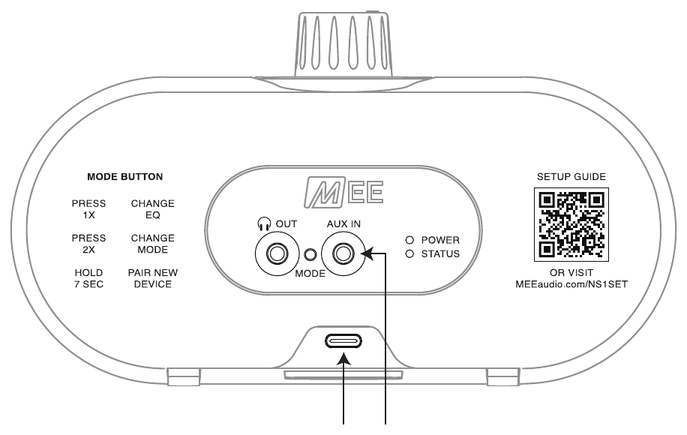
The NearSound speaker can also be used with devices that have stereo audio output via standard 3.5 mm jacks, such as older phones and tablets, stereo receivers, portable radios and DVD players, as well as with USB audio devices, such as laptops, tablets, and computers.
3.5 mm Audio Input
Plug the 3.5 mm audio cable into the audio output of the device you wish to use and into the AUX IN port on the back of your NearSound speaker.
Power on your NearSound speaker and double press the MODE button until you hear the speaker enter AUX Input Mode. Adjust the volume as needed.
USB Audio Input
Plug a USB-C cable into the device you wish to use and into the USB-C port on the back of your NearSound speaker.
Then, power on your NearSound speaker and double press the MODE button until you hear the speaker enter USB Audio Mode. Adjust the volume as needed.
The NearSound speaker will also charge when used via USB cable.
↑ Back to top7. Features & Controls
| Function | Action |
|---|---|
| Power on / off | Turn the Power / volume knob clockwise past the "click" to power on; turn it counterclockwise to the OFF position to power off |
| Increase / decrease volume | Rotate the knob clockwise / counterclockwise |
| Change audio profile | Press MODE button 1x |
| Change connection mode | Press MODE button 2x quickly |
| Reset & pair new device (Bluetooth Mode or TV Mode only) | Press & hold MODE button for 7 seconds |
Volume Knob
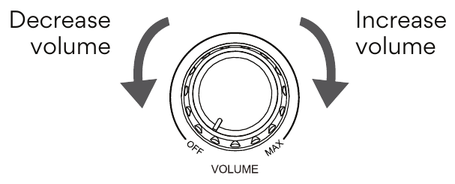
Rotate the knob clockwise to increase the volume and counterclockwise to decrease the volume.
MODE Button
Change Audio Profile – Press 1x
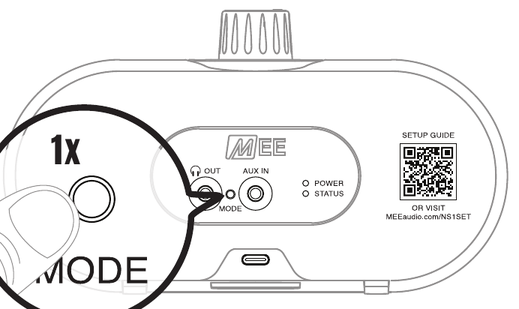
NearSound lets you switch between two sound profiles, allowing you to tailor your listening experience to your media and personal preferences.
- Clear Voice Mode (default) boosts speech clarity to make dialogue in movies and TV shows easier to hear over background sounds.
- Dynamic Mode provides a more balanced sound for a more vibrant experience with music and other audio.
Change Connection Mode – Press 2x Quickly
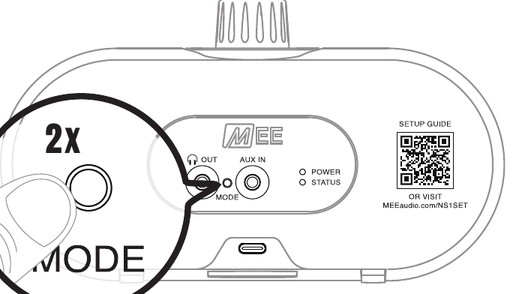
NearSound supports several different audio connection modes:
- TV Mode
- Bluetooth Mode
- USB Audio Mode (available only when a USB audio device is connected to the USB-C port)
- AUX Input Mode (available only when a 3.5 mm audio cable is connected to the AUX IN port)
Reset & Pair New Device – Press & Hold 7 Seconds
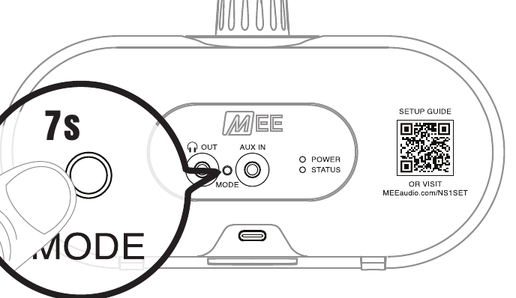
Note: Available in Bluetooth Mode or TV Mode only.
8. Speaker Indicator Lights
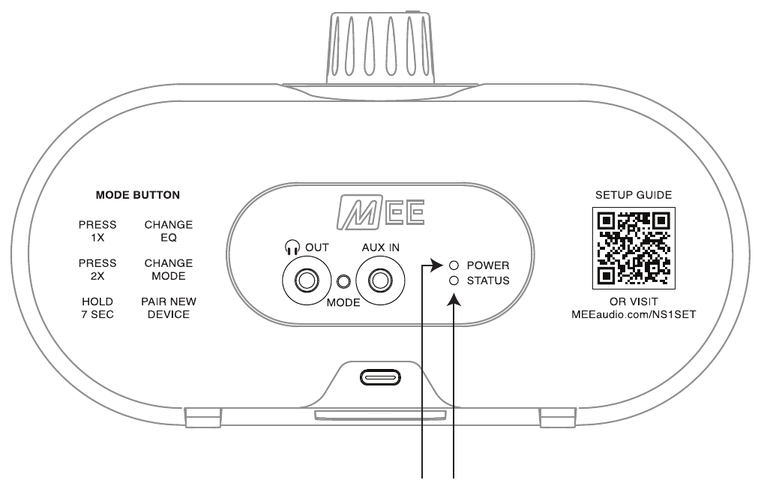
| State | TV Mode | Bluetooth Mode | USB Audio Mode | AUX Input Mode |
|---|---|---|---|---|
| Pairing | Blinking pink | Blinking red & blue | Not applicable | Not applicable |
| Connected | Solid pink | Solid blue | Solid red | Solid red |
| State | Light |
|---|---|
| Charging | Red |
| Fully charged | Green |
9. Pairing Additional NearSound Speakers (Sold Separately)
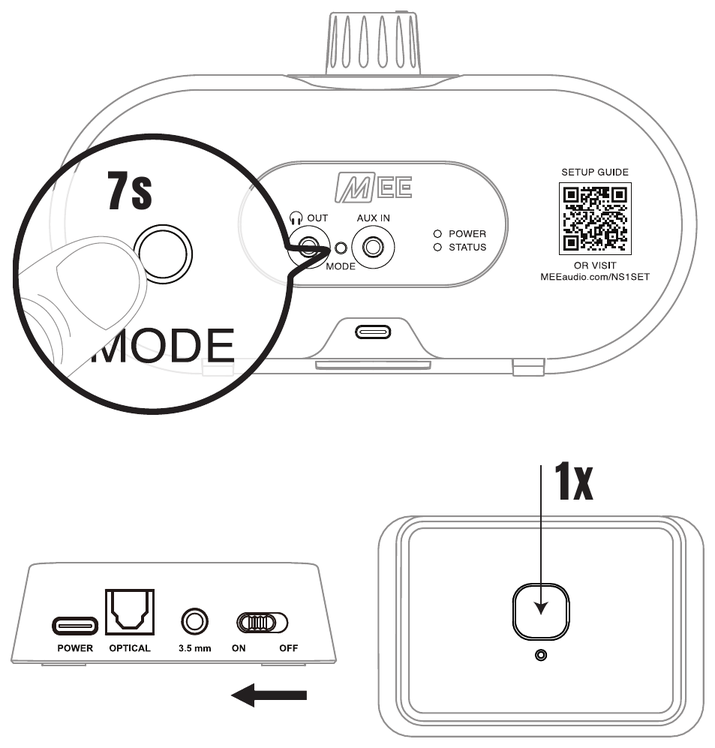
One NearSound transmitter can be connected to multiple NearSound speakers at the same time.
For each NearSound speaker you wish to pair, perform the following steps:
- Charge the NearSound speaker.
- Power on the speaker and make sure it is in TV Mode.
- Press and hold the MODE button on the speaker for 7 seconds to put it in pairing mode.
- Make sure the NearSound transmitter is powered on, then press the button on the transmitter to put it in pairing mode.
- Allow pairing to complete. The STATUS indicator light on the NearSound speaker will be solid pink once a connection is established.
Note: Multiple speakers can only be used with the NearSound transmitter. Multiple speakers cannot be used in Bluetooth Mode, USB Audio Mode, or AUX Input Mode.
10. Using Wired Headphones (Sold Separately)
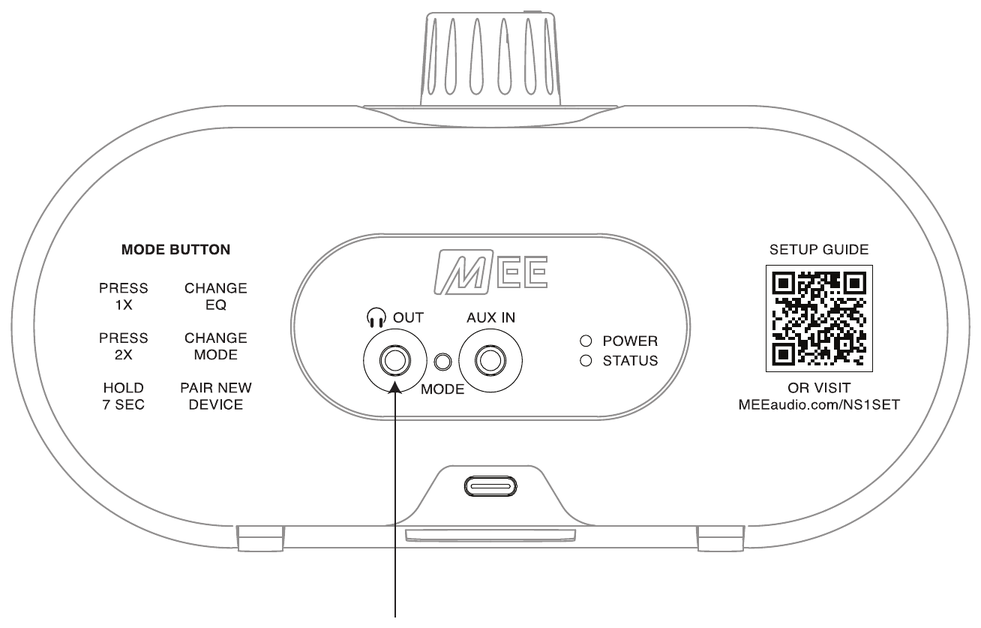
The NearSound speaker can also be used with any pair of wired headphones or earphones with a standard 3.5 mm audio connector to create a private listening environment so that you can enjoy your audio without those around you being able to hear it.
To activate, connect your wired headphones to the speaker's headphone OUT port.
While headphones are connected, the speaker will be muted.
To unmute the speaker, simply unplug your headphones.
↑ Back to top11. Troubleshooting
When Used with Transmitter (TV Mode)
Issue: No Sound from the Speaker
- Make sure the volume knob on the NearSound speaker is turned up.
- Make sure your TV is not muted. If using the 3.5 mm or RCA connection, also turn up the TV volume.
- Check the STATUS light on the speaker. If it is not solid pink, the speaker is not connected to the transmitter – see Speaker Not Connected to the Transmitter below.
- Check that the audio cable is pushed firmly into both the transmitter and the TV, and that it is plugged into an audio OUT port on the TV (not an audio IN port).
- If using the optical cable, make sure the protective caps have been removed from both ends and check if your TV's sound or audio settings have an option for "Optical," "Digital Audio Out," or "External Speakers".
- If the transmitter is plugged into your TV's USB port for power, note that some TVs turn their USB ports off with the TV. Try a wall USB adapter instead so the transmitter stays powered on.
Issue: Speaker Not Connected to the Transmitter
- Make sure the transmitter's power switch is in the ON position and its light is on.
- Make sure the speaker is in TV Mode (double press the MODE button until you hear "TV Mode").
- Move the speaker closer to the transmitter and away from large metal objects, cordless phone bases, and Wi-Fi routers.
- If the speaker still won't connect, reset and re-pair using the Factory Reset – TV Mode steps below.
Issue: Sound Cuts Out or Crackles
- Move the speaker closer to the transmitter. Walls and large furniture between the two can weaken the signal.
- Keep the transmitter out in the open rather than behind the TV or inside a cabinet, and away from Wi-Fi routers and microwave ovens.
When Connected to a Bluetooth Device Directly (Bluetooth Mode)
Issue: Speaker is Not Connecting to My Bluetooth Device
- Make sure the speaker is in Bluetooth Mode (double press the MODE button until you hear "Bluetooth Mode").
- Put the speaker in pairing mode: press and hold the MODE button for 7 seconds until the STATUS light alternates red and blue.
- On your TV, phone, or tablet, turn Bluetooth off and back on, then search again for "MEE audio NEARSOUND."
- If the speaker was previously paired with this device, delete or "forget" the old pairing on your device first, then pair again.
Factory Reset
Most issues can be solved by resetting and reconnecting the speaker.
TV Mode
To reset and reconnect the NearSound speaker to the transmitter, follow the steps below:
- Power on the speaker and make sure it is in TV Mode.
- Press and hold the MODE button for 7 seconds to put the speaker in pairing mode.
- Make sure the NearSound transmitter is powered on, then press the button on the transmitter to put it in pairing mode.
- Allow pairing to complete. The STATUS indicator light on the NearSound speaker will be solid pink once a connection is established.
Bluetooth Mode
To reset the Bluetooth feature of the NearSound speaker, follow the steps below:
- Power on the speaker and make sure it is in Bluetooth Mode.
- Press and hold the MODE button for 7 seconds to clear the Bluetooth pairings from memory.
Note: Resetting will erase all previous Bluetooth pairings. You'll need to delete "MEE audio NEARSOUND" from your Bluetooth device list and create a new pairing before using it again. See the Setup with Bluetooth-enabled Devices section.
12. Additional Support
View Our Video Setup Guide

View our video setup guide at MEEaudio.com/NS1SET or by scanning the QR code.
Visit our NearSound support page at MEEaudio.com/NS1support for the latest troubleshooting information.
Questions? We're Here to Help!
Phone Support: 626-965-1008
Monday – Friday, 9:00 am – 5:00 pm Pacific Time
Email Support: support@meeaudio.com
All emails are responded to within 2 business days.
Warranty
MEE audio products purchased from authorized resellers are covered by a 1-year manufacturer warranty (2 years in the EU). For more information, contact your local MEE audio dealer or visit MEEaudio.com/support.
↑ Back to top13. Care and Maintenance
- Clean with a soft cloth; use diluted soapy water if needed. Do not use chemical cleaners.
- Battery performance will be severely decreased when stored in extreme temperatures. Avoid extreme temperatures: below −10°C/14°F or above 45°C/113°F, including direct sunlight.
- The lifetime of the battery will be significantly reduced if your speaker is not charged for a long time. Charge at least once a month to maintain battery health.
14. Warnings
⚠ WARNING: This device is designed and manufactured to operate within its defined design limits. Misuse may result in electric shock or fire. Read and follow these instructions carefully.
- Do not expose the device to water. If the device comes in contact with liquids, quickly wipe away. Do not power on until completely dry. Do not operate the product with wet hands. If you smell or see smoke or notice damage to the cable, or the product begins to overheat, discontinue use immediately. Do not plug damaged power cables into the product.
- Carefully inspect the speaker for any signs of visible damage before each use. Discontinue use immediately if any damage is found and contact MEE audio or your authorized reseller for repair or replacement. Using a damaged speaker may result in electric shock or injury.
- Do not place the product in direct sunlight or near sources of heat. Do not cover it with a cloth or otherwise restrict airflow around this product. This could result in fire or injury due to overheating.
- Listening to audio at high volumes for extended periods can cause permanent hearing damage. To protect your hearing, always keep the volume at a moderate or low level. When connecting your speaker, start with the volume low, then increase gradually.
- Danger of explosion or fire if batteries are damaged. Never attempt to open the battery for any reason. Do not use the device if it has been crushed, pierced, or otherwise damaged in any way that could compromise the battery. Do not leave the device in any location with excessive heat including open flames or near heat sources such as radiators and stoves. Do not expose the battery to spark, flame, or salt water.
- Do not charge or use around flammable gases, liquids, or dust as fire or explosion may occur.
- There are no user replaceable/reparable parts in the device. Disassembling it will void your warranty and may cause personal injury. Changes or modifications to this unit not expressly approved by MEE audio could void the user's authority to operate the equipment.
- Only use attachments/accessories specified by the manufacturer.
⚠ CAUTION: Choking hazard: small parts. Keep the packaging out of the reach of children and pets.
15. Product Information
| Product Name | NearSound Speaker |
|---|---|
| Model | AF-NS1 |
| Brand | MEE audio |
| Country of Origin | Made in China |
| Production Batch | N20260501 |
| Production Date | 08-15-2026 |
Manufacturer / Importer
EU Authorized Representative (EC REP)
Product Symbols
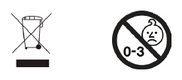
Safety Summary
- ⚠ To prevent hearing damage, keep volume below 85 dB and take frequent breaks.
- ⚠ Danger of explosion or fire if batteries are damaged. Do not crush, pierce, or expose battery to heat, flame, sparks, or water. Do not charge or use near flammable gases, liquids, or dust.
- ⚠ Choking hazard: keep device and packaging away from children and pets.
16. Compliance Information
FCC Statement
This device complies with part 15 of the FCC Rules. Operation is subject to the following two conditions: (1) This device may not cause harmful interference, and (2) this device must accept any interference received, including interference that may cause undesired operation.
FCC Rules
This equipment has been tested and found to comply with the limits for a Class B digital device, pursuant to part 15 of the FCC Rules. These limits are designed to provide reasonable protection against harmful interference in a residential installation. This equipment generates, uses and can radiate radio frequency energy and, if not installed and used in accordance with the instruction manual, may cause harmful interference to radio communications.
However, there is no guarantee that interference will not occur in a particular installation. If this equipment does cause harmful interference to radio or television reception, which can be determined by turning the equipment off and on, the user is encouraged to try to correct the interference by one or more of the following measures:
- Relocate the receiving antenna.
- Increase the separation between equipment and receiver.
- Connect the equipment into an outlet on a circuit different from that to which the receiver is connected.
- Consult the dealer or an experienced radio/TV technician for help.
FCC ID: 2ABMR-NS1
FCC ID: 2ABMR-NS1TX
EU / UK Declaration of Conformity
S2E, Inc. dba MEE audio hereby declares that the radio equipment type AF-NS1 is in compliance with Directive 2014/53/EU (Radio Equipment Directive) and with the Radio Equipment Regulations 2017 (S.I. 2017/1206). The full text of the EU declaration of conformity and the UK declaration of conformity is available at meeaudio.com/compliance.
Operating frequency range: 2402–2480 MHz
Maximum transmission power: <20 dBm

View the declaration in other EU languages
ES – DECLARACIÓN DE CONFORMIDAD UE / REINO UNIDO
S2E, Inc. dba MEE audio declara por la presente que este dispositivo inalámbrico AF-NS1 cumple con la Directiva 2014/53/UE (Directiva de equipos radioeléctricos). El texto completo de la declaración UE de conformidad está disponible en la siguiente dirección de internet: meeaudio.com/compliance
Rango de frecuencia de funcionamiento: 2402–2480 MHz
Potencia de transmisión máxima: <20 dBm
FR – DÉCLARATION DE CONFORMITÉ UE / ROYAUME-UNI
S2E, Inc. dba MEE audio déclare par la présente que cet appareil sans fil AF-NS1 est conforme à la directive 2014/53/UE (directive sur les équipements radioélectriques). Le texte complet de la déclaration UE de conformité est disponible à l'adresse internet suivante : meeaudio.com/compliance
Plage de fréquences de fonctionnement: 2402–2480 MHz
Puissance d'émission maximale: <20 dBm
DE – EU-/UK-KONFORMITÄTSERKLÄRUNG
S2E, Inc. dba MEE audio erklärt hiermit, dass dieses drahtlose Gerät AF-NS1 der Richtlinie 2014/53/EU (Funkanlagenrichtlinie) entspricht. Der vollständige Text der EU-Konformitätserklärung ist unter der folgenden Internetadresse abrufbar: meeaudio.com/compliance
Betriebsfrequenzbereich: 2402–2480 MHz
Maximale Sendeleistung: <20 dBm
IT – DICHIARAZIONE DI CONFORMITÀ UE / REGNO UNITO
S2E, Inc. dba MEE audio con la presente dichiara che questo dispositivo wireless AF-NS1 è conforme alla direttiva 2014/53/UE (direttiva sulle apparecchiature radio). Il testo completo della dichiarazione di conformità UE è disponibile al seguente indirizzo internet: meeaudio.com/compliance
Gamma di frequenza operativa: 2402–2480 MHz
Potenza di trasmissione massima: <20 dBm
BG – ДЕКЛАРАЦИЯ ЗА СЪОТВЕТСТВИЕ НА ЕС / ОБЕДИНЕНОТО КРАЛСТВО
S2E, Inc. dba MEE audio декларира с настоящото, че това безжично устройство AF-NS1 е в съответствие с Директива 2014/53/ЕС (Директива за радиосъоръженията). Пълният текст на ЕС декларацията за съответствие е достъпен на следния интернет адрес: meeaudio.com/compliance
Работен честотен диапазон: 2402–2480 MHz
Максимална мощност на предаване: <20 dBm
HR – EU / UK IZJAVA O SUKLADNOSTI
S2E, Inc. dba MEE audio ovime izjavljuje da ovaj bežični uređaj AF-NS1 ispunjava zahtjeve Direktive 2014/53/EU (Direktiva o radijskoj opremi). Cjeloviti tekst EU izjave o sukladnosti dostupan je na sljedećoj internetskoj adresi: meeaudio.com/compliance
Raspon radnih frekvencija: 2402–2480 MHz
Maksimalna snaga odašiljanja: <20 dBm
CS – EU / UK PROHLÁŠENÍ O SHODĚ
S2E, Inc. dba MEE audio tímto prohlašuje, že toto bezdrátové zařízení AF-NS1 je v souladu se směrnicí 2014/53/EU (směrnice o rádiových zařízeních). Úplné znění EU prohlášení o shodě je k dispozici na níže uvedené internetové adrese: meeaudio.com/compliance
Provozní frekvenční rozsah: 2402–2480 MHz
Maximální vysílací výkon: <20 dBm
DA – EU-/UK-OVERENSSTEMMELSESERKLÆRING
S2E, Inc. dba MEE audio erklærer herved, at dette trådløse udstyr AF-NS1 er i overensstemmelse med direktiv 2014/53/EU (radioudstyrsdirektivet). Den fulde tekst til EU-overensstemmelseserklæringen er tilgængelig på følgende internetadresse: meeaudio.com/compliance
Driftsfrekvensområde: 2402–2480 MHz
Maksimal transmissionseffekt: <20 dBm
NL – EU-/VK-CONFORMITEITSVERKLARING
S2E, Inc. dba MEE audio verklaart hierbij dat dit draadloze apparaat AF-NS1 in overeenstemming is met Richtlijn 2014/53/EU (richtlijn radioapparatuur). De volledige tekst van de EU-conformiteitsverklaring is beschikbaar op het volgende internetadres: meeaudio.com/compliance
Werkingsfrequentiebereik: 2402–2480 MHz
Maximaal zendvermogen: <20 dBm
ET – EL / ÜK VASTAVUSDEKLARATSIOON
S2E, Inc. dba MEE audio kinnitab käesolevaga, et see traadita seade AF-NS1 vastab direktiivi 2014/53/EL (raadioseadmete direktiiv) nõuetele. ELi vastavusdeklaratsiooni täistekst on saadaval järgmisel internetiaadressil: meeaudio.com/compliance
Tööšageduse vahemik: 2402–2480 MHz
Maksimaalne saatevõimsus: <20 dBm
FI – EU- / UK-VAATIMUSTENMUKAISUUSVAKUUTUS
S2E, Inc. dba MEE audio vakuuttaa täten, että tämä langaton laite AF-NS1 täyttää direktiivin 2014/53/EU (radiolaitteiden direktiivi) vaatimukset. EU-vaatimustenmukaisuusvakuutuksen koko teksti on saatavilla seuraavassa internetosoitteessa: meeaudio.com/compliance
Toimintataajuusalue: 2402–2480 MHz
Suurin lähetysteho: <20 dBm
EL – ΔΗΛΩΣΗ ΣΥ ΣΥΜΜΟΡΦΩΣΗΣ / ΗΝΩΜΕΝΟΥ
Η S2E, Inc. dba MEE audio δηλώνει δια του παρόντος ότι αυτή η ασύρματη συσκευή AF-NS1 συμμορφώνεται με την Οδηγία 2014/53/ΕΕ (Οδηγία για τον ραδιοεξοπλισμό). Το πλήρες κείμενο της δήλωσης συμμόρφωσης ΕΕ είναι διαθέσιμο στην ακόλουθη διεύθυνση διαδικτύου: meeaudio.com/compliance
Εύρος συχνότητας λειτουργίας: 2402–2480 MHz
Μέγιστη ισχύς εκπομπής: <20 dBm
HU – EU / UK MEGFELELŐSÉGI NYILATKOZAT
S2E, Inc. dba MEE audio ezennel kijelenti, hogy ez a vezeték nélküli készülék AF-NS1 megfelel a 2014/53/EU irányelvnek (rádióberendezések irányelve). Az EU-megfelelőségi nyilatkozat teljes szövege a következő internetes címen érhető el: meeaudio.com/compliance
Működési frekvenciatartomány: 2402–2480 MHz
Maximális adásteljesítmény: <20 dBm
GA – DEARBHÚ COMHRÉIRE AE / RÍOCHT AONTAITHE
S2E, Inc. dba MEE audio dearbhaíonn leis seo go bhfuil an gléas gan sreang AF-NS1 i gcomhréir le Treoir 2014/53/AE (Treoir maidir le Trealamh Raidió). Tá téacs iomlán an dearbhaithe comhréireachta AE ar fáil ag an seoladh idirlín seo a leanas: meeaudio.com/compliance
Raon minicíochta oibriúcháin: 2402–2480 MHz
Cumhacht tarchurtha uasta: <20 dBm
LV – ES / AK ATBILSTĪBAS DEKLARĀCIJA
S2E, Inc. dba MEE audio ar šo paziņo, ka šī bezvadu iekārta AF-NS1 atbilst Direktīvas 2014/53/ES (Radioiekārtu direktīva) prasībām. ES atbilstības deklarācijas pilns teksts ir pieejams šādā interneta adresē: meeaudio.com/compliance
Darbības frekvenču diapazons: 2402–2480 MHz
Maksimālā pārraides jauda: <20 dBm
LT – ES / JUNGTINĖS KARALYSTĖS ATITIKTIES DEKLARACIJA
S2E, Inc. dba MEE audio šiuo pareiškia, kad šis belaidis įrenginys AF-NS1 atitinka Direktyvos 2014/53/ES (Radijo ryšio įrenginių direktyva) reikalavimus. Visas ES atitikties deklaracijos tekstas yra prieinamas šiuo interneto adresu: meeaudio.com/compliance
Veikimo dažnių diapazonas: 2402–2480 MHz
Didžiausia perdavimo galia: <20 dBm
MT – DIKJARAZZJONI TA’ KONFORMITÀ TAL-UE / UK
S2E, Inc. dba MEE audio b'dan tiddikjara li dan it-tagħmir mingħajr fili AF-NS1 huwa konformi mad-Direttiva 2014/53/UE (Direttiva dwar it-tagħmir tar-radju). It-test sħiħ tad-dikjarazzjoni ta' konformità tal-UE huwa disponibbli fl-indirizz tal-internet li ġej: meeaudio.com/compliance
Firxa ta' frekwenza operattiva: 2402–2480 MHz
Qawwa massima ta' trażmissjoni: <20 dBm
PL – DEKLARACJA ZGODNOŚCI UE / WIELKIEJ BRYTANII
S2E, Inc. dba MEE audio niniejszym oświadcza, że to urządzenie bezprzewodowe AF-NS1 jest zgodne z dyrektywą 2014/53/UE (dyrektywa w sprawie urządzeń radiowych). Pełny tekst deklaracji zgodności UE jest dostępny pod następującym adresem internetowym: meeaudio.com/compliance
Zakres częstotliwości roboczej: 2402–2480 MHz
Maksymalna moc nadawania: <20 dBm
PT – DECLARAÇÃO DE CONFORMIDADE UE / REINO UNIDO
S2E, Inc. dba MEE audio declara que este dispositivo sem fios AF-NS1 está em conformidade com a Diretiva 2014/53/UE (Diretiva Equipamentos de Rádio). O texto integral da declaração de conformidade UE está disponível no seguinte endereço de internet: meeaudio.com/compliance
Gama de frequência de operação: 2402–2480 MHz
Potência de transmissão máxima: <20 dBm
RO – DECLARAȚIE DE CONFORMITATE UE / REGATUL UNIT
S2E, Inc. dba MEE audio declară prin prezenta că acest echipament wireless AF-NS1 este în conformitate cu Directiva 2014/53/UE (Directiva privind echipamentele radio). Textul integral al declarației UE de conformitate este disponibil la următoarea adresă de internet: meeaudio.com/compliance
Gama de frecvențe de funcționare: 2402–2480 MHz
Puterea maximă de transmisie: <20 dBm
SK – VYHLÁSENIE O ZHODE EÚ / SPOJENÉHO KRÁĽOVSTVA
S2E, Inc. dba MEE audio týmto vyhlasuje, že toto bezdrôtové zariadenie AF-NS1 spĺňa požiadavky smernice 2014/53/EÚ (smernica o rádiových zariadeniach). Úplné znenie EÚ vyhlásenia o zhode je dostupné na nasledujúcej internetovej adrese: meeaudio.com/compliance
Prevádzkový frekvenčný rozsah: 2402–2480 MHz
Maximálny vysielací výkon: <20 dBm
SL – IZJAVA O SKLADNOSTI EU / ZDRUŽENEGA KRALJESTVA
S2E, Inc. dba MEE audio izjavlja, da ta brezžična naprava AF-NS1 izpolnjuje zahteve Direktive 2014/53/EU (Direktiva o radijski opremi). Celotno besedilo EU izjave o skladnosti je na voljo na naslednjem spletnem naslovu: meeaudio.com/compliance
Območje delovne frekvence: 2402–2480 MHz
Največja oddajna moč: <20 dBm
SV – EU-/UK-ÖVERENSSTÄMMELSEFÖRKLARING
S2E, Inc. dba MEE audio förklarar härmed att denna trådlösa produkt AF-NS1 uppfyller kraven i direktiv 2014/53/EU (direktivet om radioutrustning). Den fullständiga texten till EU-försäkran om överensstämmelse finns tillgänglig på följande internetadress: meeaudio.com/compliance
Driftsfrekvensområde: 2402–2480 MHz
Maximal sändningseffekt: <20 dBm
17. Availability of Replacement Parts, Repair Services, and Maintenance Information (Québec Consumers)
In accordance with the Consumer Protection Act (Québec) and its regulations, we provide the following information regarding the availability of replacement parts, repair services, and information necessary to maintain and repair this product:
- Replacement parts: Partially available
- Available replacement parts include replacement charging cable, replacement audio cables, and replacement transmitter.
- Repair services: Partially available
- Maintenance and repair information: Not available
Replacement parts that we make available are designed to be installed using commonly available tools.
For more details or to request support, please visit meeaudio.com/qc-repair-disclosure or contact us at:
Voir la version française (consommateurs du Québec)
Disponibilité des pièces de rechange, services de réparation et informations sur l'entretien (consommateurs du Québec)
Conformément à la Loi sur la protection du consommateur du Québec et à ses modifications entrées en vigueur le 5 octobre 2025, nous fournissons les informations suivantes concernant la disponibilité des pièces de rechange, les services de réparation et les informations d'entretien/réparation pour nos produits.
- Pièces de rechange : Partiellement disponible
- Les pièces de rechange disponibles comprennent un câble de chargement de remplacement, des câbles audio de remplacement et un transmetteur de remplacement
- Disponibilité des services de réparation : Partiellement disponible
- Informations relatives à l'entretien et aux réparations : Non disponible
Les pièces de rechange que nous mettons à disposition sont conçues pour être installées à l'aide d'outils courants.
Pour plus d'informations ou pour demander une assistance, rendez-vous sur meeaudio.com/qc-repair-disclosure ou contactez-nous à l'adresse suivante : MEE audio, 817 Lawson St., Industry, CA 91748 USA, +1-626-965-1008, support@meeaudio.com.
18. Disposal and Recycling
Dispose of this product in accordance with all local laws and regulations. Because this product contains electronic components and a battery, it must be disposed of separately from household waste. Contact local authorities to learn about disposal and recycling options.
MEE audio and its logo are registered trademarks of S2E, Inc. All rights reserved. The Bluetooth® word mark and logos are registered trademarks owned by Bluetooth SIG, Inc. and any use of such marks by MEE audio is under license. Other trademarks and trade names are those of their respective owners.
↑ Back to top