Pebbles Air Setup Guide
by MEE audio — Truly Wireless Earbuds
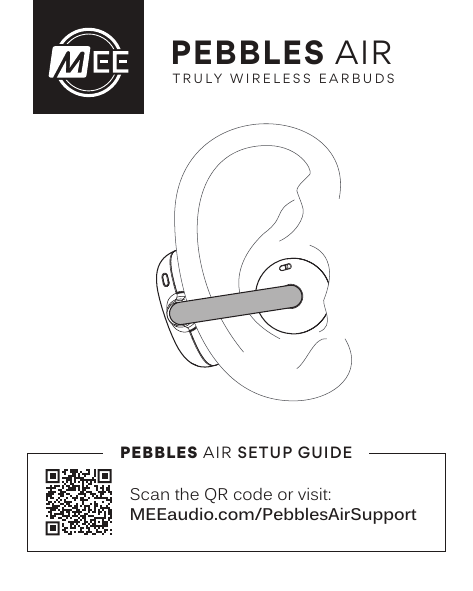
For additional support, visit MEEaudio.com/PebblesAirSupport
Product Overview
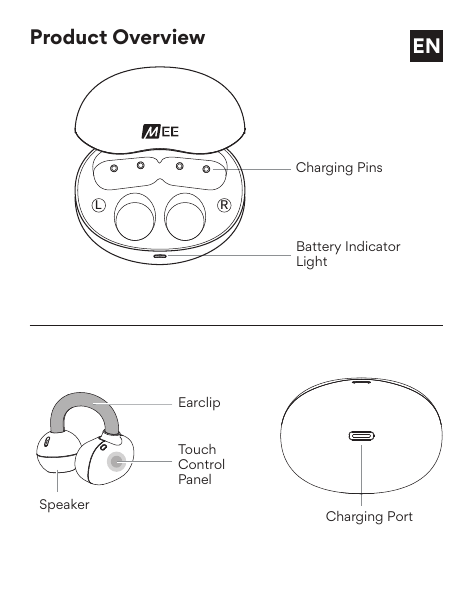
Charging Case Components
- Charging Pins – Metal contacts that charge the earbuds when placed in the case.
- Battery Indicator Light – LED strip on the front of the case showing remaining battery level.
- Charging Port – USB port on the bottom of the case for charging the case itself.
Earbud Components
- Earclip – The curved hook that wraps over the ear for a secure fit.
- Touch Control Panel – Flat circular touch sensor used to control playback, calls, and settings.
- Speaker – The round ball that sits in front of the ear and delivers audio.
Getting Started
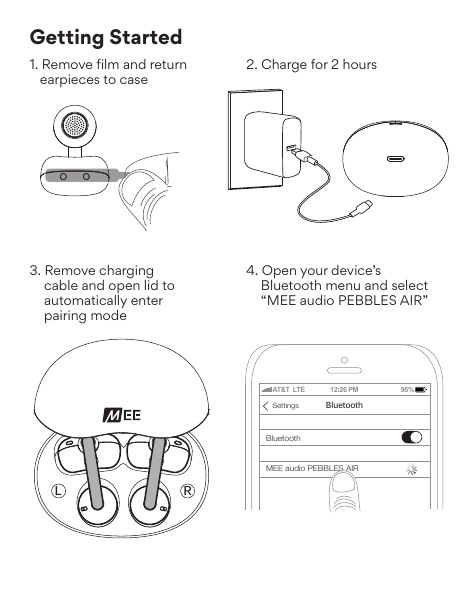
- Remove film and return earpieces to case. Peel off any protective film from the earbuds, then seat both earpieces back in the case.
- Charge for 2 hours. Connect the charging cable to the case and allow it to charge fully before first use.
- Remove charging cable and open lid to automatically enter pairing mode. Once fully charged, unplug the cable and open the case lid. The earbuds will power on and enter Bluetooth pairing mode automatically.
- Open your device's Bluetooth menu and select "MEE audio PEBBLES AIR." Select it from the list of available devices to complete pairing.
How to Wear
Wear the Pebbles Air correctly for the best comfort and sound quality.
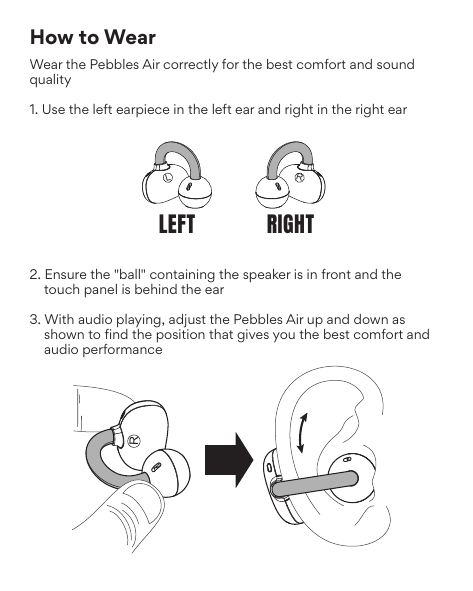
- Use the left earpiece in the left ear and the right earpiece in the right ear.
- Ensure the "ball" containing the speaker faces forward and the touch panel sits behind the ear.
- With audio playing, adjust the Pebbles Air up and down to find the position that gives you the best comfort and audio performance.
Controls
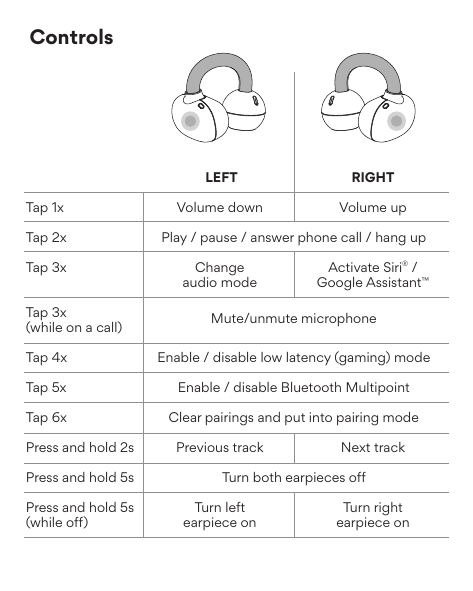
| Action | Left Earbud | Right Earbud |
|---|---|---|
| Tap 1× | Volume down | Volume up |
| Tap 2× | Play / Pause / Answer phone call / Hang up | |
| Tap 3× | Change audio mode | Activate Siri® / Google Assistant™ |
| Tap 3× (while on a call) | Mute / Unmute microphone | |
| Tap 4× | Enable / Disable low latency (gaming) mode | |
| Tap 5× | Enable / Disable Bluetooth Multipoint | |
| Tap 6× | Clear pairings and put into pairing mode | |
| Press and hold 2 s | Previous track | Next track |
| Press and hold 5 s | Turn both earpieces off | |
| Press and hold 5 s (while off) | Turn left earpiece on | Turn right earpiece on |
Charging Case Indicator Light
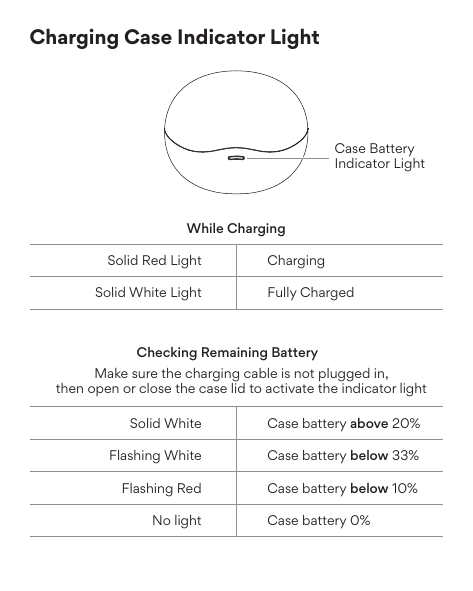
While Charging
- Solid Red Light
- Case is currently charging.
- Solid White Light
- Case is fully charged.
Checking Remaining Battery
Make sure the charging cable is not plugged in, then open or close the case lid to activate the indicator light.
- Solid White
- Case battery above 20%.
- Flashing White
- Case battery below 33%.
- Flashing Red
- Case battery below 10%.
- No Light
- Case battery at 0% — charge the case immediately.
Clear Pairings / Pair New Device
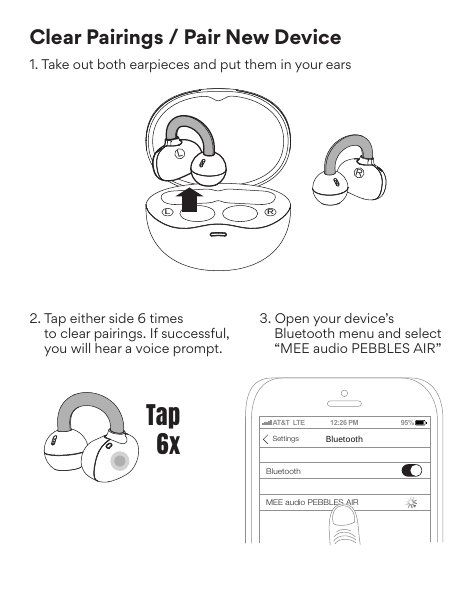
- Take out both earpieces and put them in your ears.
- Tap either touch panel 6 times to clear pairings. If successful, you will hear a voice prompt.
- Open your device's Bluetooth menu and select "MEE audio PEBBLES AIR" to create a new pairing.
Audio Modes
The Pebbles Air allow on-the-fly audio adjustment with 4 distinct audio modes.
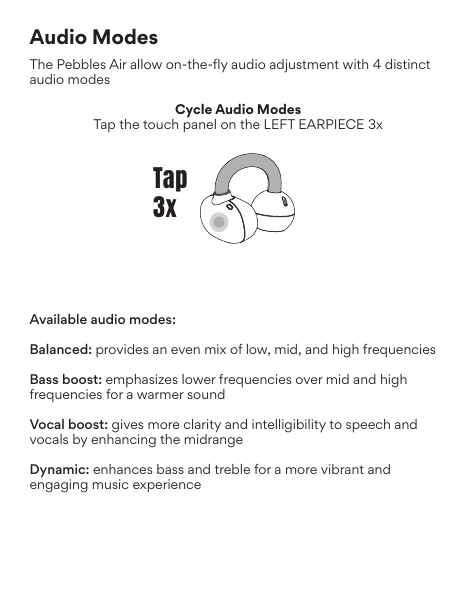
Cycle Audio Modes
Tap the touch panel on the left earpiece 3 times to cycle through the available audio modes.
Available Audio Modes
- Balanced
- Provides an even mix of low, mid, and high frequencies.
- Bass Boost
- Emphasizes lower frequencies over mid and high frequencies for a warmer sound.
- Vocal Boost
- Gives more clarity and intelligibility to speech and vocals by enhancing the midrange.
- Dynamic
- Enhances bass and treble for a more vibrant and engaging music experience.
Bluetooth Multipoint
Bluetooth Multipoint can be used to connect two Bluetooth devices to your Pebbles Air simultaneously. For example, you can connect both your tablet and your phone to stream audio from your tablet and not worry about missing important phone calls.
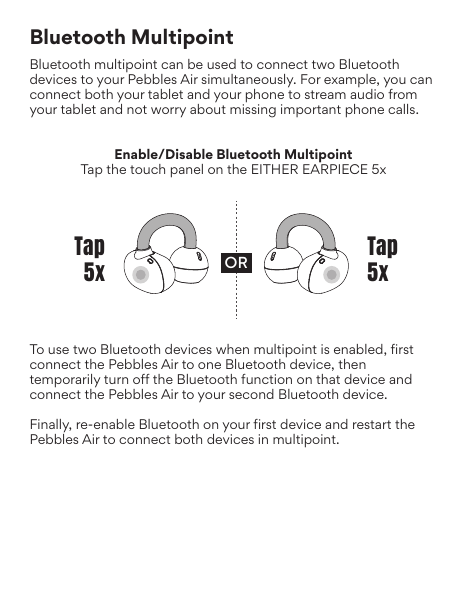
Enable / Disable Bluetooth Multipoint
Tap the touch panel on either earpiece 5 times.
Connecting Two Devices
- Enable Bluetooth Multipoint (tap 5×).
- Connect the Pebbles Air to your first Bluetooth device.
- Temporarily turn off Bluetooth on that device.
- Connect the Pebbles Air to your second Bluetooth device.
- Re-enable Bluetooth on the first device.
- Restart the Pebbles Air to connect both devices simultaneously in Multipoint mode.
Troubleshooting
Most issues can be solved by resetting the Pebbles Air and re-connecting it to your device.
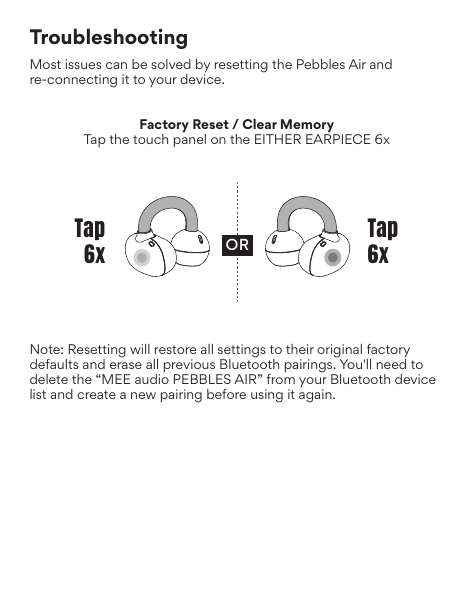
Factory Reset / Clear Memory
Tap the touch panel on either earpiece 6 times.
Note: Resetting will restore all settings to their original factory defaults and erase all previous Bluetooth pairings. You will need to delete "MEE audio PEBBLES AIR" from your Bluetooth device list and create a new pairing before using it again.
Care and Maintenance
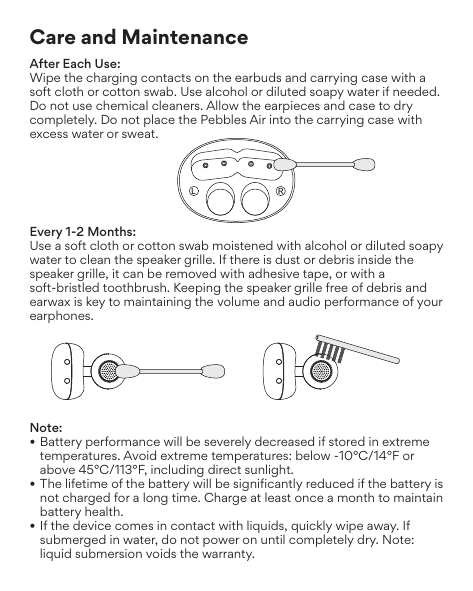
After Each Use
Wipe the charging contacts on the earbuds and carrying case with a soft cloth or cotton swab. Use alcohol or diluted soapy water if needed. Do not use chemical cleaners. Allow the earpieces and case to dry completely. Do not place the Pebbles Air into the carrying case with excess water or sweat.
Every 1–2 Months
Use a soft cloth or cotton swab moistened with alcohol or diluted soapy water to clean the speaker grille. If there is dust or debris inside the speaker grille, it can be removed with adhesive tape or a soft-bristled toothbrush. Keeping the speaker grille free of debris and earwax is key to maintaining the volume and audio performance of your earphones.
Important Notes
- Extreme temperatures: Battery performance will be severely decreased if stored below −10°C / 14°F or above 45°C / 113°F, including in direct sunlight.
- Long-term storage: The lifetime of the battery will be significantly reduced if the battery is not charged for a long time. Charge at least once a month to maintain battery health.
- Liquid exposure: If the device comes in contact with liquids, quickly wipe away. If submerged in water, do not power on until completely dry. Note: liquid submersion voids the warranty.
Additional Support & Warranty
Video Setup Guide
Scan the QR code on the packaging or visit:
MEEaudio.com/PebblesAirSupport
Contact Support
Phone: 626-965-1008
Hours: Monday – Friday, 9:00 am – 5:00 pm PST
Email: support@meeaudio.com — all emails are responded to within 2 business days.
Warranty
MEE audio products purchased from authorized resellers are covered by a 1-year manufacturer warranty (2 years in the EU). For more information, contact your local MEE audio dealer or visit MEEaudio.com/support.
↑ Back to topWarnings
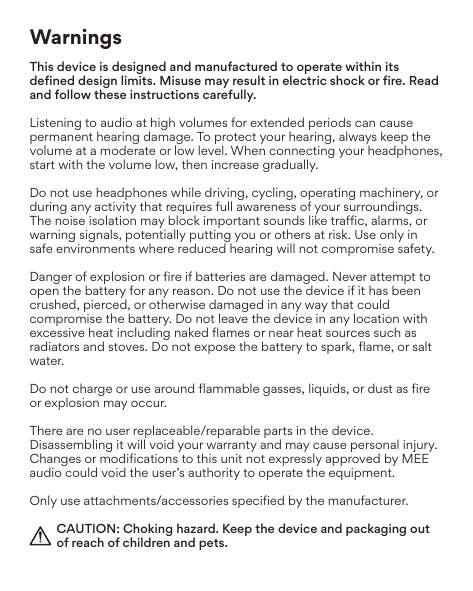
This device is designed and manufactured to operate within its defined design limits. Misuse may result in electric shock or fire. Read and follow these instructions carefully.
Hearing Damage: Listening to audio at high volumes for extended periods can cause permanent hearing damage. To protect your hearing, always keep the volume at a moderate or low level. When connecting your headphones, start with the volume low, then increase gradually.
Situational Awareness: Do not use headphones while driving, cycling, operating machinery, or during any activity that requires full awareness of your surroundings. The noise isolation may block important sounds like traffic, alarms, or warning signals, potentially putting you or others at risk. Use only in safe environments where reduced hearing will not compromise safety.
Battery Safety: Danger of explosion or fire if batteries are damaged. Never attempt to open the battery for any reason. Do not use the device if it has been crushed, pierced, or otherwise damaged. Do not leave the device in any location with excessive heat including naked flames or near heat sources such as radiators and stoves. Do not expose the battery to spark, flame, or salt water.
Flammable Environments: Do not charge or use around flammable gases, liquids, or dust as fire or explosion may occur.
No User-Serviceable Parts: There are no user replaceable or repairable parts in the device. Disassembling it will void your warranty and may cause personal injury. Changes or modifications not expressly approved by MEE audio could void the user's authority to operate the equipment.
Accessories: Only use attachments/accessories specified by the manufacturer.
Choking Hazard: Keep the device and packaging out of reach of children and pets.
FCC Rules & Compliance
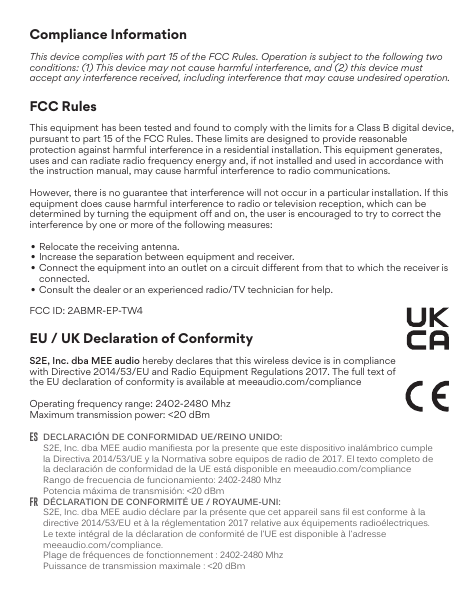
This equipment has been tested and found to comply with the limits for a Class B digital device, pursuant to part 15 of the FCC Rules. These limits are designed to provide reasonable protection against harmful interference in a residential installation. This equipment generates, uses, and can radiate radio frequency energy and, if not installed and used in accordance with the instruction manual, may cause harmful interference to radio communications.
However, there is no guarantee that interference will not occur in a particular installation. If this equipment does cause harmful interference to radio or television reception, which can be determined by turning the equipment off and on, the user is encouraged to try to correct the interference by one or more of the following measures:
- Relocate the receiving antenna.
- Increase the separation between the equipment and receiver.
- Connect the equipment into an outlet on a circuit different from that to which the receiver is connected.
- Consult the dealer or an experienced radio/TV technician for help.
FCC ID: 2ABMR-EP-TW4
This device complies with part 15 of the FCC Rules. Operation is subject to the following two conditions: (1) This device may not cause harmful interference, and (2) this device must accept any interference received, including interference that may cause undesired operation.
EU / UK Declaration of Conformity
S2E, Inc. dba MEE audio hereby declares that this wireless device is in compliance with Directive 2014/53/EU and Radio Equipment Regulations 2017. The full text of the EU declaration of conformity is available at meeaudio.com/compliance.
- Operating frequency range: 2402–2480 MHz
- Maximum transmission power: <20 dBm
Availability of Replacement Parts, Repair Services, and Maintenance Information (Québec Consumers)
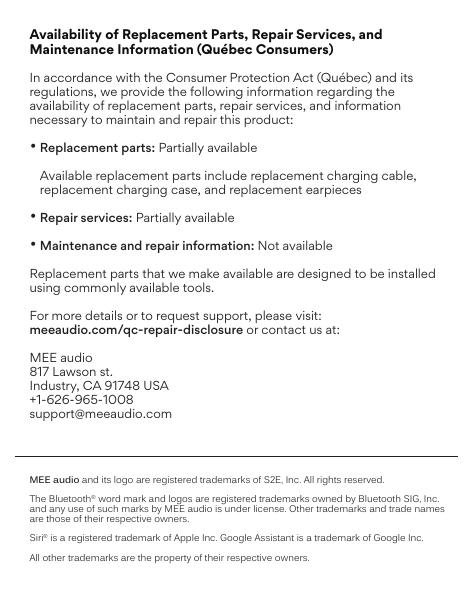
In accordance with the Consumer Protection Act (Québec) and its regulations, we provide the following information regarding the availability of replacement parts, repair services, and information necessary to maintain and repair this product:
- Replacement Parts
- Partially available. Available replacement parts include replacement charging cable, replacement charging case, and replacement earpieces.
- Repair Services
- Partially available.
- Maintenance and Repair Information
- Not available.
Replacement parts that we make available are designed to be installed using commonly available tools.
For more details or to request support, please visit: meeaudio.com/qc-repair-disclosure
MEE audio and its logo are registered trademarks of S2E, Inc. All rights reserved. The Bluetooth® word mark and logos are registered trademarks owned by Bluetooth SIG, Inc. Siri® is a registered trademark of Apple Inc. Google Assistant™ is a trademark of Google Inc. All other trademarks are the property of their respective owners.
↑ Back to topMultilingual Safety Warnings
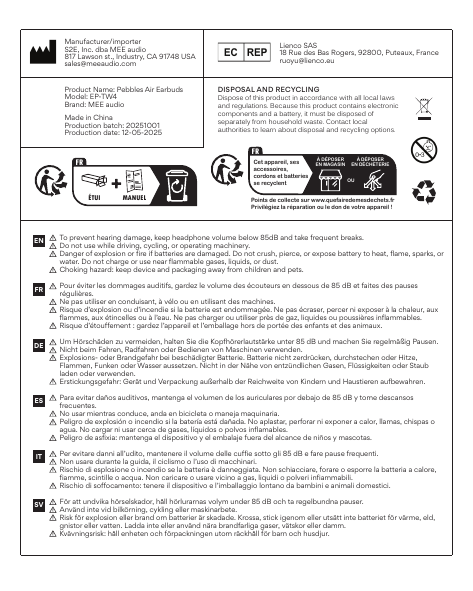
English (EN)
- To prevent hearing damage, keep headphone volume below 85 dB and take frequent breaks.
- Do not use while driving, cycling, or operating machinery.
- Danger of explosion or fire if batteries are damaged. Do not crush, pierce, or expose battery to heat, flame, sparks, or water. Do not charge or use near flammable gases, liquids, or dust.
- Choking hazard: keep device and packaging away from children and pets.
Français (FR)
- Pour éviter les dommages auditifs, gardez le volume des écouteurs en dessous de 85 dB et faites des pauses régulières.
- Ne pas utiliser en conduisant, à vélo ou en utilisant des machines.
- Risque d'explosion ou d'incendie si la batterie est endommagée. Ne pas écraser, percer ni exposer à la chaleur, aux flammes, aux étincelles ou à l'eau. Ne pas charger ou utiliser près de gaz, liquides ou poussières inflammables.
- Risque d'étouffement : gardez l'appareil et l'emballage hors de portée des enfants et des animaux.
Deutsch (DE)
- Um Hörschäden zu vermeiden, halten Sie die Kopfhörerlautstärke unter 85 dB und machen Sie regelmäßig Pausen.
- Nicht beim Fahren, Radfahren oder Bedienen von Maschinen verwenden.
- Explosions- oder Brandgefahr bei beschädigter Batterie. Batterie nicht zerdrücken, durchstechen oder Hitze, Flammen, Funken oder Wasser aussetzen. Nicht in der Nähe von entzündlichen Gasen, Flüssigkeiten oder Staub laden oder verwenden.
- Erstickungsgefahr: Gerät und Verpackung außerhalb der Reichweite von Kindern und Haustieren aufbewahren.
Español (ES)
- Para evitar daños auditivos, mantenga el volumen de los auriculares por debajo de 85 dB y tome descansos frecuentes.
- No usar mientras conduce, anda en bicicleta o maneja maquinaria.
- Peligro de explosión o incendio si la batería está dañada. No aplastar, perforar ni exponer a calor, llamas, chispas o agua. No cargar ni usar cerca de gases, líquidos o polvos inflamables.
- Peligro de asfixia: mantenga el dispositivo y el embalaje fuera del alcance de niños y mascotas.
Italiano (IT)
- Per evitare danni all'udito, mantenere il volume delle cuffie sotto gli 85 dB e fare pause frequenti.
- Non usare durante la guida, il ciclismo o l'uso di macchinari.
- Rischio di esplosione o incendio se la batteria è danneggiata. Non schiacciare, forare o esporre la batteria a calore, fiamme, scintille o acqua. Non caricare o usare vicino a gas, liquidi o polveri infiammabili.
- Rischio di soffocamento: tenere il dispositivo e l'imballaggio lontano da bambini e animali domestici.
Svenska (SV)
- För att undvika hörselskador, håll hörlurarnas volym under 85 dB och ta regelbundna pauser.
- Använd inte vid bilkörning, cykling eller maskinarbete.
- Risk för explosion eller brand om batterier är skadade. Krossa, stick igenom eller utsätt inte batteriet för värme, eld, gnistor eller vatten. Ladda inte eller använd nära brandfarliga gaser, vätskor eller damm.
- Kvävningsrisk: håll enheten och förpackningen utom räckhåll för barn och husdjur.
Product Information
- Product Name: Pebbles Air Earbuds
- Model: EP-TW4
- Brand: MEE audio
- Made in China
Disposal and Recycling
Dispose of this product in accordance with all local laws and regulations. Because this product contains electronic components and a battery, it must be disposed of separately from household waste. Contact local authorities to learn about disposal and recycling options.